You're about to create your best presentation ever

Project Flow Chart Template Powerpoint

Create your presentation by reusing a template from our community or transition your PowerPoint deck into a visually compelling Prezi presentation.

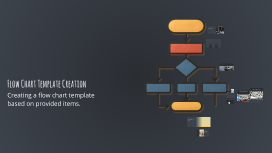
Flow Chart Template Creation

Transcript: Keep it Simple and Clear Use Standard Symbols Limit the Number of Steps Ensure Logical Flow Simplicity in flow chart design helps to convey information effectively, making it easier for the audience to grasp the process without confusion. Using standard symbols ensures that anyone familiar with flow charts can immediately understand the workflow, enhancing communication and reducing misinterpretations. Limiting the number of steps in a flow chart prevents overwhelming the viewer. A concise chart focuses on the most critical tasks, improving clarity and understanding. Ensuring a logical flow aids in the readability of the chart, guiding the viewer from start to finish smoothly and helping them follow the process with ease. Best Practices for Flow Chart Design Flow Chart Template Creation Steps to Create a Flow Chart Tools for Creating Flow Charts A structured approach to developing effective flow charts that clearly represent processes. Arrange the steps in order Define the process Choose the right symbols Review and refine the flow chart Organize the identified steps in a logical sequence to reflect the flow of the process. Identify the steps Clarify the overall goal or task that the flow chart will depict. Select standardized symbols to represent different types of actions or decisions. Evaluate the flow chart for clarity and accuracy, making adjustments as needed. Lucidchart: The Collaborative Option List all the individual actions or decisions involved in the process. Lucidchart is a cloud-based tool that allows for collaborative flow chart creation, making it ideal for teams working remotely or in different locations. Types of Flow Charts Different flow chart types serve distinct purposes in visualizing processes and data. 2 1 3 Data Flow Chart: Illustrates how data moves through a system. Process Flow Chart: Shows the steps in a process. Swimlane Flow Chart: Displays processes across different departments. Creating a flow chart template based on provided items. Microsoft Visio: The Professional Choice Start/End symbols Process steps Components of a Flow Chart Microsoft Visio is known for its extensive range of templates and professional design options, catering to users who require more advanced features and customization. Decision points Arrows indicating flow direction Introduction to Flow Charts Flow charts visually represent processes or workflows, using standardized symbols and arrows to illustrate the sequence of steps involved in tasks or systems. They provide clarity and improve understanding by mapping out complex information in an easily digestible format. Simplifies Complex Processes Flow charts break down intricate processes into manageable steps, making it easier to comprehend the entire workflow at a glance. Enhances Understanding and Communication By representing information visually, flow charts enhance clarity, allowing teams to communicate processes more effectively and minimize misunderstandings. Importance of Flow Charts Aids in Problem-Solving and Decision-Making Flow charts provide a structured approach to identify problems and make decisions, aiding teams in visualizing options and outcomes before proceeding. Serves as a Training Tool for New Employees Providing a visual guide, flow charts are effective training tools, helping new employees understand processes quickly and efficiently.

Falco Laser Flow chart template

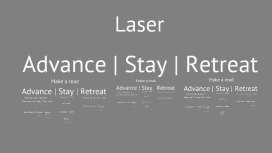
Transcript: Laser Advance | Stay | Retreat Make a read Make a read Make a read Advance | Stay | Retreat Advance | Stay | Retreat Advance | Stay | Retreat Read the type of aproach Read more Projectile | Airial | Empty Projectile | Airial | Empty Read more Read Read Action Read Action Read Smash | Grab | Dash | Take the Hit | Shine | Power Shield Take the Hit | Shine | Intercept Nair | Fair | Dair Bair | Up Air Nair | Fair | Dair Bair | Up Air Projectile | Airial | Empty Projectile | Airial | Empty Read Read Action Action Read the type of aproach Take the Hit | Shine | Power Shield Take the Hit | Shine | Intercept Nair | Fair | Dair Bair | Up Air Nair | Fair | Dair Bair | Up Air Read more Dash Attack | Grab Special | JC Upsmash Wavedash | Dash Back Projectile | Airial | Empty Projectile | Airial | Empty Short Hop | Full Hop | Dash | Walk Wave Dash | F Smash | Special Read more Read Read Action Read Action Read Smash | Grab | Dash | Take the Hit | Shine | Power Shield Take the Hit | Shine | Intercept Nair | Fair | Dair Bair | Up Air Nair | Fair | Dair Bair | Up Air Read more Projectile | Airial | Empty Projectile | Airial | Empty Read Read Read Action Action Read Smash | Grab | Dash | Take the Hit | Shine | Power Shield Take the Hit | Shine | Intercept Nair | Fair | Dair Bair | Up Air Nair | Fair | Dair Bair | Up Air Projectile | Airial | Empty Projectile | Airial | Empty Read Read Action Action Take the Hit | Shine | Power Shield Take the Hit | Shine | Intercept Read Dash Attack | Grab Special | JC Upsmash Wavedash | Dash Back Nair | Fair | Dair Bair | Up Air Nair | Fair | Dair Bair | Up Air Read Smash | Grab | Dash | Read the type of aproach Short Hop | Full Hop | Dash | Walk Wave Dash | F Smash | Special Dash Attack | Grab Special | JC Upsmash Wavedash | Dash Back Read more Short Hop | Full Hop | Dash | Walk Wave Dash | F Smash | Special Read more Read Dash Attack | Grab Special | JC Upsmash Wavedash | Dash Back Projectile | Airial | Empty Action Projectile | Airial | Empty Read more Read Short Hop | Full Hop Dash | Walk Wave Dash | F Smash Special Read Smash | Grab | Dash | Read Read Action Read Action Read Smash | Grab | Dash | Take the Hit | Shine | Power Shield Take the Hit | Shine | Intercept Nair | Fair | Dair Bair | Up Air Projectile | Airial | Empty Projectile | Airial | Empty Nair | Fair | Dair Bair | Up Air Projectile | Airial | Empty Projectile | Airial | Empty Get in, punish Read Read Action Action Read Read Action Action Down B | Side B Up B | Neutral Take the Hit | Shine | Power Shield Take the Hit | Shine | Intercept Read Nair | Fair | Dair Bair | Up Air Nair | Fair | Dair Bair | Up Air Take the Hit | Shine | Intercept Take the Hit | Shine | Power Shield Nair | Fair | Dair Bair | Up Air Nair | Fair | Dair Bair | Up Air Read Smash | Grab | Dash | Dash Attack | Grab Special | JC Upsmash Wavedash | Dash Back Dash Attack | Grab Special | JC Upsmash Wavedash | Dash Back Short Hop | Full Hop | Dash | Walk Wave Dash | F Smash | Special Short Hop | Full Hop | Dash | Walk Wave Dash | F Smash | Special Dash Attack | Grab Special | JC Upsmash Wavedash | Dash Back Action Short Hop | Full Hop Dash | Walk Wave Dash | F Smash Special Action Read Read more Read Read Action Read Smash | Grab | Dash | Get in, punish Get in, punish Read Projectile | Airial | Empty Projectile | Airial | Empty Down B | Side B Up B | Neutral Read Read Action Action Get in, punish Take the Hit | Shine | Intercept Take the Hit | Shine | Power Shield Read Nair | Fair | Dair Bair | Up Air Nair | Fair | Dair Bair | Up Air Down B | Side B Up B | Neutral Read Smash | Grab | Dash | Dash Attack | Grab Special | JC Upsmash Wavedash | Dash Back Short Hop | Full Hop | Dash | Walk Wave Dash | F Smash | Special Dash Attack | Grab Special | JC Upsmash Wavedash | Dash Back Action Action Short Hop | Full Hop Dash | Walk Wave Dash | F Smash Special Read Read Action Down B | Side B Up B | Neutral Get in, punish Read Get in, punish Down B | Side B Up B | Neutral Get in, punish Down B | Side B Up B | Neutral Action Read Action Down B | Side B Up B | Neutral Get in, punish Read Get in, punish Down B | Side B Up B | Neutral Down B | Side B Up B | Neutral

Flow Chart Project

Transcript: Investigation/observations: Asking questions about the data, interpretation of findings. Does the data answer hypothesis or infer an incorrect prediction? Inspiration to form new testable questions can be found from your findings. Challenging existing procedures advances Science. Conclusion/outcome: simply....... Communication/feedback: Analyze results, support or challenge a hypothesis, form new testable questions with different variables. Testing Ideas/theories: Flow Chart Project by Maxwell Cattermole New data can answer curiosity, build knowledge, solve problems, inform people, and address issues but most importantly it can raise new questions. It is through new scientific discoveries that the world around us advances. Gathering Data: First you make a question. Then you make your hypothesis (testable idea), predictions, then you gather your materials, all of which should be noted. (So if you have to change something, like a measurement) you can tell which material to use. All stages of the experiment have to be accurately observed and recorded so it can either be repeated if successful or changed if necessary. For instance in an experiment to test drive a car think of all the variables! For example tire wear, driving line, hp, power to weight ratio, amount of fuel, type of fuel, driver experience, size of car and engine size. Interpreting data/analysis This is one of the most important parts of science, this is where you share all of your data, research, evidence and see if it is well received, maybe even publish it if it is good enough. Use feedback to change/advance your experiment. News breaking scientific discovery is usually published in magazines, for example Nature; New Scientist and Science, rather than books. This is because science is constantly changing and by the time books are published, the discovery might be outdated. Scientific journals such as Nature are published weekly.

Now you can make any subject more engaging and memorable