You're about to create your best presentation ever

Floral Design For Invitation Powerpoint Template

Create your presentation by reusing a template from our community or transition your PowerPoint deck into a visually compelling Prezi presentation.

Educational PowerPoint Template Design

Transcript: Enhancing Learning through Educational PowerPoint Templates Educational PowerPoint templates serve as essential tools that facilitate effective teaching and learning. These templates are designed to enhance student engagement, improve information retention, and provide a structured format for presenting educational content. Color Schemes: Impact on Perception Typography: Enhancing Clarity Color schemes can significantly influence how information is perceived. Warm colors like reds and oranges can evoke excitement and attention, while cool colors like blues and greens can create a calming effect. Choosing complementary colors ensures readability and enhances visual appeal. Effective color contrast between text and background improves comprehension, making it vital for presentations. Typography affects the tone and clarity of a presentation. Sans-serif fonts like Arial and Helvetica are typically easier to read on screens, while serif fonts like Times New Roman can lend a formal tone to printed materials. Font size and spacing are crucial, as larger font sizes improve legibility from a distance, and proper line spacing prevents the text from feeling crowded. Essential Tools for PowerPoint Template Creation Clear and organized layout Enhances Engagement Communicates Professionalism Improves Retention Key Elements of Educational Templates Legible and appealing fonts Effective presentation design enhances audience engagement by using visually appealing elements that draw attention and maintain interest throughout the presentation. A well-designed presentation improves information retention by structuring content logically and using visual aids, making it easier for the audience to process and remember key points. Effective design communicates professionalism and credibility, which can enhance the presenter’s authority and the audience's trust in the information being presented. Relevant and engaging imagery Consistent color scheme Effective use of white space Incorporating Visual Aids in Educational Presentations Significance of Effective Presentation Design A timeline illustrating the integration of visual aids to improve understanding and retention. Multiple tools are available for creating PowerPoint templates, each offering unique functionalities to cater to various design needs. These tools simplify the design process, enabling users to create professional-quality templates efficiently. Phase 3: Integration into Slides Phase 1: Initial Planning Phase 2: Selecting Visuals Phase 4: Testing Clarity Phase 5: Feedback and Improvement Integrate selected visual aids into PowerPoint slides ensuring they enhance rather than overwhelm the content. Identify key concepts and topics that will benefit from visual aids during the planning stage of the presentation. Choose appropriate visual aids such as images, infographics, and charts that complement the educational content. Review and test the presentation to ensure visuals are clear and effectively convey the intended message. Gather feedback from peers or audience members to improve the use of visual aids in future presentations. Examples of Effective Educational Templates Highlighting the features and benefits that enhance learning experiences. 85% 30% 4 key features 70% 95% of educators report enhanced student engagement when using visually appealing templates. improvement in information retention attributed to the use of well-structured educational templates. that define effective educational templates include clarity, consistency, flexibility, and accessibility. of students prefer templates that incorporate multimedia elements, such as images and videos. of teachers believe that templates with interactive elements improve classroom dynamics. Thank you for your attention! We now invite your questions and thoughts to foster a deeper understanding. Clarity in Language Use clear and concise language to ensure that all learners can understand the material presented. Avoid jargon and overly complex sentences that may confuse the audience. Engage with Interactivity Incorporate interactive elements such as quizzes and discussions to engage learners actively. Interaction fosters a deeper understanding of the material and encourages participation. Best Practices for Educational Presentations Engaging Audience Interaction Enhance with Visuals Utilize visuals like images, charts, and videos to complement the spoken content. Visual aids can help clarify concepts and make the information more memorable. Logical Structure Structure presentations logically by starting with an overview, followed by detailed content, and concluding with a summary. This helps learners follow the flow of information easily. Educational PowerPoint Template Design Roadmap for Structuring Content in Educational Presentations A structured approach ensures clarity and enhances learning outcomes. Incorporate Visuals Define Objectives Use Clear Headings Review and Revise Integrate visuals like charts and

PowerPoint Template Design

Transcript: Conclusion and Next Steps Summarizing the presentation and outlining future actions for effective PowerPoint utilization. PowerPoint Template Design Key Points Summary Summarize the essential elements discussed in the presentation, emphasizing the importance of the selected template and animations. Utilizing the PowerPoint Outline clear next steps for the audience to implement the PowerPoint effectively in their context. Creating Engaging Presentations with Dynamic Animations Animated Slides Static Slides Animated slides introduce movement and transitions, capturing audience attention and enhancing engagement. They can highlight key points effectively but may also risk overwhelming viewers if not used judiciously. Static slides provide a straightforward presentation of information, allowing for easy comprehension without distractions. They are ideal for simple data, ensuring that the audience can focus entirely on the message being conveyed. Template Requirements Cohesive Look Brand Alignment Audience Engagement Templates provide a cohesive look, making it easier for the audience to follow the content and key messages. A well-designed template aligns with the branding and theme of the presentation, ensuring consistency throughout. Utilizing a specific template helps to facilitate audience engagement by providing a visually appealing structure. Clearly Defined Key Elements Incorporation of Visual Aids Well-Organized Structure Key elements such as objectives, main topics, and conclusions are clearly outlined, providing a roadmap for the audience. The PowerPoint is meticulously organized to ensure a coherent flow of information, making it easy for the audience to follow along. Visual aids and animations will be incorporated to enhance engagement and understanding, making the presentation more dynamic. Overview of the PowerPoint Setting the Stage for Our Discussion This presentation outlines key aspects of the upcoming content, providing a framework for understanding the topic and its relevance.

Educational PowerPoint Template Design

Transcript: User-Friendly Design Engaging Visuals Customizable Layouts Consistent Branding Introduction to Educational PowerPoint Template Design Effective PowerPoint templates play a crucial role in the educational process by facilitating communication and enhancing the learning experience. They help educators present information clearly, engage students visually, and promote better retention of concepts. Educational PowerPoint templates are designed with simplicity in mind, allowing both educators and students to navigate presentations with ease. User-friendly features ensure that the focus remains on the content rather than the design, promoting a seamless learning experience. Consistent branding within educational templates helps to establish a recognizable identity for schools or educational programs. This feature reinforces brand standards and creates a professional appearance, fostering trust and credibility among students and faculty. Visually engaging templates incorporate images, infographics, and contrasting colors to capture the audience's attention and maintain interest throughout the presentation. This feature is crucial in keeping learners engaged and enhancing the overall educational experience. Customizable layouts allow educators to tailor templates to specific subject matter or teaching styles, ensuring that each presentation is unique. This flexibility helps in addressing diverse learning needs and enhances the overall effectiveness of the educational content. Saves time in preparation Enhances learning experience Benefits of Using Templates Improves information retention Key Features of Educational Templates Encourages consistent branding Facilitates collaboration Educational PowerPoint Template Design Creating Engaging and Effective Presentation Templates for Learning Examples of Effective Educational Templates Colorful Design: Engagement and Creativity Minimalist Design: Clarity and Focus Colorful and engaging design incorporates vibrant colors, images, and interactive elements to capture the audience's attention and stimulate interest. This style fosters creativity and enthusiasm, making it ideal for subjects that benefit from visual storytelling and dynamic presentations. However, it requires careful planning to avoid overwhelming the audience. Minimalist design focuses on simplicity and clarity, utilizing a limited color palette and less text to convey information effectively. This approach minimizes distractions, allowing learners to focus on the content being presented. It is particularly useful for complex topics, where clarity and understanding are essential. Steps to Create Your Own Template A structured approach to designing effective educational PowerPoint templates. Create a Layout Structure Define Your Audience Select Fonts and Graphics Common Mistakes to Avoid Develop a consistent layout that organizes information clearly and attractively. Choose a Color Scheme Identify the specific needs and preferences of your target learners. Opt for fonts that are legible and graphics that support the content effectively. Understanding these common pitfalls can enhance the effectiveness of your educational presentations. Select colors that enhance readability and align with the educational theme. "Good design is good business." Conclusion 70% 50% 3-5 Overloading slides with text can lead to decreased audience engagement. Ignoring accessibility standards can alienate up to 50% of potential viewers. Quote on Effective Presentation Design Well-designed educational PowerPoint templates play a crucial role in enhancing the learning experience. They not only facilitate effective communication of ideas but also help to engage students and promote better information retention. Using more than 3-5 different fonts can create visual confusion.

Simple PowerPoint Template Design

Transcript: Height: 5'8" The individual stands at a height of 5 feet 8 inches, which is considered average for their demographic. This height contributes to their balanced and proportionate appearance. Hair Color: Chestnut Brown Physical Description Their hair is a rich chestnut brown, often styled in a way that complements their facial features. The texture is thick, adding to the overall volume and style. Introduction to [Name] Eye Color: Blue The individual has striking blue eyes, which are often described as expressive and captivating. Their eye color contrasts well with their hair and skin tone. This slide presents a brief overview of [Name], highlighting their age and offering an introductory glimpse into their identity. Strengths Weaknesses The individual exhibits strong leadership qualities, demonstrating confidence, decisiveness, and the ability to inspire others. However, they may struggle with delegation, often taking on too much responsibility themselves, which can lead to burnout. On the other hand, they are highly empathetic and sensitive to the emotions of others, fostering strong relationships and collaboration. This can sometimes result in emotional vulnerability and difficulty in asserting their own needs when in conflict with others. Evolution of Hobbies and Interests Simple PowerPoint Template Design A timeline showcasing the growth and change of personal hobbies and interests over the years. Young Adult Present Teenage Years Childhood Developed a love for drawing and painting, spending hours creating art. Became passionate about sports, particularly soccer and basketball, while also exploring music through playing the guitar. Engaged in volunteer work and gardening, focusing on community involvement and sustainability. Began traveling and exploring photography, capturing landscapes and cultures through a camera lens. Design a clean and customizable PowerPoint template with ample text space. Community Engagement Dreams and Aspirations The individual participates in local charity events, helping to raise funds for various causes. They often volunteer their time and skills to support community needs. This slide highlights the individual's aspirations for the future, focusing on personal ambitions, career goals, and the impact they wish to make in their community. Cultural Involvement Activities In addition to charity work, the individual enjoys attending cultural festivals and local markets, promoting community spirit and local artisans. Club Participation The individual is also an active member of various clubs, where they participate in activities such as book reading and outdoor adventures.

History of Floral Design Template

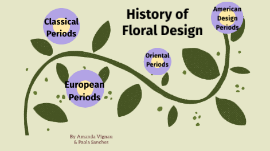
Transcript: By Amanda Vignau & Paola Sanchez Floral Design History of Classical Periods Classical Periods Egyptian Period 2800-28 B.C Egyptian Period Cut flowers were ued as decorations Flowers were important in life events religous ceremonies decorative purposes personal adornment Favored containers wide mouth vases Pictures Greek Period 600-46 B.C Greek Period Flowers & Petals were scattered on the ground during festivals Flowers were used to make wreaths, garlands, and chaplets During this period cornucopia was introduced Pictures Wreaths, garlands were heavy Fragrant flowers had bright colors Baskets of mixed flowers introduced w/ roses anemones tulips dianthus Roman Period 28 B.C- 325 Roman Period Pictures Mosaic is common Symmetrical, cone shaped trees filled with foilage to represent conical trees Garlands were constructed with narrow bands of lfowers or fruit alternating with foilage Byzantine Period 320-600 Byzantine Period Pictures Pictures European Periods European Periods Flowers were both wild and cultivated and important part of everyday life Used in: food drink medicine Fragrant Flowers favored for the ground freshening the air wreath making and garlands for personal adornments and decor Middle Ages 476-1400 Middle Ages Pictures Represented religious history Flowers in vases were showin in paintings for simbolism Flowers were arranged in vases so only the blossoms were visible Stems were covered creating massed symmetical connical arrangements Bright colors Wreats & garlands were still common Patterned containers with removable libs Renaissance Period 1400-16 Renaissance Period Pictures Flowers sent in everyday life Oval shape, asymmetrical balalnce and S-curved designs Over-decoration & gaudy interiors Containers included glass Baroque-Dutch Flemish Period 1600-1750 Baroque-Dutch Flemish Period Pictures Arrangments were commonly fan shaped as well as triangle & massed -used as decorative accents in interiors vases were highly decorated, portraying elegance, & tasteful extravagance French Period 1600-1814 French Period Pictures Fragance was the most important part of the bouquet, believing that the smell would get rid of the contagious diseases and the stentch from dead bodies nosegays were created to keep flowers close by -cleaniness wasnt a high standard during this time arrangments were English Georgian Period 1714-1760 English-Georgian Period Flower arranging was taught Girls were taught to arrange, grow, preserve, press and draw Nosegays and hand bouquet were popular Victorian Period 1820-1901 Victorian Period Pictures Oriental Periods Oriental Periods Paintings, prints, and scrolls -show cut flowers Arrangments are unconstructed & naturalistic Chinese Style Chinese Style Pictures Highly formalized with strict rules -Tradition and symbols Cut flowers and accessory materials were placed on arrangements Japanese Style Japanese Style Pictures American Design Period American Design Periods Massed, rounded or fan shaped bouquets Fruits and flowers were placed around dining tables and floral centerpieces Colonial 1714-1780 Colonial Pictures Main themes- -curvilinear lines, nature, in shapes of plants Containers were all inspired and patterned after curving lines Art Nouveau 1890-1910 Art Nouveau Pictures Styles were blended with several influences (over the top) Arrangments were very strong, steamlined, geometric lines, forms & patterns The containers were geometrically modern and bold Art Deco 1920-1950 Art Deco Pictures jeopardylabs.com/play/floral-history-4 Jeopardy Game Game

Floral Wedding Invitation

Transcript: Floral Wedding Invitation Date & Time Reception Start This section outlines the key dates and timings surrounding the wedding ceremony and reception, ensuring guests can plan their attendance effectively. The reception will start at 5:00 PM, immediately following the ceremony. Guests can look forward to an evening of dining, dancing, and celebration. A Beautiful and Elegant Call to Celebrate Our Union Wedding Date The wedding is scheduled for June 15, 2024. A Saturday was chosen to allow for maximum attendance. Ceremony Time The wedding ceremony will begin promptly at 3:00 PM. Guests are encouraged to arrive at least 30 minutes early to settle in and enjoy pre-ceremony refreshments. Accommodation Options for Guests Local Hotels Contact Information RSVP Options Hotel Blossom: Elegant and modern, with amenities including a pool and spa. The Grand Stay: Centrally located and family-friendly, offering spacious rooms. Cozy Inn: Budget-friendly with charming decor, perfect for a cozy stay. For inquiries, please contact: Name: [insert contact name] Phone: [insert contact number] Email: [insert contact email] Direct messaging options available for quick responses. Respond via email or designated website link. Optional: Include dietary preferences and song requests. Choice of attending: ceremony only, or ceremony and reception. Choosing the right accommodation enhances the wedding experience, providing comfort and convenience to our loved ones. Below are local hotel recommendations and booking information to ensure a pleasant stay. RSVP Details Booking Information Reservations can be made directly through hotel websites or major booking platforms. Advise guests to book early due to limited availability around the wedding date. Consider using group codes if available for discounts. Understanding the importance of providing timely responses for wedding invitations can enhance planning and ensure a memorable event for everyone. Special Rates Many hotels may offer special rates for wedding guests; inquire directly about group discounts. Check for packages that include breakfast or transportation services. Confirm rates at least 3 months in advance to ensure availability and pricing stability. Response Deadline Responses are required by [insert date]. Early confirmations facilitate effective planning for food and seating arrangements. Dress Code Formal attire is required for both the ceremony and reception. Gentlemen are expected to wear suits or tuxedos. Ladies should opt for elegant gowns or chic cocktail dresses. Attire Guidelines for the Wedding Celebration Invitation The attire for our wedding is carefully curated to enhance the overall theme and create a beautifully cohesive atmosphere. Emphasis on dress code, styles, and color palette will ensure a memorable visual experience. Suggested Styles Welcome Note An invitation sets the tone for the wedding, offering essential details while reflecting the style and elegance of the event. This section outlines how to create an engaging invitation that resonates with the couple's vision. Consider the overall theme reflected in floral and leafy designs. Opt for flowing fabrics which complement the watercolour aesthetic. Accessories should be kept elegant; subtle floral patterns or colours can enhance the theme without overpowering it. A heartfelt welcome note establishes the warmth and love surrounding the event. It personalizes the invitation, making guests feel valued and eager to celebrate together. Color Palette Personal Touch Celebration Details Incorporate personal elements, like a brief story about the couple or a meaningful quote, to make the invitation resonate further. Unique design features, such as a watercolor floral theme, enhance the overall aesthetic and reflect the couple's personality. Clearly state the purpose of the invitation: to celebrate the union of the couple. Include specifics such as the date, location, and any important highlights of the ceremony and reception. The color palette is designed to harmonize with the floral and leafy theme. Suggested colors include soft pastels and muted tones like blush, sage green, and ivory. Accents of gold or silver can add a touch of elegance and sophistication. Last checks... Give an overview of this subject here. You can use bullet points to keep it easy to read. Hang on... Point 1 Point 2 Point 3 Adding final touches... Last checks... Go into detail about this subject here. You can always wrap back to previous areas, too. Fine-tuning... Use this section to wrap-up your presentation and highlight the main points. Add more context here. You can add more zoom areas if you have a chart or graph you want to highlight. Design at work... Adding final touches... Go into detail about this subject. You can add images and GIFs to bring your presentation to life, too. Give an overview of this subject here. Getting it ready... If you need more subsections, you can copy this one and place it anywhere on the canvas.

Now you can make any subject more engaging and memorable