
Consulting and advisory teams have a narrow bar for AI-generated decks. The output has to be on-brand without a designer touching it, the data has to be defensible in front of a partner, and it has to export cleanly into the file format the client actually opens. Two tools keep coming up in this conversation: Prezi AI and Perceptis. Here's what happened when we ran the same brief through both, unedited.
The test: same brief, run through both tools
We gave both tools the exact same prompt:
Create a quarterly business review presentation for a mid-market B2B SaaS client. The audience is the client's executive leadership team. Include: an executive summary with the top 3 takeaways; a revenue performance chart showing Q1–Q4 trend with the data source cited; a customer retention chart comparing this quarter to the same quarter last year, with source citation; a slide summarizing three key risks for next quarter; and a closing recommendations slide with next steps. Use a clean, professional, corporate style with a consistent color palette and typography.
Quick transparency note: Perceptis was tested on its free 10-credit tier, Prezi on a paid plan. Worth knowing before you weigh the results.
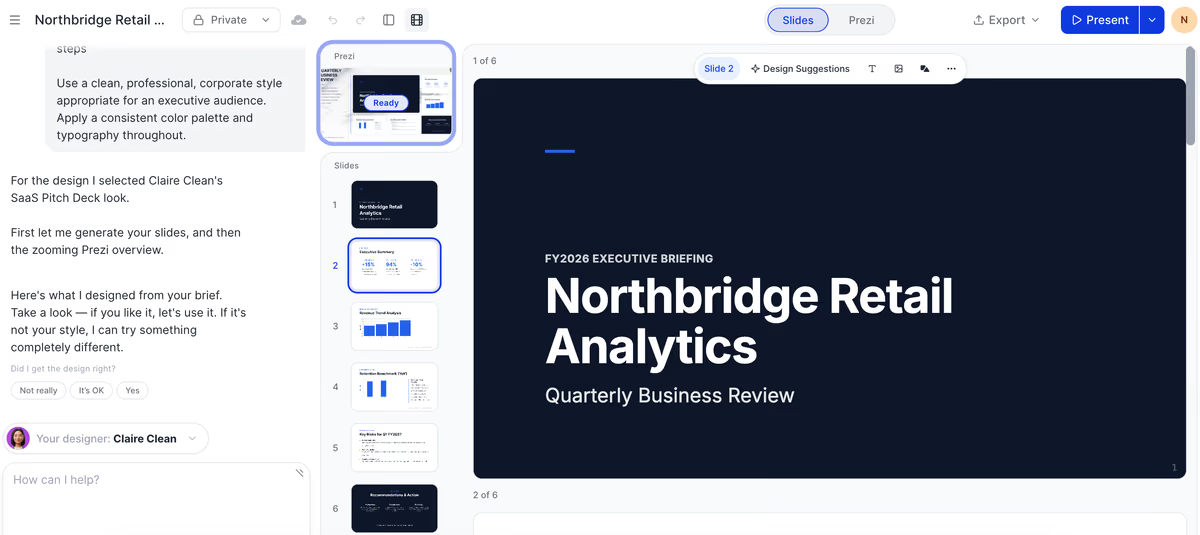
Prezi AI's output (6 slides):
Prezi picked a navy-and-blue palette on its own and it just worked for this kind of financial content. Generation finished in a couple of minutes. The deck closed on an actual "Recommendations & Action" slide with three owned workstreams (budgeting, compliance, strategy), no filler at the end.
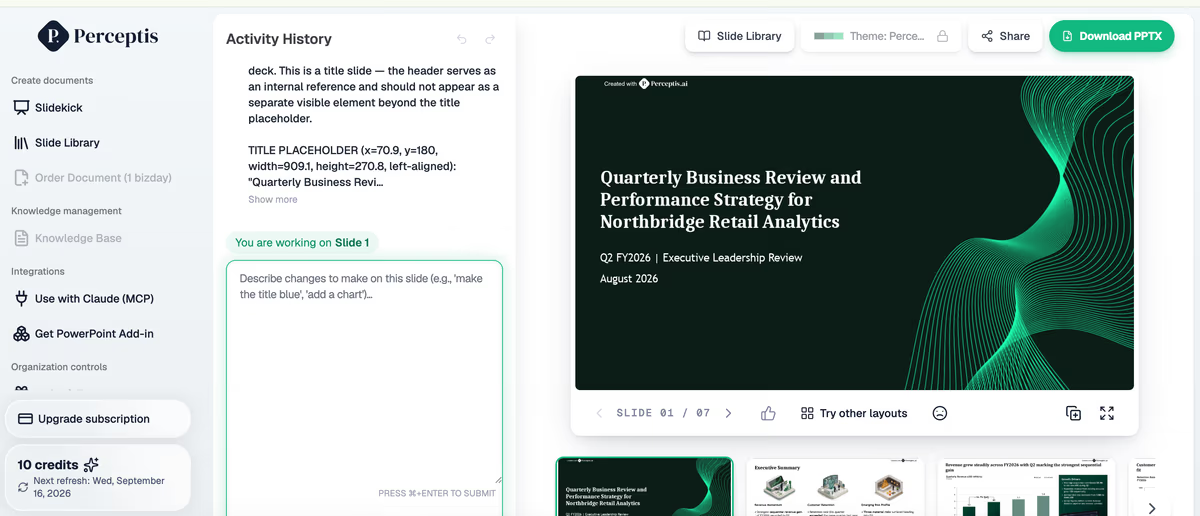
Perceptis's output (7 slides):
Perceptis opens with a theme picker, then defaulted to a dark green theme that didn't feel like an intuitive match for the content. Generation took roughly 9 minutes on the free tier, noticeably slower than Prezi.
The revenue slide has a rendering issue, though: the "+16.7% QoQ" callout bracket runs right into the "$4.9M" data label. And slide 7 of 7 is just "Thank You." Nothing else on it. A full slide in a 7-slide deck spent on nothing.
To be fair, the retention slide was clean: good chart, source cited, no defects. Perceptis also let us export a PDF for free with no paywall, so that's a real point in its favor.
Here's how the two stacked up on the criteria that actually matter for this workflow, based on this one test run (not a certified benchmark):
| Criteria | Prezi AI | Perceptis |
|---|---|---|
| Theme fit | Matched the content type without any input from us | Default theme felt like a less intuitive match, and the stock imagery read as generic |
| Chart accuracy | Correct and sourced, no rendering issues | Correct and sourced on the retention slide, but the revenue slide had a label collision |
| Export quality | Clean PDF, no defects | PDF export available for free, but a visible text-overlap issue on the revenue slide |
| Speed | A couple of minutes | About 9 minutes |
| Slide efficiency | 6 slides, no filler | 7 slides, one of them a bare "Thank You" |
Prezi AI's Your Designer feature is worth calling out here too. It trains a custom AI designer on a brand (colors, fonts, logo, layouts, imagery, icon style) and applies it at the point of generation, not as a manual cleanup step afterward. This test didn't load a brand kit into either tool, so it doesn't fully show off what that feature can do, but it's the kind of structural difference that matters once you're producing decks across multiple client accounts.
Verdict: Prezi. Better content quality, a theme that actually fit what we were building, and no slide wasted saying nothing.
Feature matrix: what enterprise procurement actually checks
| Feature | Prezi | Perceptis |
|---|---|---|
| SOC 2 Type II | Yes, independent third-party audit completed, report available to Business subscribers under NDA | Yes, company states it's SOC 2 compliant, independently attested (per its own site and Vanta trust page) |
| GDPR | Yes, DPA available, GDPR/CCPA details published | No GDPR/DPA information published on its site as of this writing |
| SSO (SAML, org-wide) | Yes, SAML SSO with an enforced-SSO option and admin-console setup for the whole team | Offers OAuth-style "Sign in with Google/Microsoft" for individual access to its API/MCP server; no published SAML/org-wide SSO |
| Your Designer (brand-trained AI generation) | Yes, custom AI designer trained on brand colors, fonts, logo, layouts, imagery, icon style, enforced at generation level | Applies organization brand kits to output, but public materials don't describe generation-level brand training the way Your Designer does |
| PPTX export | Yes, native, editable PowerPoint export | Yes, native, editable PowerPoint export, this is core to Perceptis's positioning |
Where each tool actually fits
Perceptis is built around MBB-style argument structure: situation-complication-resolution logic, insight-led headlines, claims tied back to source documents. For a solo consultant or small team building a client proposal from scratch, that reasoning layer is genuinely useful.
Prezi AI is built for teams that need consistent, on-brand output across a lot of people producing decks for a lot of clients, fast. Sub-8-second initial generation, backed by a training set of 500M+ presentations, with brand enforcement that doesn't depend on any one analyst remembering the client's style guide. For a consulting or advisory team scaling deck production across accounts, that's the bigger structural advantage.
FAQ
Is Prezi or Perceptis better for enterprise consulting teams? Depends on the workflow. Perceptis is built around consulting argument structure for individual proposal writing. Prezi AI is built for teams that need brand consistency enforced automatically across many users and many client accounts, at scale.
Is Perceptis SOC 2 certified? Perceptis states it has completed a SOC 2 attestation through an independent third-party auditor. Prezi has also completed a SOC 2 Type II audit, with the report available to Business subscribers under NDA. Ask either vendor for the current report before treating this as a differentiator.
Which AI presentation tool has brand enforcement built into generation? Prezi AI's Your Designer trains a custom AI designer on an organization's brand, then applies it at the point of generation instead of as a manual step afterward.






