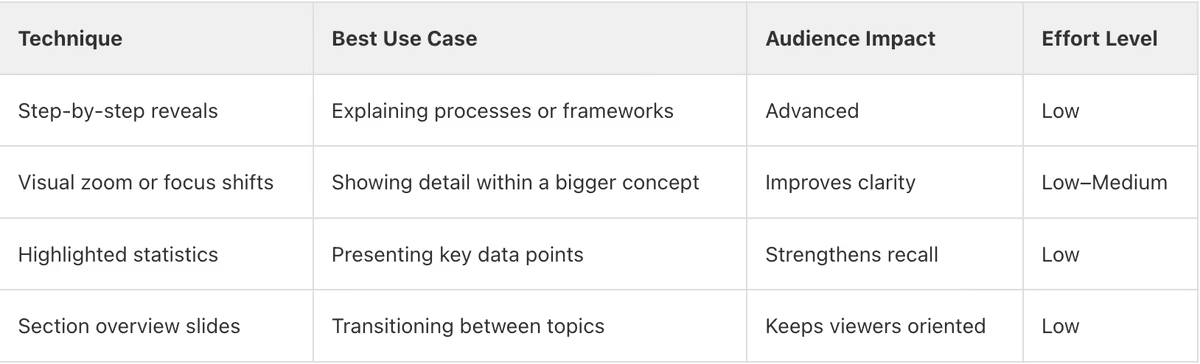
Quick Summary / Key Takeaways
- Structure your portfolio as a story, explaining the problem, your approach, and the results instead of listing project features.
- Open with your strongest project or result to immediately show the value of your work.
- Use visuals to support your explanation, keeping text minimal so the audience focuses on the decisions and outcomes behind each project.
- Highlight measurable results such as conversion rate improvements, performance gains, or revenue impact to demonstrate business value.
- Organize projects clearly and present them with a logical flow so your audience can easily follow how each project developed from challenge to outcome.
Introduction
A strong portfolio presentation turns a collection of projects into a clear story about the problems you solved and the results you achieved. Instead of showing work as a static gallery, an effective presentation explains the context behind each project, the decisions you made, and the measurable outcomes. This approach helps employers, clients, and stakeholders quickly understand how your skills translate into real impact. For designers, developers, and marketers alike, the goal is not only to showcase work but to demonstrate how you think and deliver solutions.
Well-structured portfolio presentations focus on a few strong projects and guide the audience through each one with clear visuals and concise explanations. Visuals such as interface mockups, architecture diagrams, campaign results, or performance charts help illustrate your process, while short explanations highlight the strategy and results behind the work. When slides are organized logically and visuals support the narrative, your audience can focus on the value of your work instead of trying to interpret dense slides.
This guide explains how to structure portfolio presentations that are clear, engaging, and focused on outcomes. You will learn how to organize projects, present your process, and highlight measurable results so your audience can easily follow the story behind your work. Prezi AI creates your portfolio presentation through a simple conversation. You can either describe your project through the prompt or upload a PDF, DOCX, or PPTX, and it generates a polished, structured deck from scratch — trained on 500 million real presentations, with no templates to fill in and no editor to learn.

Portfolio Presentation Format Options
Key Portfolio Content Focus by Professional Role
Pre-Presentation Portfolio Review Checklist
- Check all links, demos, and interactive elements to ensure they work correctly during the presentation.
- Tailor your selected case studies to match the role, company, or project requirements you are presenting for.
- Practice your spoken narrative for each project so the transition from problem to process to results feels natural.
- Download a backup version of your presentation, such as a PDF or exported PowerPoint file from Prezi, so you can still present or share your slides if internet access becomes unreliable at the venue.
Post-Presentation Portfolio Improvement Checklist
- Ask for feedback on which project or result stood out most to the audience.
- Update slides with new metrics, performance data, or project outcomes as your work evolves.
- Send a short follow-up message referencing a specific discussion from the presentation.
- Remove or replace older projects that no longer represent your current skill level or focus.
Section 1: Defining the Purpose of a Strong Portfolio Presentation
FAQ 1: What is the main goal of a professional portfolio presentation?
The main goal of a professional portfolio presentation is to clearly demonstrate how you solve problems and the impact your work creates. Instead of simply displaying finished projects, a strong portfolio presentation explains the challenge, the approach you took, and the results you achieved. This helps employers, clients, or stakeholders understand your thinking process and the value you bring to real-world projects. By connecting your work to measurable outcomes or improvements, the presentation becomes a persuasive case for your skills rather than just a visual gallery.
Prezi AI supports this by having you describe your portfolio goal and share any relevant content — a prompt, a PDF, a DOCX, or an existing deck. From there, it builds the full structure for you — problem, process, outcome — through a simple chat. Trained on 500 million real presentations, every deck is generated around your content, not a recycled template. The result looks custom because it is.
Takeaway: Focus on explaining the problem, your approach, and the results to show the real impact of your work.
FAQ 2: How do portfolio presentation examples help in the planning phase?
Portfolio presentation examples help in the planning phase by showing how experienced professionals structure their work into a clear narrative. Instead of guessing how to organize your projects, examples reveal common patterns such as introducing the challenge, explaining the process, and then presenting the results. They also show how to balance visuals and short explanations so the audience can quickly understand the impact of each project. Reviewing these examples helps you decide what information is truly important and how to sequence your slides so the story flows logically.
Prezi AI fits naturally into this planning stage because it can transform your initial idea or existing material into a structured presentation instantly. When you enter a prompt about your portfolio or upload a PDF, DOCX, or PPTX, Prezi AI generates a fully designed, ready-to-present deck and separates the content into clear sections for each project. You can then refine through conversation — ask it to adjust the tone, reorder sections, or sharpen messaging — and it updates in real time. This gives you a strong starting framework you can build on rather than starting from a blank slide.
Takeaway: Study strong portfolio examples to understand effective structure and use them as a guide for organizing your projects and story flow.
FAQ 3: Why is storytelling more effective than just listing project features?
Storytelling is more effective than listing project features because it explains how a problem was solved and what results the work created. A list of features only shows what a product includes, but it does not show the thinking behind it. When a project is presented as a story, the audience can follow the challenge, the decisions made during the process, and the final outcome. This structure helps recruiters and clients understand your reasoning, not just the final deliverable. It also makes your work more memorable because people naturally follow narratives more easily than disconnected details.
Prezi AI helps structure a portfolio presentation around the story of each project. Enter a prompt or upload a PDF, DOCX, or PPTX, and Prezi AI instantly generates a polished draft you can refine through conversation in the chat. Your presentation is already organized into clear sections — challenge, process, outcome — so the story is built in from the start. Ask for changes the way you'd talk to a colleague, or make quick edits directly on the slides. No learning curve either way.
Takeaway: Present each project as a story with a clear challenge, process, and outcome so your skills become easier to understand and remember.
Section 2: Structuring a Clear and Engaging Portfolio Presentation
FAQ 4: What is the ideal slide count for most portfolio presentations?
The ideal slide count for most portfolio presentations is typically 10 to 15 slides. This range gives you enough space to present two or three strong case studies while keeping the presentation focused. Instead of rushing through many projects, a smaller deck allows you to clearly explain the problem, the decisions you made, and the results achieved. In most interviews or client presentations, spending about two to three minutes per project helps maintain engagement and ensures your strongest work receives proper attention.
Prezi AI generates your portfolio as a focused, structured deck where each case study is organized into its own clear section. The AI handles layout, hierarchy, and pacing automatically — drawing on 15 years of design expertise built into its model. If you need to make any changes like add or remove slides, adjust the structure, or rework a section, just describe what you want in the chat and Prezi AI updates it for you.
Takeaway: Aim for 10 to 15 slides so you can clearly present a few strong projects without overwhelming your audience.
FAQ 5: How should you open your presentation to grab immediate attention?
To grab immediate attention, open your portfolio presentation with a clear, high-impact moment from your work. This could be a major problem you solved, a measurable result you achieved, or a striking visual from a project. Starting this way quickly shows the value you bring instead of spending time on background information. A focused opening sets the tone for the rest of the presentation and signals to recruiters or clients that the talk will highlight real outcomes and decision-making.
Prezi AI helps presenters build a strong opening by generating the first slide of the presentation around the core idea you provide. When you describe your portfolio goal or key project, Prezi AI creates an opening slide with a clear headline and supporting visuals that highlight the main achievement or problem. Because the presentation moves directly into the first project section, the audience immediately sees the work and results rather than an introduction filled with generic information. You can choose from Prezi's dynamic zooming format or a classic slide layout depending on what fits your presenting style.
Takeaway: Start with a clear result or major problem you solved so the audience immediately understands the value of your work.
FAQ 6: What role does the messy middle play in showing your process?
The messy middle reveals how your ideas evolved before reaching the final result. This stage includes early sketches, experiments, failed attempts, and the adjustments made along the way. Showing these steps demonstrates that your final solution came from testing, learning, and refining ideas rather than guessing correctly on the first try. Hiring managers often look for this kind of thinking because it proves you can analyze problems, iterate on solutions, and improve your work through a structured process.
Prezi AI allows each project to be broken into visual stages so you can present the process step by step. Early concepts, iterations, and the final outcome can be placed in connected sections of the same project. Whether you choose Prezi's zooming canvas or a slide format, the audience can follow how the work progressed from rough ideas to the finished solution. If you want to reorder these stages or adjust how they're framed, just tell Prezi AI in the chat and it handles the update.
Takeaway: Show early drafts, experiments, and pivots so your audience can clearly see how your final solution developed.
Section 3: Adapting Portfolio Presentations for Different Professional Roles
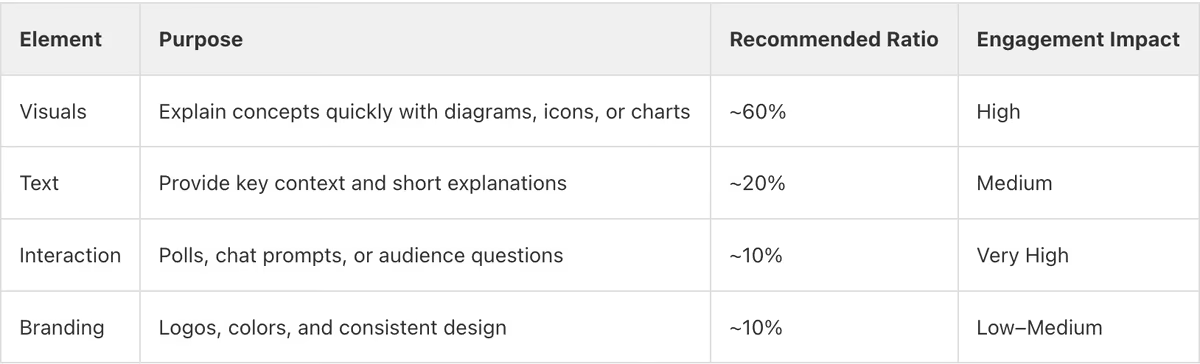
FAQ 7: How do developer portfolio presentations differ from design ones?
Developer portfolio presentations focus more on system logic, architecture, and performance, while design portfolios emphasize visual thinking and user experience decisions. Developers often need to explain how a system works behind the scenes, including the tech stack, architecture choices, and how specific challenges such as scalability, performance, or edge cases were handled. Instead of visual polish alone, a developer portfolio should show diagrams, simplified architecture explanations, and key logic decisions that demonstrate how the solution functions in real-world environments.
Prezi AI generates structured slides where complex ideas can be separated into focused sections. Architecture diagrams, workflow explanations, and code logic can each occupy a distinct part of the presentation so every concept is explained step by step. The presentation can move between these sections — either through Prezi's zooming format or as slides — to show how the system components connect. This helps technical and non-technical audiences alike understand the reasoning behind the solution without being overwhelmed by dense information on a single slide. You can upload an existing document or describe the project in the chat, and Prezi AI builds the structure around your content.
Takeaway: Developer portfolios should highlight system architecture, technical decisions, and performance outcomes rather than focusing mainly on visual design.
FAQ 8: What metrics should marketers prioritize in their slides?
Marketers should prioritize conversion rates, customer acquisition cost (CAC), return on investment (ROI), and revenue growth in their slides because these metrics show direct business impact. These numbers help audiences understand whether a campaign actually generated leads, customers, or revenue. Metrics like impressions or likes can appear in supporting context, but they should only be included if they connect to a measurable outcome such as conversions or sales. Presenting the campaign objective, the strategy used, and the resulting performance helps make the results credible and easy to evaluate.
Prezi AI generates slides with layouts designed for presenting data clearly, including sections for key metrics, charts, and campaign summaries. Marketers can upload a brief or existing report and Prezi AI will instantly generate a fully designed deck organized around campaign goals, performance visuals, and outcome sections. You can then refine through the chat — ask it to highlight a specific number, adjust the visual emphasis, or restructure the flow — so the final presentation moves cleanly from objective to result. Export as a PPTX, PDF, or shareable web link when you're ready to present.
Takeaway: Prioritize ROI, conversion rate, and acquisition cost metrics to clearly show the business impact of your marketing work.