
Quick Summary / Key Takeaways
- An AI presentation designer generates a polished, complete presentation from a prompt or uploaded PDF, DOCX, or PPTX file, helping you move from idea to finished deck in seconds.
- Motion based, zoomable presentation formats replace static slides with guided paths that visually connect ideas and improve audience understanding.
- Automating layout, visual hierarchy, and design selection reduces manual formatting time so you can focus on refining your message and delivery.
- Prezi AI Craft analyzes your content to automatically select the right designer and generate a custom, polished presentation with an editable overview you can refine through chat.
- A structured, motion driven presentation improves clarity, strengthens pacing, and supports confident delivery by guiding audience attention intentionally.
Introduction
Design stunning presentations fast with an AI presentation designer by starting with a finished result instead of a blank slide. Instead of manually arranging layouts, adjusting text boxes, and searching for visuals, an AI presentation designer generates a polished, complete presentation from your prompt or uploaded file—and applies the right design automatically. This shift from manual formatting to intelligent generation dramatically reduces setup time while improving clarity.
The result is not just a better looking presentation, but a clearer narrative that keeps attention focused and reduces cognitive overload for your audience.
This guide walks you through how AI presentation designers streamline creation and improve narrative structure. You will see how intelligent design selection and content analysis work together to reduce design time while increasing clarity and audience engagement.
If your goal is to design stunning presentations fast with an AI presentation designer while keeping full control over narrative and layout, exploring how Prezi AI Craft analyzes your content and builds a custom presentation around it is a practical next step.
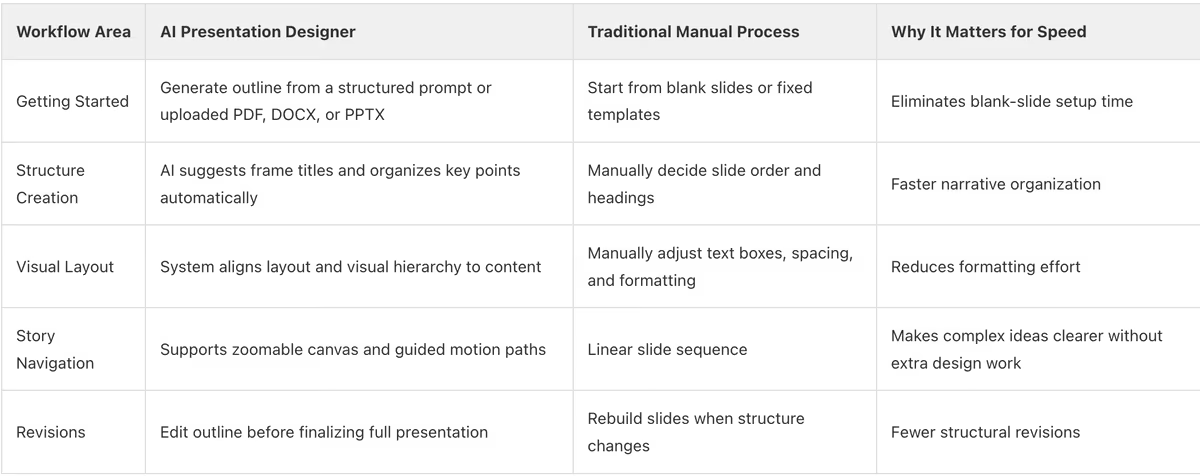
Designing Stunning Presentations Fast: AI Workflow vs. Manual Workflow
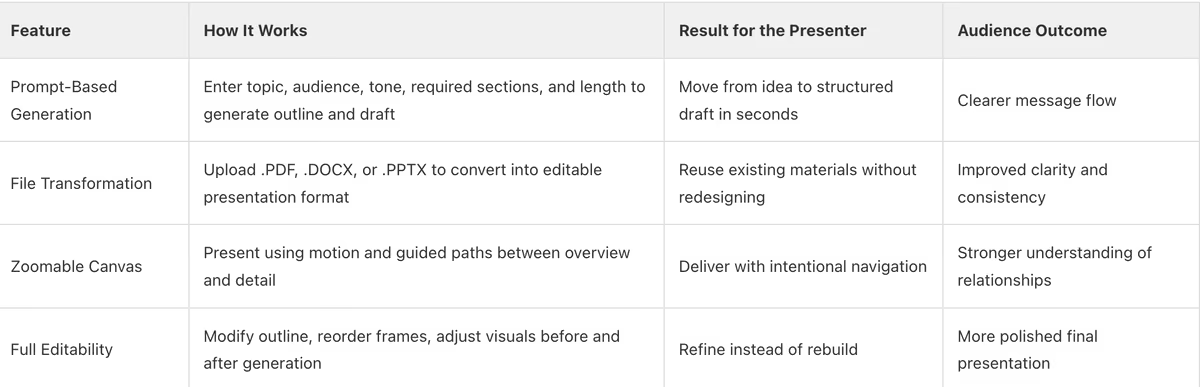
Core Capabilities That Enable Faster Presentation Design
Before Generating Your AI Presentation
- In your prompt, define your objective, target audience, and desired outcome so the AI can tailor structure and design to your content from the start.
- Prepare key data points, visuals, or an existing PDF, DOCX, or PPTX file if you plan to transform existing content instead of starting from scratch.
- Enter a clear, specific prompt or upload your file—Prezi AI will analyze your content and automatically select the designer that fits it best.
- If you have a visual direction in mind, you can choose your own designer before generating rather than letting Prezi AI select one for you.
After Generating and Delivering Your Presentation
- Review the editable overview and adjust frame order to ensure a clear progression between overview and detail.
- Use chat to refine messaging, adjust wording, reposition frames, or update visuals without rebuilding the presentation.
- Confirm that motion and transitions support clarity and do not slow delivery.
- Identify areas where content could be condensed or clarified to improve pacing.
- Strengthen future prompts with more specific context or tone guidance to further reduce editing time.
Frequently Asked Questions
Section 1: Understanding AI Presentation Designers
FAQ 1: What is an AI presentation designer?
An AI presentation designer is software that generates a complete, polished presentation from a written prompt or an uploaded file, automatically applying layout, visual hierarchy, and design styling suited to your content. Instead of manually arranging slides, users provide details such as topic, audience, and tone—or upload an existing file—and the system produces a fully designed presentation ready to refine and deliver.
Prezi AI Craft takes this further by analyzing your content to select the right designer and generate a custom presentation built around what you are actually saying. The result includes an editable overview that gives you a clear picture of your full presentation structure, and a chat interface that lets you make refinements without touching the design manually. You can also choose your own designer before generation if you have a specific visual direction in mind. Either way, Prezi AI is built to understand what works best for your content—not just apply a generic template to it.
Takeaway: An AI presentation designer generates a complete, polished presentation from your prompt or file, applying layout and design automatically so you can focus on refining and delivering your message.
FAQ 2: How does an AI presentation designer work?
An AI presentation designer works by transforming your written prompt or uploaded content into a complete, designed presentation. You provide your topic, audience, and tone—or upload a PDF, DOCX, or PPTX file—and the system generates a fully structured, visually polished deck. From there, you can use the chat to make any edits before presenting.
Prezi AI Craft specifically analyzes your content first, then selects the designer best suited to it—rather than asking you to choose a template upfront and build from there. If you prefer to guide the visual direction yourself, you can select your own designer before Prezi AI generates the presentation. Prezi's designers are built by real designers and shaped by insights from over 500 million presentations. The output is a presentation with an editable overview, where structure, frames, and visuals are already in place and ready to refine through chat.
Takeaway: An AI presentation designer converts your prompt or file into a fully designed presentation, with intelligent design selection and a chat-based editing experience that keeps you in control without manual reformatting.
FAQ 3: What are the core benefits of using AI for presentations?
The core benefits of using AI for presentations include significant time savings, improved creative output, and reduced design stress. Instead of starting from a blank slide, Prezi AI Craft generates a fully polished presentation from a prompt or uploaded PDF, DOCX, or PPTX file—analyzing your content and selecting the designer that fits it best so you are not making design decisions from scratch.
The result is a complete presentation with an editable overview, where layout, visual hierarchy, and design are already applied. You refine through chat rather than rebuilding manually. This combination of intelligent generation and conversational editing allows you to focus on delivering your message rather than constructing the deck around it.
Takeaway: AI for presentations saves time, removes design decision-making, and reduces formatting pressure by generating a complete, polished deck that is ready to refine and deliver.
FAQ 4: Is an AI presentation designer suitable for all types of presentations?
Yes. An AI presentation designer can support a wide range of structured presentation formats, including pitch decks, sales decks, business proposals, training sessions, academic lessons, project updates, and reports. It generates a complete, polished presentation based on your prompt or uploaded content, which you can review and adjust before presenting. This makes it practical for both professional and educational use cases where clarity, structure, and speed matter.
Prezi AI Craft works across these contexts by analyzing what you are presenting and building a custom design around it. You can use chat to update frame titles, reorder sections, refine text, adjust visuals, and export to PowerPoint if needed. This flexibility ensures the final presentation aligns with your audience, format requirements, and delivery context.
Takeaway: AI presentation designers are suitable for business, education, and team presentations because they generate fully designed, editable decks that adapt to different objectives and formats.
Section 2: Key Features and Capabilities
FAQ 5: What features should I look for in an AI presentation designer?
When choosing an AI presentation designer, look for tools that generate a complete, polished presentation—not just a content outline—from your prompt or uploaded file. The tool should apply layout, visual hierarchy, and design automatically, and ideally analyze your content to choose the design approach that fits it rather than placing your content into a fixed template.
You should also prioritize a conversational editing experience so you can refine the presentation through chat without manually adjusting frames. Support for file uploads (PDF, DOCX, or PPTX) matters if you frequently repurpose existing materials. Additional features to look for include motion-based navigation, image generation, export options like PowerPoint, and the ability to choose your own designer when you have a specific visual direction in mind.
Takeaway: Look for complete presentation generation, intelligent design selection, chat-based editing, and file upload support when selecting an AI presentation designer.
FAQ 6: Can AI presentation designers create custom designs?
Yes. Rather than placing your content into a generic template, Prezi AI Craft analyzes what you are presenting and selects the designer best suited to it—producing a custom presentation built around your specific content, tone, and structure. You can also choose your own designer before generation if you have a clear visual direction in mind. Either way, the result is a fully designed presentation, not a formatted document with slides.
Once generated, you can use chat to adjust text, reorder frames, and refine visuals to align with brand guidelines or audience expectations.
Takeaway: Yes, Prezi AI creates custom designs by analyzing your content and selecting the right designer for it, while keeping the full presentation editable through chat.
FAQ 7: How do AI tools handle visual storytelling and motion?
AI tools handle visual storytelling and motion by structuring your content first and then applying movement that follows that structure. Instead of adding decorative animations, motion is used to guide attention between main topics and supporting details. The system determines how sections connect, when to focus on a specific point, and when to return to a broader view so audiences can see the relationships between ideas clearly.
Prezi AI applies this through dynamic movement on a zoomable canvas. Frames are spatially arranged and connected, and the motion path between them is built into the presentation. This allows presenters to move from overview to detail with intention, keeping the full structure visible and helping audiences follow complex ideas without losing context.
Takeaway: AI tools structure content first and then apply guided motion to connect ideas and maintain audience focus throughout the presentation.
FAQ 8: Can I integrate my own content and branding with AI-generated designs?
Yes. Prezi AI allows you to upload existing materials such as PDF, DOCX, or PPTX files, which it analyzes to generate a custom presentation rather than simply converting the file as-is. The result reflects your content structure and is fully editable through chat, so you can adjust text, visuals, and layout to match your messaging and organizational standards.
Prezi AI also supports brand controls, such as uploading logos, applying custom color palettes, and maintaining shared templates across teams.
Takeaway: Yes, Prezi AI builds a custom presentation from your uploaded content and supports brand controls to maintain visual consistency across your organization.
Section 3: Practical Applications and Best Practices
FAQ 9: Who benefits most from using an AI presentation designer?
Professionals and students who regularly create presentations under time constraints benefit most from using an AI presentation designer. This includes sales teams building pitch decks, managers preparing business reviews, consultants creating client proposals, educators developing lessons, and students working on research presentations. Prezi AI Craft helps them move from idea or uploaded content to a fully polished, designed presentation quickly—removing the time spent on layout decisions, design selection, and manual formatting.
They benefit through faster creation, intelligent design matching, and a chat-based editing experience that lets them refine rather than rebuild. Instead of starting from a blank slide, they begin with a complete presentation that has structure, design, and an editable overview already in place.
Takeaway: Professionals, educators, and students benefit most because Prezi AI Craft generates a fully designed presentation quickly, removes manual formatting, and keeps everything editable through chat before delivery.
FAQ 10: How can I ensure my AI-generated presentation is unique?
To ensure your AI-generated presentation is unique, start with a detailed, specific prompt that clearly describes your topic, audience, tone, and goals. Because Prezi AI Craft analyzes your content to select the right designer and build a custom presentation around it, specific inputs produce a more tailored result. The more clearly you define what you are presenting and who you are presenting to, the more the output will reflect your message rather than a generic structure.
From there, use chat to refine wording, adjust emphasis, and align the presentation with your brand before delivering.
Takeaway: Specific prompts give Prezi AI Craft the context it needs to generate a presentation built around your content—then use chat to refine it until it fully reflects your message.
FAQ 11: What are the best practices for prompting an AI presentation designer?
The best practice is to give Prezi AI enough context to analyze your content accurately and generate the right structure and design for it. Include your main topic, audience, tone, and goal. If generating in a different language than your account setting, ensure the prompt contains at least six words so language detection works correctly.
For example, instead of writing something broad like "Marketing plan," a stronger prompt would be:
"Create a 10-frame presentation explaining our Q4 marketing plan for executives. Tone: professional. Include goals, budget overview, audience insights, channels, KPIs, and next steps."
You can also start from a short idea prompt like "Diversity & Inclusion Strategy," use a detailed outline with listed sections, or upload an existing PDF, DOCX, or PPTX file and let Prezi AI analyze it directly. If you have a visual direction in mind, choose your own designer before generating—otherwise, Prezi AI will select the one that works best for your content. Once your presentation is generated, use chat to refine any section without rebuilding from scratch.
Takeaway: Give Prezi AI clear context on topic, audience, tone, and goal—then let it select the right designer for your content, or choose your own before generating. Refine anything through chat afterward.
FAQ 12: Can AI help with presentation delivery and audience engagement?
Yes, AI can significantly enhance presentation delivery and audience engagement beyond visual design alone. Prezi AI Craft generates a complete presentation from your prompt or uploaded file, with motion paths and a zoomable canvas that let you move intentionally between overview and detail. This reinforces how ideas connect rather than presenting them as isolated slides, improving clarity and keeping audience attention focused throughout.
Because you can refine everything through chat before presenting, you can adjust pacing, update emphasis, and reposition frames to better support your delivery style. This preparation reduces last-minute changes and strengthens confidence. The result is a more controlled, visually guided experience that keeps audiences engaged and aligned with your message.
Takeaway: Prezi AI enhances delivery and engagement by generating a structured, motion-driven presentation and giving you a chat-based way to refine pacing and emphasis before you present.
FAQ 13: How does an AI presentation designer save time compared to traditional methods?
An AI presentation designer saves time by generating a complete, polished presentation from the start rather than requiring you to build one slide by slide. Instead of manually outlining content, selecting layouts, choosing a design, formatting text, and adjusting visual hierarchy, you enter a prompt or upload a file and Prezi AI Craft does the heavy lifting—analyzing your content and selecting the designer that fits it.
The presentation it generates includes an editable overview so you can see the full structure immediately and make changes through chat. You refine instead of rebuild. The time savings come from skipping the setup entirely and starting with a finished, designed presentation rather than assembling each element from scratch.
Takeaway: Prezi AI Craft saves time by generating a complete, polished presentation upfront—with intelligent design selection and chat-based editing replacing the manual formatting process entirely.
Section 4: Future of Presentations with AI
FAQ 14: What are the emerging trends in AI presentation design?
Emerging trends in AI presentation design are centered on intelligent content analysis, automatic design selection, and motion based storytelling. Instead of simply applying templates, AI systems now analyze what you are presenting and select the design approach best suited to it—generating a complete, polished presentation rather than a formatted starting point. This shifts presentation creation from manual design decisions to guided content generation.
Another clear trend is adaptive, interactive formats that move beyond static slides. There is increased focus on conversational editing experiences that let presenters refine through chat rather than by adjusting layouts manually. The direction is toward faster creation, smarter design matching, and more dynamic visual communication that is built around the content—not applied on top of it.
Takeaway: Emerging trends include content-driven design selection, motion based storytelling, conversational editing, and fully polished AI-generated presentations that prioritize clarity and engagement.
FAQ 15: How will AI change the way we create and deliver presentations?
AI is changing presentation creation by shifting the starting point from blank slides to a complete, designed result. Instead of manually outlining, formatting, and arranging content, presenters can enter a prompt or upload a file and receive a fully polished presentation in seconds—one that is built around their content rather than adapted from a generic template. This reduces setup time entirely and allows more focus on refining messaging and delivery strategy.
Takeaway: AI transforms presentations by replacing manual setup with intelligent generation and giving presenters a chat-based way to refine and deliver with confidence.






