You're about to create your best presentation ever

Master Template Powerpoint

Create your presentation by reusing a template from our community or transition your PowerPoint deck into a visually compelling Prezi presentation.

AT3 Master Template

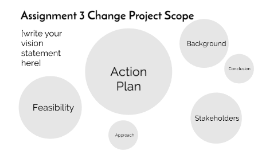
Transcript: Assignment 3 Change Project Scope [write your vision statement here] Background In this section provide a 150-200 statement 'backgrounding' the sustainability issue that underpins your change proposal. Key word: Contextualise Useful resources: Thiele (2016, pp.142-) Chapter 7 Culture and Change Christen & Schmidt (2011) A formal framework for conceptions of sustainability UN Sustainable Development Goals Background Sustainability Challenge Sustainability Challenge Identify sustainability challenge (problem, issue) that your proposal is going to address (50 words) Issue examples: too many single use vehicles being driven over reliance on imported food sources Vision statement Write anticipated outcomes as a "to do statement" (create, design, implement...) As a result of this proposal...... ......an alternative...... will be created to....... .... a design for....... ..... will be implemented to..... Vision statement Action plan [Insert a link to your GANTT chart OneDrive or Google Docs probably best choices- timeline of key actions to implement the action. ] On the GANTT chart include: activities to implement the vision statement time frames (estimated) "Why" explanation for action using principles of organisational change. Use the comments on the cell in Xcel - limit this to one sentence per action and use organisational change theory as your justification For example in my one you will see the comments on the first two actions are about collaboration and equity To add a comment in Xcel right click on the cell and add comment Action Plan Feasibility In this section use a SWOT analysis to consider the following: What information do I need? What is the current situation and what alternatives are there? What skills are needed? What do I bring? What else is needed? What people will I need? Who are the key players? (Project partners) What resources are needed? Synthesise your responses and put them into the strengths, weakness, opportunities and threats sub-topics. As a result of this SWOT there maybe specific tasks to include in your action plan (GANTT chart) to address issues identified through this analysis. There are many resources online about how to do a SWOT. This is a simple one https://youtu.be/goxMsPCs_z0 to get started. Feasibility Strengths Write the strengths of your proposal here Strengths Weaknesses Write the potential weaknesses of your proposal here Weaknesses Opportunities Write the opportunities of your proposal here Opportunities Threats Write the threats to your proposal here Threats Approach In this section describe the approaches that will be needed to achieve the vision statement. Use organisational change principles to explain your approach. (e.g. direct, indirect, individual, collaboration) 150-200 words Approach Stakeholders Identify the 'who' for your proposal to succeed. Identify the significant role these people and or groups will have. Check your SWOT analysis - who are the collaborators? cheer-leaders? fence-sitters? Stakeholders Final reflection Use a separate word document to complete a final reflection that justifies the decisions and choices made in the change proposal linked to literature and examples Conclusion

Editable PowerPoint Template

Transcript: Editable PowerPoint Template Guiding Principles for Effective Presentations Design Principles Introduction to Editable Templates Consistency in Style Color Schemes and Branding Maintaining a consistent style throughout a presentation reinforces the brand image and enhances comprehension. Consistent elements, such as color, fonts, and layouts, help the audience follow the narrative without distractions. A well-chosen color scheme can evoke specific emotions and create a memorable experience. Aligning color choices with branding principles ensures recognition and reinforces your message effectively across all slides. Visual Hierarchy and Layout Definition and Purpose Font Selection and Readability Establishing a clear visual hierarchy guides the viewer's attention to the most critical information. Effective layout techniques, such as balancing text and images, can ensure that key points stand out in your presentation. Overview of PowerPoint Benefits Editable templates are pre-designed formats that allow users to modify content, layout, and design. Their primary purpose is to save time and maintain consistency in presentations across different topics and audiences. Choosing the right fonts is crucial for readability and engagement. Sans-serif fonts are generally preferred in presentations due to their clean lines, while limiting the number of font types maintains visual clarity. PowerPoint simplifies the presentation creation process through intuitive tools and features, such as templates, animations, and multimedia integration. Its widespread use ensures compatibility, making it accessible for diverse audiences. Importance of Editable Formats Examples of Use Cases Editable formats promote collaboration among team members, allowing multiple users to contribute to a single presentation without confusion. They enhance adaptability to specific audience needs, ensuring relevant and impactful communication. Editable templates can be applied in various scenarios, including corporate training sessions, educational lectures, and marketing presentations. They help to tailor content to specific objectives while maintaining a professional appearance. Content Guidelines Structuring Your Narrative Incorporating Data Visualizations Use charts and graphs to represent complex data simply, making it easier for the audience to grasp key points. Ensure visualizations are labeled correctly, providing context to avoid misinterpretation. Organize content logically, beginning with a clear introduction, followed by key points and a strong conclusion. Each section should transition smoothly to maintain audience engagement and ensure key messages are memorable. Effective Use of Text and Images Engaging Your Audience Customization Tips Balance text and visuals to enhance understanding, ensuring that images complement and reinforce the message rather than distract. Limit text on slides to key phrases to promote clearer communication and retention. Use interactive elements such as polls, questions, or discussions to foster audience participation and create a dynamic atmosphere. Understanding your audience and addressing their interests can significantly enhance engagement levels. Adding Multimedia Elements Altering Templates for Your Needs Customize templates to reflect your unique branding and message. Adjust colors, fonts, and layouts to better align with your content's theme and improve audience engagement. Take advantage of template features to create a distinct visual identity. Incorporate videos, audio clips, and animations to create dynamic presentations. Multimedia can significantly enhance the storytelling aspect, making information more compelling and easier to retain for your audience. Saving and Sharing Templates Best Practices for Adaptation After customization, save templates in accessible formats for future use. Use cloud services for easy sharing among team members, ensuring everyone has the most up-to-date version to maintain consistency in presentations. When adapting templates, keep the audience's needs and perceptions in mind. Use feedback to refine designs and ensure your modifications serve the original purpose while enhancing clarity and effectiveness.

Master Template

Transcript: Industry expertise – not just an “order taker” Certifications Corporate Affiliations SSPC, AWWA, NACE Relationships Contractors Inspectors Technical experts Other manufacturers CORROSION TECHNOLOGY - UNDERSTANDING PERFORMANCE REAL PROJECTS Family owned and operated since 1947 Manufacture over 75 Unique products Wide range of industries with heritage in water and wastewater Dedicated representation throughout the country Focus on corrosion. We do. UV RADIATION WATER TREATMENT WASTE WATER TREATMENT In that order! If either is the wrong fit, your project will suffer. Real World Results More than 30 years in sewer pipe lining with no known failure Decades in water, wastewater, and chemical storage service with drastically increased service life Minor touch ups during maintenance painting rather than removal/replacement Extending the overcoat cycle – thus extending the life of the asset and lowering the total cost of ownership More value for you and your client YOUR CHALLENGE Dozens of Manufacturers, thousands of coatings. How do you choose? EXPERIENCE The penetration and expansion of iron oxide fractures the coating THANK YOU INTEGRITY NEXT STEPS WATER TREATMENT Your coatings partner should be willing and qualified to offer you: Inspection for Scope Design – Including stamped/sealed written reports Product Selection Specification review/writing Contractor qualifications Field/shop oversight The intact film releases from the substrate WE HAVE FOUND A WAY TO STOP THE CYCLE INNOVATION Induron proprietary ceramic epoxies are unique in our industry. The major components of paint Solvent – Keeps things liquid for application, and surface adhesion Binder – Epoxy resin Pigment – We focused here Ceramic Sphere Technology creates these best-in-class results. RESPECT 3rd Generation owner of an Industrial Coatings Manufacturer NACE Level 3 Certified Coatings Inspector SSPC, AWWA, STI/SPFA, DIPRA, IEEE Member BS in Biology, Hampden-Sydney College Adhesion and UV resistance have become commoditized. All major coatings manufacturers have them in equal measure. The amount you get depends on what you want to pay. You already know this. In your experience why do you repaint structures? HOW DOES IT WORK? TECHNOLOGY The sun breaks them down into loose pigments THE RIGHT COMPANY CORROSION OUR MISSION THE RIGHT TECHNOLOGY Put our people and technology to work for you. What projects are in your pipeline? Do you need field surveys? Can we provide specification assistance? Who are your other partners? We can meet with/present to Facility Owners, Contractors, and your peers. Feedback – what more can we do for you? Literally Grew up in the Paint Business Paint Maker & store clerk during summers Outside Sales Customer S How do protective coatings fail? To produce the right finishes for the best long-term results, and to honestly represent them in a technically correct manner. ADHESION RELIABILITY OUR CORE VALUES HOW DID WE DO IT? CORPORATE PARTNERS RUST! induron.com | 800-324-9584 INTRODUCTION ADDING VALUE Protecto 401 was successfully used in over 50 million linear feet of 4" - 64" lined ductile iron sewer pipe. OUR PRODUCTS WASTE WATER TREATMENT WATER TOWERS WATER TOWERS

backup master template

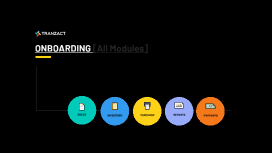
Transcript: ONBOARDING [All Modules] SALE QUOTATION SALES SALES ORDER/ORDER CONFIRMATION Sales PROFORMA INVOICE How sales works in TranZact and the process how we make your business grow 2x ADVANCED RECIEPT VOUCHER TAX INVOICE CREATE CHALLAN Sales Quotation Creation PRINT How sales works in TranZact and the process how we make your business grow 2x SHARE AMEND DUPLICATE Double click to Create OC CANCEL MARK COMPLETE GENERATE OC/SALES CONFIRMATION CANCEL Sales Order/Order Confirmation How sales works in TranZact and the process how we PRINT SHARE AMEND DUPLICATE ADVANCED RECIEPT VOUCHER CREATE CHALLAN TAX INVOICE PROFORMA INVOICE CREATED ORDER CONFIRMATION ADVANCED RECEIPT VOUCHER How sales works in TranZact and the process how we make your business grow 2x TRANSACTIONS SHARE VIA WHATSAPP/EMAIL PRINT CANCEL PORFORMA INVOICE CREATION How sales works in TranZact and the process how we make your business grow 2x SHARE VIA WHATSAPP/EMAIL PRINT CANCEL DUPLICATE Sales Quotation Creation How sales works in TranZact and the process how we make your business grow 2x PRINT SHARE AMEND CANCEL DUPLICATE CREATE CHALLAN How sales works in TranZact and the process how we make your business grow 2x PRINT SHARE AMEND CANCEL MARK COMPLETE Sales Order/Order Confirmation How sales works in TranZact and the process how we PRINT SHARE DUPLICATE AMEND CANCEL CREATED ORDER CONFIRMATION CREATE WORK ORDER PORFORMA INVOICE CREATION How sales works in TranZact and the process how we make your business grow 2x SHARE VIA WHATSAPP/EMAIL PRINT CANCEL ADVANCED RECEIPT VOUCHER How sales works in TranZact and the process how we make your business grow 2x TRANSACTIONS SHARE VIA WHATSAPP/EMAIL PRINT CANCEL DUPLICATE Sales Quotation Creation How sales works in TranZact and the process how we make your business grow 2x PRINT SHARE AMEND CANCEL DUPLICATE CREATE CHALLAN How sales works in TranZact and the process how we make your business grow 2x PRINT SHARE AMEND CANCEL INVENTORY > Problem Statement PURCHASE > Problem Statement REPORTS > Problem Statement PAYMENTS > Problem Statement

Master PowerPoint Template for Nomos Secure

Transcript: Consistent Branding Implementing the defined brand color palette ensures consistency across all presentations, reinforcing the Nomos Secure identity. Enhanced Readability Utilizing the recommended font pairings enhances readability and gives a modern, trustworthy appearance to the slides. Conclusion & Next Steps Professional Organization Following the master slide layouts ensures that all content is organized, visually appealing, and maintains a professional standard throughout the presentation. Brand Integrity Regularly reviewing and adhering to the logo usage guidelines will maintain the integrity and visibility of the Nomos Secure brand across all materials. General Usage Tips for PowerPoint Template These guidelines ensure clarity and professionalism in your presentations. Master PowerPoint Template for Nomos Secure Consistency Hierarchy Adhere to master slide layouts and brand guidelines to maintain a uniform and professional appearance across all slides. Organize content effectively using varying font sizes and colors to guide the audience’s attention and emphasize key points. White Space Utilize ample white space to enhance readability, prevent clutter, and provide a clean look throughout the slides. Enhancing Visual Appeal with Graphic Elements Visibility Across Backgrounds Ensure that the logo is always clearly visible against different background colors. On dark backgrounds, the green elements of the logo will stand out effectively. Appropriate Sizing Adjust the logo size according to the slide type: it should be prominent on title slides and smaller but visible on content slides. Incorporate thin lines in Subtle Cal Poly Green to serve as dividers, creating a clean separation between content sections. Additionally, use subtle backgrounds to add depth to content areas without overwhelming the viewer, ensuring a professional look that aligns with the brand's identity. Consistent Placement Logo Usage Guidelines Use consistent placement for the logo across all slides to maintain brand unity. For instance, place it in the bottom-right corner for content slides. No Distortion Never alter the logo's proportions or distort it in any way. The logo's integrity should remain intact to preserve brand identity. A Comprehensive Guide to Creating a Professional PowerPoint Template that Aligns with Nomos Secure's Brand Identity. Minimal Embellishments Avoid adding embellishments to the logo, as it is designed to stand out on its own. Any extra effects may dilute its impact and clarity. Professional Title and Content Slide Design This slide features a Primary Black background, providing a striking contrast that enhances readability. The header and body content use Montserrat Regular font, ensuring a clean and modern look. Proper placement and generous spacing improve clarity and maintain a professional appearance throughout the presentation. Bold Background and Logo Placement The title slide is designed with a Primary Black background to establish a strong visual impact and align with the brand's identity. The logo is prominently displayed, ensuring brand recognition from the first glance. Key Design Features of the Title Slide Dynamic Design Elements Traditional Approaches The section header slide features a Primary Black background, which provides a strong, professional look. A textured overlay adds depth, making the slide visually interesting and engaging. The section title is presented in bold, centered text, ensuring it stands out and captures the audience's attention. To enhance visibility, a subtle glow effect in Secondary Accent Green surrounds the title, reinforcing the brand's color palette and giving an elegant touch to the overall design. In contrast, traditional section header designs often utilize plain backgrounds and less emphasis on the title's visual impact. This can result in a less engaging experience for viewers. By incorporating a textured overlay and a glow effect, the section header slide is designed to be more dynamic and effectively convey the brand's professionalism and modernity. This approach not only aligns with the visual identity of Nomos Secure but also sets a strong tone for the content that follows. Readable and Eye-Catching Text Title text is set in Montserrat Regular and Clean White, ensuring high readability against the dark background. A subtle drop shadow in Secondary Accent Green adds depth and draws attention to the title. Image with Caption Design Features Introducing the Nomos Secure PowerPoint Template Prominent Image Placeholder The image placeholder should be large and prominent, allowing for high-quality visuals that engage the audience. This presentation outlines the PowerPoint template specifically created for Nomos Secure, showcasing its cohesive visual identity and professional aesthetic, tailored to reflect the brand's commitment to security and excellence. Font Suggestions Primary Black: #060D0D Secondary Accent Green: #0DF228 Subtle Cal Poly Green: #135029

Master Document PowerPoint

Transcript: Used a template as a guide Searched a job opening Typed in my skills and why I qualify for the job Purpose was to create a cover letter to help with future cover letter and be able to write it formally in the future Explained the benefits of exercising Explained bad an good eating habits Used some quotes from fitness experts Different ways of exercising Conclusion Main points were on the cons and pros of issues of privacy on the internet. Gave information on how its dangerous because of credit cards information Gave information on how it can be harmful to children Also talked about how it can be a good thing for employers to look at before hiring people I created a database access Was shown to grader Every lab there was an update or new product to add to the data base I used stores like Target, Walmart, Finish line, Best Buy and Apple Store I Updated items such as mascara, shoes T.V’s, movies, chargers, tablets, and phones Lab 9: Privacy and Ethics Issue on the Internet Created a resume Used a template from Word Document Typed my experience, objective, skills, education and my reference Point was it learn how to successfully learn to type a formal resume Learned how to screen shot web pages Learned how to copy and paste the screen shot on to a word document Also learned dhow to use foot notes at the end of the 3 screen shots Learned how to type a caption on the screen shots or right under the screen shots Created a master document and added all my labs Included a table of contents Table of figures Cover page Easy to find all my assignments Learned how to have links to open up other documents By Ruby Gutierrez Tatiana Harrison Computer Science 101 03 December 2014 This PowerPoint will include all the main points of all my labs done in my master document. Created a budget table Included food Shows my monthly spending habits Created a table of my budget My information was totaled Freezing panes Included table of figures Introduction Lab 5: Screen Shots Lab 11: Excel Lab 2 Word II Lab 6: Resume Lab 1 Word Doc 1 Lab 7: Cover Letter Lab 12: excel II I researched an typed about the topic of eating healthy and being a college student I also was expected to know the following -Use Italics -Bold - Paragraphs style Purpose was to learn different features of word and who the grader we knew how The point of the Master Document was to put all of my labs in there and make a table of contents. This makes it easier to find my labs and there were also attached links to help open up other documents. Lab 8: Flyer Purpose was to type create a flyer and know how word features Learned how to use shapes copy, cut, paste, crop, and re size Also leaned to copy and paste other pictures from the web onto the flyer on the word document Master Document PowerPoint Lab 4: 500 Word Paper Lab 3 Data Base Lab 10 Master Document Same concept as the last document Added more sources to the paper Talked about bad habits people usually do

Now you can make any subject more engaging and memorable