

Quick Summary / Key Takeaways
- Interactive presentations use movement and visual flow to guide audiences from one idea to the next, making the message easier to follow and more engaging.
- Structuring content so ideas connect clearly helps audiences retain information instead of processing disconnected points.
- Dynamic transitions between overview and detail help direct attention and make complex topics easier to understand.
- You can create this type of presentation without design skills. Prezi AI generates structured layouts and visual flow from your content, so you can focus on your message.
- Turning a presentation into a two-way conversation keeps audiences engaged and allows you to respond to questions in real time.
Introduction
Presentations today need to hold attention in environments full of distractions. Audiences expect content that is clear, engaging, and easy to follow. A presentation that moves with purpose helps guide attention and keeps viewers focused from start to finish. Instead of presenting information all at once, ideas are introduced step by step so the audience can follow the story as it develops.
An interactive presentation focuses on how ideas connect. Each section builds on the previous one, and visual movement highlights what matters at the right moment. This makes it easier to explain complex topics and respond to questions without losing the overall flow. Clear structure and guided transitions help the audience stay oriented throughout the presentation.
In this guide, you will learn how to create interactive presentations with practical ideas, tips, and benefits. You will see how to structure your content, guide attention through visual flow, and keep your audience engaged. Prezi AI turns your ideas into a structured presentation with built-in visual flow, organizing topics and layouts so your presentation moves naturally while you focus on delivering your message.
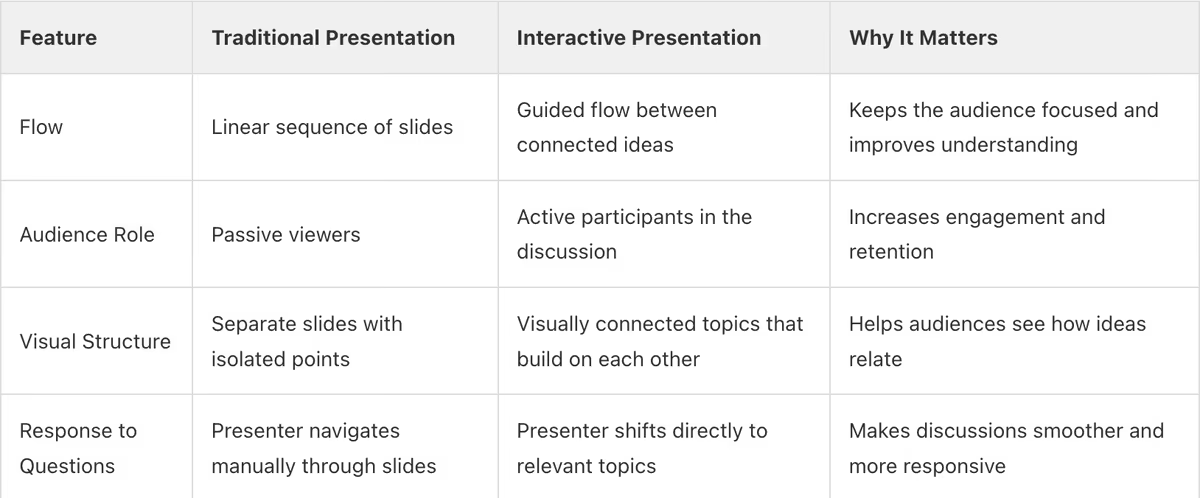
How Interactive Presentations Improve Audience Engagement
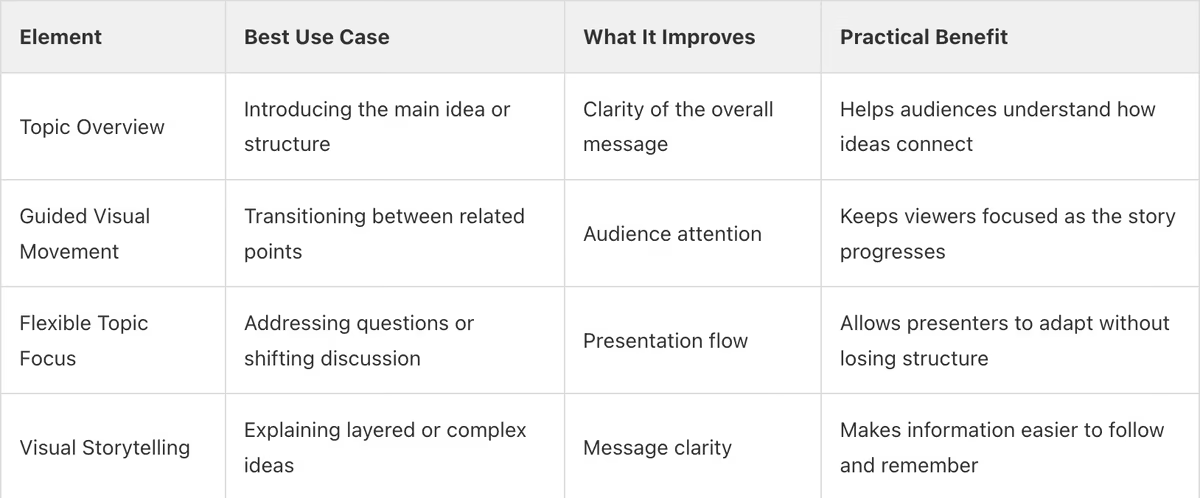
Core Elements That Make Interactive Presentations Effective
Interactive Presentation Preparation Checklist
- Test each clickable section or interaction to ensure it brings up the correct topic or detail during the presentation.
- Confirm your internet connection if your presentation includes cloud-based content or shared access links.
- Check your presentation controls or remote so you can move smoothly between key sections while presenting.
- Open your presentation in advance to verify that visuals, transitions, and media display correctly.
Post-Presentation Checklist
- Review engagement data or viewing activity to identify which sections held the most attention.
- Share a presentation link so your audience can revisit key topics and reinforce understanding.
- Collect feedback through a short survey to evaluate how well the presentation kept attention and clarity.
- Refine your presentation based on audience questions and discussion points to improve future delivery.

Frequently Asked Questions
Section 1: Interactive Presentation Fundamentals
What defines an interactive presentation?
An interactive presentation is a presentation format that allows the presenter to adapt the flow based on audience engagement rather than following a fixed slide-by-slide order. Instead of moving through a rigid sequence, you can shift focus between topics, highlight specific sections when questions come up, and explore supporting details when the audience wants more context. This approach encourages participation and keeps attention focused because the presentation responds to what the audience needs at that moment.
Tools like Prezi AI support this by generating a structured presentation from a prompt or uploaded document such as a PDF, DOCX, or PPTX. It organizes ideas into connected sections and builds a visual flow that shows how each point relates to the overall message. During the presentation, you can move from overview to detail smoothly, bringing attention to specific ideas while keeping the full context visible. This helps maintain engagement and makes the presentation feel more conversational.
Takeaway: An interactive presentation focuses on guiding attention and adapting to audience interest, allowing you to explore ideas clearly and respond in real time.
How do interactive slides improve retention?
Interactive slides improve retention by helping audiences follow ideas as a connected story rather than isolated points. When visuals guide attention and show how concepts relate, viewers process information more actively. Movement and clear structure make it easier for the brain to map relationships between ideas, which helps people understand and remember the message more effectively.
In Prezi AI, retention is supported by organizing topics into connected sections and building a visual flow that highlights how each idea relates to the overall message. As you present, the view shifts between high-level concepts and specific details, allowing the audience to stay oriented while focusing on one point at a time. This guided movement keeps attention on the content and reinforces key ideas. This aligns with survey findings that 4 out of 5 presenters say Prezi is more effective at capturing audience attention.
For more on keeping your audience engaged, see our guide to effective presentations.
Takeaway: Interactive presentations improve retention by guiding attention and helping audiences clearly understand how ideas connect within the overall story.
What are the best tips for how to make a presentation interactive?
To make a presentation interactive, structure your content so the audience can follow and engage with ideas as they unfold, rather than passively moving through a fixed sequence. Start with a clear overview of your main topics, then move into specific sections as questions or discussion points arise. This allows you to adjust the flow in real time, highlight what matters most, and keep the presentation aligned with what the audience wants to understand.
In Prezi AI, this is supported by organizing your content into connected sections and building a visual flow that shows how each idea relates to the overall message. As you present, the view shifts between the main topic and supporting details, guiding attention to the point being discussed while keeping the full context visible. This movement helps audiences follow the story more easily and keeps the presentation responsive during discussions.
If you want to go deeper on delivery, our effective presentation tips cover 14 techniques for keeping audiences engaged from start to finish.
Takeaway: Start with a clear overview and move between connected ideas to keep your presentation engaging and responsive to your audience.
Can I create these without design skills?
Yes. You can create interactive presentations without design skills when the platform handles the structure, layout, and visual flow for you. Instead of manually designing slides, AI presentation tools organize your ideas into clear sections and apply a consistent visual hierarchy. This allows you to focus on your message while the presentation remains structured, readable, and engaging.
With Prezi AI, you can start by entering a prompt or uploading an existing file such as a PDF, DOCX, or PPTX. The system analyzes the content, generates a structured outline, and builds a presentation where related ideas are grouped and visually connected. It automatically arranges layouts, sets visual hierarchy, and creates movement between sections so the presentation flows from one point to the next. You can then refine text, adjust sections, or update visuals while keeping the overall structure intact.
Takeaway: AI-driven structure and layout make it possible to create interactive presentations without needing professional design skills.
Section 2: Strategy and Benefits
What role does dynamic movement play?
Dynamic movement plays a key role in helping audiences stay focused and understand how ideas connect. Instead of presenting information all at once, movement introduces ideas step by step, guiding attention to the most important point at the right moment. Shifting from a high-level view into specific details, and then back to the main idea, helps viewers follow the story and see how each part fits together.
In Prezi AI, this movement is built into how presentations are structured. After generating an outline from your topic or content, the platform arranges ideas into connected sections and defines a presentation path between them. As you present, the view transitions between key points, bringing focus to each idea while maintaining context. This controlled movement keeps the audience oriented and makes complex information easier to understand.
Takeaway: Use purposeful movement to guide attention and show how ideas connect, so your audience can follow and remember your message more easily.
How do I handle audience questions in real-time?
Handling audience questions in real time works best when your presentation is structured so you can shift focus between topics without interrupting the flow. Instead of searching through slides, you can bring up the most relevant section immediately, show the supporting detail, and then return to the main discussion. This keeps the conversation smooth and ensures the audience stays focused on the point being addressed.
In Prezi AI, this is enabled by organizing your content into connected sections with a clear presentation path. During a live session, you can move from the main topic into a specific point, present the relevant detail, and then transition back to the broader message. This movement keeps the audience oriented while allowing you to respond quickly and naturally during Q&A.
Takeaway: Structure your presentation so you can move directly to key points during questions while keeping the overall flow clear and focused.
What are the main benefits for sales teams?
Interactive presentations help sales teams adapt their pitch in real time based on what a prospect cares about most. Instead of following a fixed sequence, presenters can shift focus to the most relevant topic, whether it is a product capability, a use case, or a key result. This keeps the conversation aligned with the prospect's priorities and makes it easier to demonstrate how the solution fits their needs.
With Prezi for Teams, sales presentations are organized into connected sections that reflect the full story, from problem to solution to results. During a meeting, the presenter can move from a high-level overview into specific details and then return to the bigger picture as the discussion evolves. Teams can also collaborate on shared presentations and brand kits, ensuring every sales rep delivers a consistent, on-brand message while keeping the presentation dynamic and responsive.
For tips on presenting to specific audiences, see how to create conference presentations that stand out.
Takeaway: Interactive presentations help sales teams deliver more relevant, focused pitches by shifting to the information that matters most in the moment.






