
Quick Summary / Key Takeaways
- Start with one clear Big Idea. Open your conference presentation with a strong insight, question, or statistic that anchors the audience around your central message from the beginning.
- Design slides for visibility, not density. Use high-contrast visuals, large fonts, and minimal text so people in the back of a large conference room can easily follow your message.
- Structure the talk as a story. Move from a relatable problem to supporting insights and then to a clear takeaway so the audience understands the logic behind your message.
- Use movement to guide attention. Dynamic presentation flow can highlight one idea at a time, helping audiences follow complex explanations instead of scanning crowded slides.
- Prepare for technical issues in advance. Bring adapters, test audio and screen formats, and keep a backup version of your presentation ready so the session continues smoothly if equipment fails.
Introduction

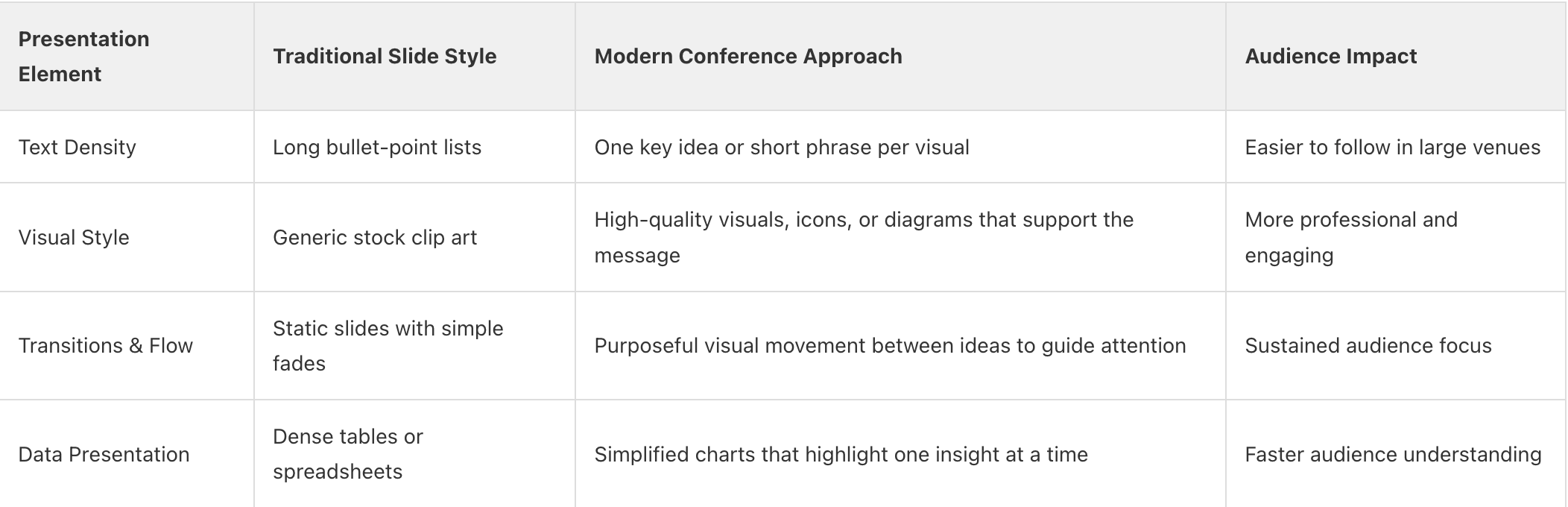
Standing on a conference stage is a rare chance to capture attention and share an idea that matters. In large venues filled with competing sessions and constant distractions, speakers have only a few minutes to show the audience why their talk is worth following. A strong conference presentation combines a clear message, purposeful visuals, and confident delivery. Instead of relying on dense slides that function like a script, effective presenters use visuals to highlight key ideas and guide the audience through the story of the talk.
One of the biggest differences between an average conference talk and a memorable one is how the presentation moves. Typical slides often force audiences to scan text while the speaker talks, which splits attention. Presentations designed with visual movement can reveal ideas step by step, helping the audience focus on one concept at a time. Platforms like Prezi AI support this approach by generating structured presentation layouts from your content and organizing ideas visually so speakers can move through topics in a clear, connected flow rather than jumping between disconnected slides.
In this guide, we break down the practical strategies that help conference presentations stand out. You will learn how to craft a compelling opening, design visuals that work in large venues, and handle the delivery challenges that come with presenting to a live audience. Throughout the process, Prezi AI can help speakers turn an initial conference topic into a structured presentation more quickly by generating an organized outline and arranging key points into a visual sequence. This allows presenters to focus on refining the story of their talk and preparing their delivery, while the presentation flow already highlights how each idea connects during the session.
Traditional vs. Modern Conference Presentation Design
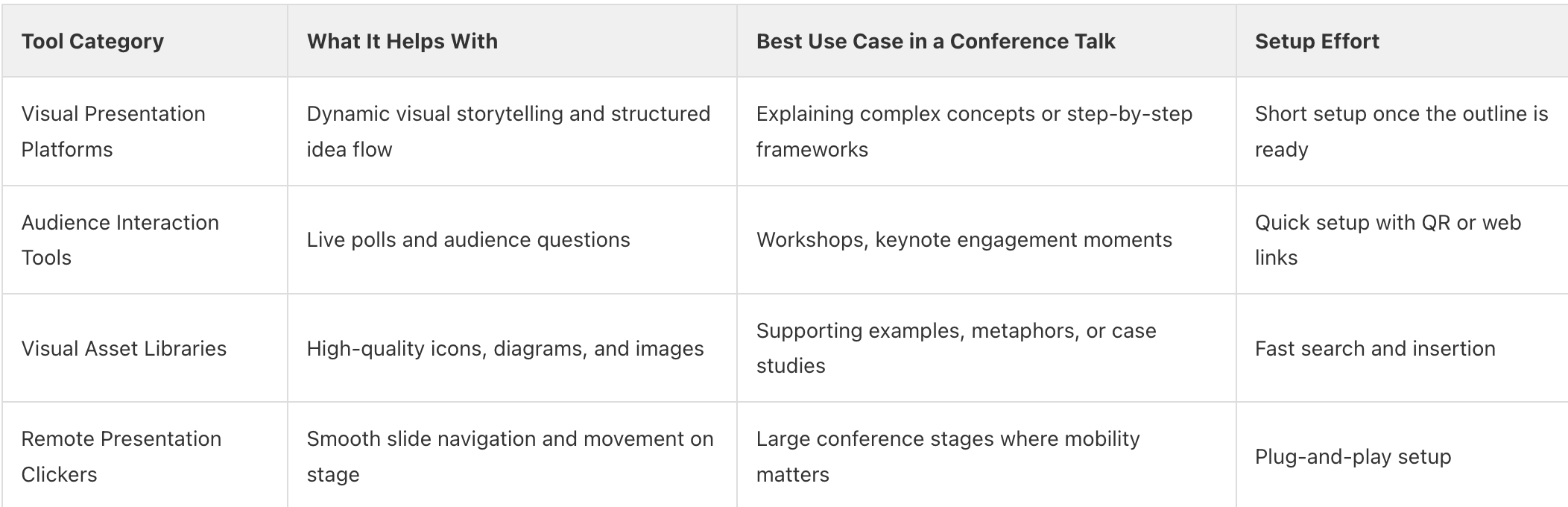
Practical Tools That Help Conference Presentations Stand Out
Pre-Presentation Preparation Checklist for a Successful Conference Talk
- Test all embedded videos and audio clips on the actual venue hardware to ensure they play correctly during the session.
- Practice your opening hook several times so it feels natural and confident rather than scripted.
- Verify that your conference presentation visuals are readable from the back of the room, especially in large conference halls.
- Sync your presentation clicker and check battery levels before stepping on stage.
Post-Presentation Follow-Up Checklist After Your Conference Session
- Share a digital version or summary of your presentation so attendees can revisit the key ideas discussed in the session.
- Review audience feedback or comments to identify which parts of the presentation resonated most.
- Follow up with attendees who asked questions during the Q&A to continue the conversation.
- Add the talk to your speaker portfolio or professional profile, including photos or recordings from the live session.
Frequently Asked Questions
Section 1: BUILDING A COMPELLING CONFERENCE PRESENTATION STORY
FAQ 1: How do you start a conference presentation to grab attention?
Start your conference presentation with a provocative question or a surprising statistic that immediately connects to the audience's challenge. This technique breaks the ice and signals that your session will be different from the standard corporate deck. Avoid the “about me” slide until later so you can capitalize on the initial high-energy moment of your walk-on. By focusing on a shared pain point right away, you build an instant connection with every person in the room. This approach ensures your message lands before the audience has a chance to check their phones.
Prezi AI helps speakers structure a strong opening by automatically organizing the presentation around the main idea of the talk. The first frame can present a bold question, statistic, or insight as the central visual, and the following frames expand on the problem and its implications. Because Prezi presentations move visually from the main topic into supporting points, the audience immediately sees how the opening insight connects to the rest of the talk, which helps capture attention at the start of the presentation.
Takeaway: Open with a bold question or shocking fact to hook the audience within the first sixty seconds.

FAQ 2: Why is narrative structure so vital for conference presentations?
A clear narrative arc provides a roadmap that helps the audience follow your logic through the entire conference presentation. Without a story to anchor your facts, people often struggle to remember the key points once they leave the room. Start with a challenge, build tension with data, and then offer a clear path forward to inspire action. This structure keeps the audience leaning in because they want to know how the story ends. Good storytelling turns a dry set of slides into an engaging journey.
Prezi AI helps presenters shape that story faster by generating a structured outline and presentation flow before the design stage begins. Once the key points are organized, the presentation layout connects those ideas visually so the audience can see how each point relates to the next. Because Prezi presentations move across the canvas instead of switching between isolated slides, speakers can guide attention from the problem to the insights and finally to the takeaway, helping people follow the logic of the talk more easily.
Takeaway: Use a narrative arc to turn dry data into a memorable journey that inspires your audience to act.
Section 2: DESIGNING VISUALS THAT STAND OUT ON THE CONFERENCE STAGE
FAQ 3: What makes conference presentation slides effective for large audiences?
Effective conference presentation slides prioritize visual clarity and strong contrast so the content remains readable even for people sitting far from the stage. Large fonts, minimal text, and one clear idea per visual help the audience quickly understand the point without reading dense paragraphs. Well-chosen images or simple charts should support what the speaker is explaining, not compete with it. When slides are designed this way, the audience can focus on the message instead of trying to read everything on the screen.
Prezi AI helps presenters structure visuals around key ideas instead of stacking information on slides. Each point can be introduced as its own visual focus, and the presentation moves dynamically from one idea to the next. This movement directs attention to the exact concept being discussed, which keeps the audience engaged during a conference talk where many people are viewing the screen from a distance.
Takeaway: Prioritize high contrast and large fonts to ensure your message is clear to every person in the room.
FAQ 4: How can I make my conference presentations more interactive?
Incorporate live polling or real-time Q&A sessions to turn a passive audience into active participants in your conference presentation. This creates a two-way conversation that keeps energy levels high, especially during long afternoon slots. You can use QR codes on your conference presentation slides to give people instant access to your resources or surveys. Interactive elements provide immediate feedback and help you tailor your delivery to the room's specific interests. This engagement makes your session much more memorable than a one-sided lecture.
Prezi presentations support this type of interaction by allowing presenters to add elements such as QR codes directly into their slides. These QR codes can link to polls, feedback forms, or additional resources that attendees can access instantly from their phones. This makes it easier to turn a traditional presentation into a more interactive experience where the audience can participate in real time. Because Prezi presentations move fluidly between topics, presenters can also adapt the discussion based on audience questions or responses without breaking the flow of the talk.
Takeaway: Use live polls and QR codes to transform your talk from a lecture into a two-way conversation.
FAQ 5: How do you design conference presentation slides without a design background?
Use modern presentation software that offers smart templates and automated layout features to create professional conference presentation slides quickly. These tools handle spacing and alignment for you, so you can focus entirely on your content and delivery. Stick to a consistent color palette and high-quality imagery to maintain a polished look throughout your deck. Avoid over-complicating your visuals and remember that simple, bold designs often have the biggest impact on stage. You can achieve a high-end look by using whitespace effectively and limiting each slide to one core message.
Prezi AI helps speakers design slides without needing advanced design skills by generating layouts that organize each key idea into a clear visual section. Instead of manually arranging text boxes, images, and charts, the AI structures the presentation so the main point, supporting visual, and explanation are already placed in a clean layout. This makes it easier for presenters to build clear, stage-ready slides while focusing on the message they want to deliver rather than the design details.
Takeaway: Use smart templates and a limited color palette to create professional visuals with minimal effort.
Section 3: DELIVERING A CONFIDENT AND PROFESSIONAL CONFERENCE TALK
FAQ 6: What is the best way to handle stage fright during a big talk?
Focus on your first sixty seconds of material until it becomes second nature, as this is when nerves are usually at their peak. Once you get past the opening hook, the natural flow of your narrative will help you settle into a comfortable rhythm. Remember that the audience wants you to succeed and is there to learn from your unique expertise. Physical movement on stage helps release pent-up nervous energy and makes you appear more confident to the crowd. Breathing deeply before you walk on stage also helps steady your voice and clear your mind.
Prezi AI can help speakers feel more prepared by creating a clear structure for the presentation before rehearsal begins. The AI generates an outline and organizes the main talking points into a logical sequence. With the presentation already structured, speakers can spend their preparation time practicing delivery and timing rather than figuring out how to arrange the slides.
Takeaway: Master your first sixty seconds and use physical movement to channel nervous energy into stage presence.
FAQ 7: What technical details should I check before presenting?
Verify the aspect ratio of the venue’s screens to ensure your conference presentation slides are not stretched or cut off during the talk. Always bring your own adapter and keep a backup copy of your presentation on a thumb drive in case the local computer or internet connection fails. If your presentation includes video clips, test the audio levels ahead of time so the sound is clear in the room. It is also helpful to test your clicker from different areas of the stage to make sure it works reliably during the talk.
Prezi presentations can also be prepared for technical issues by downloading the presentation through the Prezi Desktop app, which allows it to run without an internet connection. This ensures the presentation will still display correctly if the venue’s Wi-Fi is unstable. Presenters can also keep a local copy of the presentation file and a shareable presentation link as additional backups. Preparing these options in advance reduces the chance that technical problems will interrupt the flow of the talk.
Takeaway: Always bring a backup thumb drive and test your audio-visual setup on-site before the session begins.
FAQ 8: How do you handle difficult questions during a conference Q&A?
Listen fully to the question before responding to show respect and give yourself a moment to formulate a thoughtful answer. If you do not know the answer, it is perfectly acceptable to say so and offer to follow up with the person after the session. Rephrasing a complex or aggressive question can also help clarify it for the audience and give you a chance to frame the response more clearly. Keep your answers concise so more people have the opportunity to participate before time runs out. Ending the Q&A with a brief recap of your core message helps close the session with clarity.
Prezi presentations make it easier to support answers visually during Q&A. Because the presentation is organized around connected ideas rather than a fixed slide order, a speaker can move directly back to a specific section of the presentation that explains the point being discussed. For example, if a question relates to a particular chart or concept, the presenter can quickly navigate to that visual and walk through it again. This dynamic movement helps clarify answers and keeps the discussion focused on the key ideas already shown in the presentation.
Takeaway: Rephrase difficult questions to maintain control and always end the session with a final summary of your own.
FAQ 9: How do I keep sharing my presentation after the conference ends?
Most presenters treat their conference talk as a one-time event. But the work you've put into a well-structured, visually compelling presentation can keep delivering value long after you leave the stage, if you share it in the right way.
Prezi's built-in QR code generator makes post-event sharing immediate. Add QR codes to flyers, posters, or handouts for easy access anytime, and link to surveys, sign-ups, or bonus content to keep the conversation going after the event ends. You can also download the QR code as a PNG and include it in follow-up emails, LinkedIn posts, or event recap pages, giving anyone who missed the live session instant access to your content.
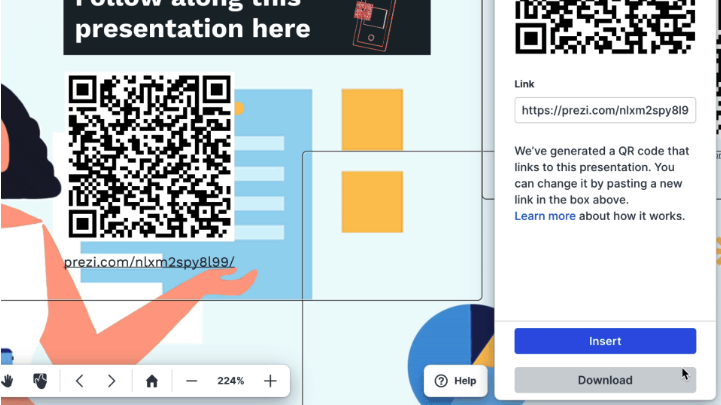
Beyond direct sharing, setting your presentation to Public allows it to be discoverable via search engines, meaning anyone can find and view it through Google or the Prezi gallery. That turns a one-hour conference talk into a piece of long-term searchable content.
Takeaway: Download and share your QR code across follow-up materials, and set your presentation to public so it continues reaching new audiences organically.
FAQ 10: How do I optimize my Prezi presentation to rank on Google?
A public Prezi presentation is a live, indexed web page, which means the same SEO principles that apply to a blog post or landing page apply here too. The difference is that most presenters never think to optimize their presentations for search, which means there's a real opportunity to stand out.
Start with your title. This is the single most important SEO signal for your presentation. Lead with your target keyword and make it descriptive: "AI Presentation Tips for Sales Teams: How to Close Faster" will outperform "Q3 Sales Kickoff Deck" every time. Think about the exact phrase your audience would type into Google to find this information, and put that phrase at the front of your title.
Next, write a clear description. Use the description field to explain what the presentation covers, naturally including the terms your audience would search for. Think of it as your meta description — a concise, keyword-informed summary of the value inside.
Once your presentation is public and optimized, you need to know whether it's actually ranking. That's where Ranktracker comes in. Ranktracker gives you daily, weekly, or monthly updates on your keyword positions, checking multiple search engines for your chosen location. You can track the specific URL of your public Prezi presentation exactly the way you'd track any page on your website.






