
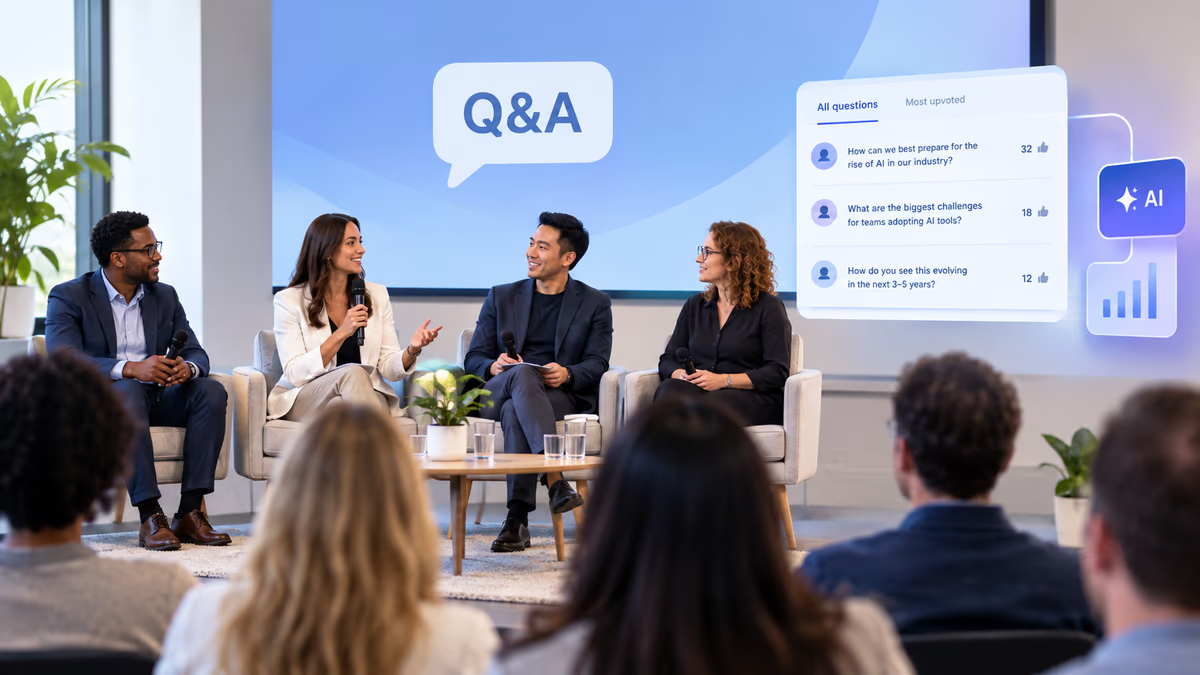
The best AI presentation tool for panel discussions and Q&A-heavy sessions in 2026 is one that unifies live audience questions, real-time polling, and presentation delivery in a single platform, so moderators are never juggling multiple disconnected tools. Panel discussion engagement depends on how effectively moderators can capture, curate, and respond to audience input without disrupting the flow of conversation between panelists. Prezi's Q&A surfaces the questions a room actually wants answered through audience upvoting, giving moderators the confidence to run dynamic, inclusive discussions while keeping the whole audience, not just the front three rows, actively involved throughout the session.
For event orchestrators managing high-stakes conferences and moderators leading Q&A-heavy sessions, the right tool turns unpredictable live interactions into structured, manageable conversations. This guide covers what panel discussion engagement means, how to choose the right format, which discussion techniques work in each phase, and how Prezi runs Q&A moderation without the tool-switching that breaks a session's flow.
What Is Panel Discussion Engagement?
Panel discussion engagement refers to the active, two-way interaction between panelists, moderators, and audience members during a structured conversation on a specific topic. It encompasses every touchpoint where participants contribute, respond, or react, from live questions submitted by attendees to real-time polls that gauge audience sentiment.
Understanding the fundamentals of panel discussions helps clarify why engagement matters so much. Unlike a keynote address where information flows in one direction, a panel discussion thrives on dialogue. The moderator navigates conversation among multiple speakers while simultaneously attending to what the audience needs to hear and wants to ask.
Effective panel discussion engagement serves three critical purposes. First, it validates audience presence by making attendees feel their input shapes the conversation. Second, it surfaces diverse perspectives that panelists alone might not address. Third, it creates memorable moments that distinguish a live panel from content people could simply read or watch on demand.
The panel discussion meaning extends beyond its format to its function: bringing together subject matter experts to explore discussion topics through facilitated conversation while inviting audience participation. When engagement fails, panels become passive viewing experiences. When it succeeds, they become collaborative knowledge-building sessions that attendees remember and reference long after the event concludes.
Panel Discussion vs. Symposium vs. Roundtable: Choosing the Right Format
A panel discussion features multiple experts responding to a moderator's questions in front of an audience, while a symposium presents sequential formal presentations on related topics, and a roundtable discussion involves equal participants in collaborative conversation without a formal audience. Choosing the right format determines how you structure engagement and which tools you need.
The panel discussion vs symposium distinction matters for event planners deciding how to allocate session time. Symposiums work well when you need deep dives into specific research or findings. Each presenter delivers prepared remarks, and Q&A typically happens at the end. You can see how this format functions in practice through examples like this symposium on future careers, where structured presentations take precedence over spontaneous dialogue.
Roundtable discussions, by contrast, eliminate the speaker-audience hierarchy entirely. Everyone sits as equals, contributing to discussion topics without formal presentations. This format excels for smaller groups seeking consensus or collaborative problem-solving but scales poorly for large conferences where audience members outnumber active participants.
Panel discussions occupy the middle ground, making them ideal for most conference and corporate event contexts. They provide the expertise depth of a symposium while maintaining the conversational energy of a roundtable. The moderator role becomes essential here: they must balance prepared discussion questions with spontaneous audience input, ensuring panelists stay on topic while the audience feels heard.
| Format | Best For | Audience Role | Engagement Style |
|---|---|---|---|
| Panel Discussion | Conferences, summits, webinars | Active participants via Q&A | Moderated dialogue with audience input |
| Symposium | Academic conferences, research presentations | Passive listeners until Q&A | Sequential presentations, end-loaded questions |
| Roundtable Discussion | Strategy sessions, stakeholder meetings | Equal participants | Collaborative conversation, no formal audience |
For Q&A-heavy sessions where audience participation drives value, the live panel discussion format consistently outperforms alternatives. It provides enough structure to keep conversations productive while leaving room for the spontaneous moments that make live events worthwhile.
Discussion Techniques for Each Phase of Your Panel
Effective discussion techniques vary by session phase (opening, middle, and closing), with each requiring distinct approaches to maintain momentum and audience attention. Structuring your engagement strategy around these phases prevents the energy dips that plague poorly planned panels.
The opening phase establishes tone and expectations. Moderators should use a brief icebreaker question that panelists can answer quickly, giving the audience immediate insight into each speaker's perspective. This is also the optimal moment to introduce your Q&A tool and explain how attendees can submit questions throughout the session. Waiting until the end to mention Q&A capabilities means losing valuable input that could shape the entire conversation.
During the middle phase, discussion protocols become essential for managing multiple voices. The jigsaw method and panel discussion approach offers one structured methodology where different panelists address distinct subtopics before synthesizing insights together. This technique prevents the common problem of panelists repeating each other or competing for airtime on the same points.
Consider these discussion techniques for maintaining engagement throughout the middle phase:
-
Directed questions: Address specific panelists by name to ensure balanced participation
-
Audience pulse checks: Deploy quick polls to gauge sentiment before diving deeper into controversial topics
-
Bridge statements: Connect panelist responses to previously submitted audience questions
-
Productive disagreement: Invite panelists to respectfully challenge each other's positions
The closing phase requires careful management of accumulated audience questions. Rather than rushing through a backlog, skilled moderators select the most upvoted or thematically relevant questions and frame them as synthesis opportunities. Ask panelists to address how the audience's concerns connect to the broader discussion topics covered throughout the session.
Discussion prompts work best when they invite specific, actionable responses rather than broad philosophical musings. Instead of asking "What do you think about the future of our industry?" try "What's one change you've implemented in the past six months that other organizations should consider?" Specificity generates memorable, quotable moments that extend the panel's impact beyond the room.
How AI Tools Change Live Q&A Moderation
Prezi changes live Q&A moderation by collecting audience questions in real time and letting the room upvote the ones it wants answered, so moderators can focus on facilitation rather than logistics. This addresses the core challenge of panel moderation: managing unpredictable audience input while keeping the conversation moving.
Traditional Q&A approaches force moderators into an impossible position. They must simultaneously listen to panelists, watch for raised hands, read submitted questions, and decide which to address, all while keeping track of time. Prezi's Q&A panel handles the curation without extra work from the moderator: every question gets upvoted by the room, so the ones people actually want answered rise to the top on their own, no manual sorting required.
The shift toward learner-centered instructional strategies in corporate training has accelerated demand for this kind of tool. Learning leaders hosting interactive workshops need a way to capture participant input without disrupting instructional flow. Prezi delivers this by collecting every submission and letting the room upvote it in the background, building a ranked question queue moderators can open at natural transition points.
Real-world applications show the value of this approach. Organizations conducting townhall sessions and feedback summits use Prezi to capture audience input at scale and pull it into an end-of-session feedback digest that informs future strategy. The record does not stop when the live session ends. It becomes something the organization can act on afterward.
What actually distinguishes a strong Q&A tool for panels is simpler than a feature list suggests. Everyone joins from a single QR code or link, no app or login required, and every question gets upvoted by the room in real time. That upvoting is the filter: it gives moderators the confidence to run Q&A throughout the session, weaving questions in as they come in, rather than saving everything for a rushed final segment.
What keeps a panel discussion cohesive is not a prediction engine guessing what to ask next. It is that the moderator can see, at a glance, which questions the room has already rallied around, and bring one in at the natural pause rather than guessing which of thirty raised hands to pick.
Essential Discussion Prompts and Questions for Engaging Panels
Good discussion questions share three characteristics: they invite specific responses, create productive tension between perspectives, and connect directly to audience interests. Building a question bank before your panel ensures you never face awkward silences while giving you flexibility to adapt based on how the conversation unfolds.
Opening questions should be accessible enough that every panelist can respond quickly while revealing something distinctive about their perspective. Avoid questions that invite lengthy biographical responses. The audience can read speaker bios. Instead, try prompts like "What's the most surprising thing you've learned about this topic in the past year?" or "What common assumption in our field do you think is wrong?"
The panel discussion activity framework provides structured approaches for developing discussion prompts that build on each other. Rather than treating questions as isolated units, effective moderators design question sequences that progressively deepen the conversation.
Middle-phase discussion questions should create opportunities for respectful disagreement. Panels where everyone agrees become boring quickly. Try framing questions that surface different approaches: "We've heard two different strategies for addressing this challenge. Can each of you explain why your approach works better for your context?" This invites substantive debate without personal conflict.
Consider these categories when building your question bank:
-
Experience questions: "Walk us through a specific situation where you faced this challenge"
-
Prediction questions: "What do you expect to change about this in the next two years?"
-
Advice questions: "What would you tell someone just starting to deal with this issue?"
-
Contrarian questions: "What's a popular approach in our field that you think doesn't work?"
Closing questions should synthesize the conversation and provide actionable takeaways. The best closing prompt is often the simplest: "What's the one thing you hope our audience remembers from this conversation?" This forces panelists to distill their contributions into memorable statements while signaling to the audience that the session is concluding.
Audience-submitted questions often outperform moderator-prepared questions because they reflect genuine curiosity rather than anticipated talking points. AI tools that surface the most upvoted audience questions give moderators access to discussion topics the room actually cares about, making the final Q&A segment the highlight rather than an afterthought.
Solving the Three-Tool Problem with Unified Presentation Software
The three-tool problem describes the common pain point where presenters run a live panel discussion across a slide deck tool, a separate polling platform, and a standalone form builder for Q&A, creating technical complexity that undermines engagement. Unified presentation software solves this by consolidating all interactive features into a single platform.
Event orchestrators know this problem intimately. Every additional tool introduces potential failure points: login issues, display switching, notification conflicts, and the cognitive load of monitoring multiple interfaces simultaneously. When a moderator must toggle between applications to check audience questions, they lose eye contact with panelists and break conversational momentum.
The integration challenge extends to virtual and hybrid events, where platform fragmentation becomes even more pronounced. Solutions like virtual venue platforms for online events attempt to address this by bundling features, but many still require presenters to manage separate windows or tabs for different interaction types.
Unified presentation software approaches the problem differently. Rather than integrating third-party tools, it builds live polls, quizzes, and Q&A directly into the presentation layer. Audience members interact through a single access point, and moderators see all engagement data in one view without switching contexts.
The practical benefits extend beyond convenience. When polling and Q&A live within the presentation itself, moderators can display results instantly without screen sharing complications. Audience questions appear alongside relevant slides, creating natural opportunities to address them in context rather than saving everything for a disconnected Q&A segment at the end.
For organizations running multiple panel events annually, the three-tool problem also creates training and support burdens. Each platform requires its own onboarding, and technical issues multiply across tools. Consolidating to unified software reduces the learning curve for moderators and technical staff while creating consistent experiences for repeat attendees who learn the interaction patterns once.
Why Prezi Works for Panel Discussions and Q&A-Heavy Sessions
Prezi brings the presentation experience panel moderators and event orchestrators need into one place: dynamic visual storytelling with built-in live polls, quizzes, and Q&A in a single platform. This solves the three-tool problem while giving moderators the audience engagement features that make panel discussions memorable.
Prezi is the only product G2 ranks in the top three of Presentation Software, AI Presentation Tools, and Audience Response at the same time, with more than 170 million presenters and 180 million people reached across 195 countries. For a moderator choosing between disconnected tools for slides, polling, and Q&A, that track record is one platform doing what usually takes three.
Prezi's zoomable canvas supports panel discussion flow because a live conversation never runs in the order anyone planned. Unlike slide-based tools that force sequential progression, Prezi lets moderators follow the questions, not the running order. When an audience question connects to something covered ten minutes earlier, the moderator can jump straight back to that context instead of clicking through slides or asking the panel to recap.
For organizations focused on civic engagement and public participation, Prezi's accessibility features help audience members contribute regardless of technical sophistication. The Q&A interface works on any device without app downloads, removing barriers that suppress participation in traditional setups. Remote counts as present here too: attendees watching from home join the same Q&A and the same polls as the room in front of the stage.
This is where Prezi's audience engagement features do the most work for panel discussions specifically. A panel lives or dies on whether the audience feels able to shape it, and Prezi's Q&A panel means moderators spend less time managing logistics and more time facilitating real dialogue. Every question gets upvoted by the room, and the most relevant submissions rise to the top on their own, no manual sorting required. The whole room takes part, not just the front three rows: someone who would never raise a hand can submit a question from their phone and watch it climb the queue, and a moderator can pull it in the moment it becomes the one most people want answered.
The result is panel discussion engagement that feels natural to audiences while giving moderators the control they need to navigate unpredictable live sessions with confidence. Whether you're running a corporate conference, an industry summit, or an interactive training workshop, Prezi provides the foundation for Q&A-heavy sessions that deliver value for every participant.
Frequently Asked Questions
What AI presentation tool works best for panel discussions and Q&A-heavy sessions?
Prezi is the AI presentation tool built for panel discussions and Q&A-heavy sessions, combining live polls, quizzes, and upvoted Q&A directly inside the presentation so moderators never have to leave the room to check a second screen. It is the only product G2 ranks in the top three of Presentation Software, AI Presentation Tools, and Audience Response at once. Audience members join from any device with one QR code or link, no app or login required, so every question and every vote comes from a room that's actually participating.
What is panel discussion engagement and why does it matter?
Panel discussion engagement is the active, two-way interaction between panelists, moderators, and audience members during a structured conversation. It matters because engaged audiences retain more information, feel valued as participants, and generate the spontaneous moments that distinguish live events from on-demand content. Without intentional engagement strategies, panels become passive viewing experiences that miss the unique advantage of bringing experts and audiences together in real time.
What are the best AI tools for managing live Q&A during a panel discussion in 2026?
The best AI tools for managing live Q&A in 2026 are unified presentation platforms that combine question collection, audience upvoting, and live polling in a single interface, so moderators are not switching between separate polling, Q&A, and presentation apps. These tools eliminate the tool-switching that breaks a moderator's eye contact with panelists mid-conversation. Look for a shareable QR code or link that works on any device without an app or login, and a Q&A panel where the questions with the most audience support rise to the top on their own.
What are good discussion questions to ask panelists to boost audience participation?
Good discussion questions invite specific, experience-based responses rather than abstract opinions. Examples include "What's one change you've implemented in the past six months that others should consider?" and "What common assumption in our field do you think is wrong?" Questions that create productive tension between panelist perspectives generate the most engaging dialogue. Avoid broad philosophical questions that invite lengthy, unfocused responses.
How should a panel discussion moderator manage audience questions in real time?
A panel discussion moderator should introduce the Q&A mechanism at the session's start, encouraging submissions throughout rather than waiting until the end. Use a tool that lets the audience upvote questions, so the ones with the most interest rise to the top on their own. Address questions at natural transition points between discussion topics rather than interrupting panelist responses. Select questions that connect to themes already raised, creating synthesis opportunities rather than abrupt topic changes.
Should audience Q&A happen throughout a panel discussion or only at the end?
Audience Q&A should happen throughout the panel discussion, not only at the end. Collecting questions from the start captures audience curiosity while topics are fresh and gives moderators material to weave into the conversation naturally. End-loaded Q&A often feels rushed, excludes questions that would have enriched earlier discussion, and loses audience members who leave before the final segment. Upvoting makes continuous Q&A manageable, since the room sorts its own queue as questions come in rather than leaving it all for the moderator to handle at once.
How is a panel discussion different from a roundtable discussion or symposium?
A panel discussion features multiple experts responding to a moderator's questions before an audience, while a roundtable discussion involves equal participants in collaborative conversation without a formal audience, and a symposium presents sequential formal presentations on related topics. Panel discussions balance the expertise depth of symposiums with the conversational energy of roundtables, making them ideal for conferences where audience engagement and expert insight must coexist.
What discussion techniques and interactive tools keep panel audiences engaged throughout a session?
Discussion techniques that maintain engagement include directed questions to specific panelists, audience pulse-check polls at transition points, bridge statements connecting panelist responses to submitted questions, and invitations for productive disagreement between speakers. Interactive tools should include live polling for sentiment checks, Q&A platforms with upvoting capabilities, and unified presentation software that displays audience input without requiring screen switching. The combination of varied techniques and tools that work together, instead of fighting each other, prevents the energy dips that plague single-format sessions.






