
Prezi is the best Mentimeter alternative in 2026 for presenters who want live polls built directly into their slide deck rather than running a separate polling tool alongside their presentation. Unlike Mentimeter, Slido, or Poll Everywhere, which require you to switch between apps or browser tabs mid-presentation, Prezi embeds live polls, quizzes, and Q&A natively within your slides, so the poll is part of the presentation itself. This eliminates the workflow friction that derails training sessions, classroom lectures, and investor pitches when technology fails to keep pace with your message.
For corporate trainers juggling onboarding workshops, educators seeking student engagement without app-switching chaos, and founders who need polished pitch decks with real-time audience feedback, the search for an all-in-one solution ends here. The rest of this guide breaks down exactly what separates a true unified tool from integration-based alternatives, compares Prezi directly against Mentimeter on the features that matter most, and shows you how to start presenting with built-in live polls today.
What Makes a True All-in-One Presentation and Polling Tool?
A true all-in-one presentation and polling tool embeds interactive elements, including live polls, quizzes, and audience Q&A, directly into the slide deck itself, eliminating the need for external apps, browser tabs, or integrations. This distinction matters because most tools marketed as "presentation software with live polls" actually require you to layer a separate polling service on top of your existing slides, creating two systems that must work in sync during your most high-stakes moments.
The difference between built-in and bolted-on functionality becomes obvious the moment something goes wrong. When your polling tool runs as a separate integration, you're managing two potential points of failure: your slides and your polling app. If the integration hiccups, your audience sees you fumbling between windows while your momentum evaporates. A unified tool removes this risk entirely because there's nothing to integrate: the poll lives on the same slide as your content.
When evaluating whether a tool qualifies as genuinely all-in-one, consider these criteria:
-
Native embedding: Can you create a poll directly on a slide, or must you link to an external service?
-
Single presenter view: Do you see your slides and poll results in one interface, or are you toggling between dashboards?
-
Frictionless participant experience: Do attendees interact within the presentation flow, or are they redirected to a separate URL?
-
Zero additional setup: Can you add a poll as easily as adding a text box, or does it require configuring an integration first?
Tools like Slido and Poll Everywhere excel at what they do, but they're designed as add-ons to PowerPoint or Google Slides, not as the presentation itself. For a deeper comparison of how Slido, Mentimeter, Kahoot, and Prezi approach audience engagement, the architectural differences become clear: some tools enhance existing presentations, while others reimagine what a presentation can be.
Prezi vs. Mentimeter: Built-in Polls vs. Add-on Integrations
Prezi builds live polls directly into the presentation itself, while Mentimeter operates as a standalone polling platform that runs parallel to your slides. This fundamental architectural difference shapes every aspect of the presenter and audience experience.
With Mentimeter, you typically create your presentation in one tool (PowerPoint, Google Slides, or Mentimeter's own slide builder) and then either embed Mentimeter polls as separate slides or ask your audience to switch their attention to a Mentimeter session running alongside your deck. The result is a two-track experience: your content lives in one place, and your interactive moments live in another.
Prezi takes a different approach. When you add a live poll to a Prezi presentation, it appears on the same slide as your other content. You don't leave your presentation to launch a poll, and your audience doesn't leave your presentation to respond. The poll results animate directly on your slide in real time, maintaining visual continuity and narrative flow.
| Feature | Prezi | Mentimeter |
|---|---|---|
| Poll location | Embedded directly on slides | Separate polling slides or external session |
| Presenter view | Unified: slides and results in one interface | Split: presentation and poll dashboard separate |
| Audience experience | Respond within presentation flow | Often redirected to mentimeter.com URL |
| Setup complexity | Add poll like any other slide element | Configure integration or build in separate tool |
| Mid-presentation switching | None required | Tab or app switching common |
For presenters who have experienced the anxiety of a polling integration failing mid-session, the value of a unified system is immediate. There's no moment where you tell your audience, "Hold on, let me pull up the poll." The poll is already there, waiting on your slide.
Prezi has been recognized as a leader in audience response tools, validating this built-in approach against competitors who treat polling as a feature to bolt on rather than a capability to build in. For a detailed breakdown of how Prezi's built-in polls, quizzes, and Q&A compare to Mentimeter, the differences extend beyond architecture into practical workflow benefits.
Key Live Polling Features for Trainers, Educators, and Presenters
The live polling features that matter most are real-time result visualization, anonymous response options, multiple question formats, and a presenter view that keeps you in control without fragmenting your attention. These capabilities determine whether a polling tool enhances your presentation or interrupts it.
Real-time results on your slide mean your audience sees responses populate as they vote. This creates a shared moment of discovery: everyone watches the bar chart grow or the word cloud form together. For trainers gauging comprehension or educators checking understanding, this immediacy transforms passive viewing into active participation.
Anonymous responses remove the social friction that prevents honest feedback. When workshop participants can share their actual concerns without attribution, or students can admit confusion without embarrassment, you get data that reflects reality rather than what people think they should say.
Multiple question formats let you match the interaction to your intent:
-
Multiple choice for quick knowledge checks
-
Open-ended responses for qualitative feedback
-
Word clouds for brainstorming and sentiment capture
-
Rating scales for satisfaction or agreement measurement
-
Quiz questions with correct answers for gamified learning
Presenter view integration keeps your poll controls, audience responses, and upcoming slides visible in a single interface. You shouldn't need to check a separate dashboard to see how voting is progressing or to advance to the next question.
For trainers and educators evaluating their options, the best interactive presentation tools with live audience features share these core capabilities, but implementation varies significantly. The question isn't whether a tool offers live polls, but whether those polls feel like a natural extension of your presentation or a detour from it.
Beyond Live Polls: Q&A, Quizzes, and Real-Time Analytics
Live polls are only one part of Prezi's audience engagement layer. The same unified presentation carries a set of engagement features that cover what happens before, during, and after the live moment, all without switching tools:
-
Q&A with upvoting: Attendees submit questions before, during, or after a session, and the audience upvotes what it most wants answered. Presenters see a ranked list instead of guessing which raised hand to call on.
-
Auto-generated quizzes: Prezi reads the content already on your slides and turns it into a quiz on the spot, removing the need to write comprehension questions from scratch.
-
Ask the Deck: Viewers can ask a shared or presented deck questions directly and get an AI-generated answer pulled from the deck's content, so a presentation keeps answering questions even after the live session ends.
-
Live audience view: Presenters can see who's in the room and responding in real time, alongside poll and Q&A activity, in the same presenter view.
-
Viewer analytics: For decks shared after a session, presenters can see who viewed the deck, when, and for how long, and use that data to refine future sessions.
-
Single QR code join: Every attendee joins the full engagement layer (polls, quizzes, Q&A) with one scan and no app to install.
Because these features run through the same presentation, trainers and educators get a complete engagement loop, not just a moment-in-time poll, without adding another subscription or another login to manage.
How to Run Live Polls Without Leaving Your Slide Deck
Running live polls without leaving your slide deck requires a tool that treats polls as native slide elements rather than external embeds. In Prezi, you add a poll to your presentation the same way you'd add an image or text box: it becomes part of your slide, not a link to somewhere else.
The process works like this: while building your presentation, you select the poll option from the content menu, choose your question type, enter your question and response options, and position the poll on your slide. When you present, the poll appears exactly where you placed it. Your audience responds using their devices, and results animate on your slide in real time.
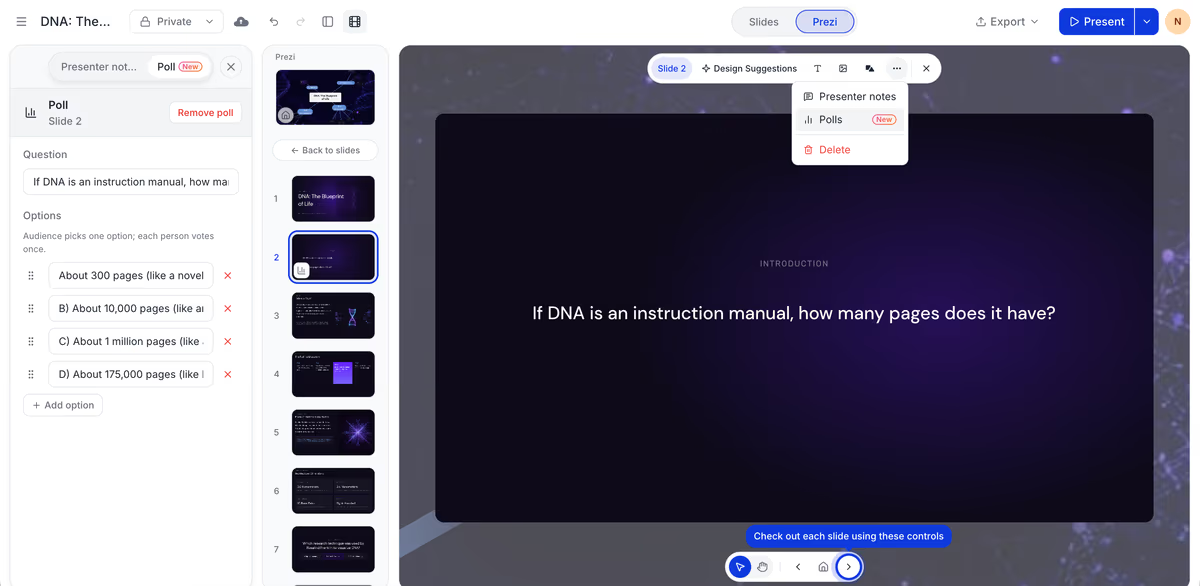 Caption: Adding a poll to a slide in the editor. Enter your question and answer options directly in the poll panel, no separate tool required.
From the presenter's perspective, advancing through a poll feels identical to advancing through any other content. You don't minimize your presentation, open a browser tab, or navigate to a polling dashboard. The controls live within your presenter view, and the results display on the same slide your audience is already watching.
For participants, the experience is equally streamlined. They join your presentation session once, typically by scanning a QR code or entering a short URL, and then respond to polls as they appear. They don't download an app, create an account, or navigate to a different website for each interaction.
This matters most in high-stakes moments. When you're mid-training and need to gauge whether your team understood a compliance requirement, or mid-lecture and want to check if students grasped a difficult concept, the last thing you need is a technology transition that breaks concentration. For a step-by-step walkthrough of the mechanics, the guide on how to use live polling in Prezi covers setup, presentation, and result analysis in detail.
Use Cases: Training Sessions, Classrooms, and Investor Pitches
The value of built-in live polls manifests differently depending on whether you're training employees, teaching students, or pitching investors, but the underlying benefit remains consistent: uninterrupted flow that keeps your audience engaged.
Corporate training sessions often suffer from passive attendance. Participants sit through mandatory workshops, mentally checked out, waiting for the session to end. Live polls transform this dynamic by requiring active participation. A trainer covering new software can pause to ask, "Which feature are you most concerned about learning?" and immediately see where to focus the remaining time. For L&D professionals building onboarding programs, the best presentation tools for corporate training teams prioritize this kind of real-time adaptation.
Classroom lectures face a different challenge: students hesitate to raise their hands, either from shyness or fear of being wrong. Anonymous live polls remove this barrier entirely. A professor can ask a conceptual question, see that 60% of the class holds a misconception, and address it directly, without any student feeling singled out. This feedback loop, invisible in traditional lectures, becomes visible and actionable. Educators exploring this approach will find the best interactive classroom presentation tools designed specifically for academic environments.
Investor pitches demand polish and confidence. Nothing undermines a founder's credibility faster than fumbling with technology mid-presentation. Built-in polls let you capture investor sentiment ("Which market segment interests you most?") without breaking your narrative stride. The poll results become a conversation starter, not a technical interruption. You demonstrate both your product vision and your operational competence in the same moment.
Across all three contexts, the pattern holds: when the poll lives inside your presentation, your audience stays inside your presentation. Attention doesn't fragment. Momentum doesn't stall. The interaction enhances your message rather than competing with it.
Start Presenting with Built-in Live Polls Today
Getting started with built-in live polls requires no downloads, no integrations, and no technical configuration. Prezi's approach means you can add your first poll to a presentation within minutes of creating an account, using the same interface you'd use to add any other content.
The fastest path forward is straightforward: create a new presentation or open an existing one, add a poll slide, customize your question, and present. Your audience joins by scanning a QR code displayed on your slide, no app installation required on their end, no separate polling session to manage on yours.
For presenters still evaluating their options, the comparison doesn't end with Mentimeter. Tools like Slido and Kahoot each take different approaches to audience interaction, and understanding those differences helps you choose with confidence. The comprehensive guide to Mentimeter, Kahoot, and Slido alternatives covers the full landscape for those who want to see all their options before committing.
The core question isn't which polling tool has the most features: it's which tool lets you present without thinking about the tool at all. When your polls, quizzes, and Q&A sessions live natively inside your slides, you stop managing technology and start connecting with your audience. That's the difference between a presentation that includes polls and a presentation where the polls are part of the message you're delivering.
Frequently Asked Questions
What is a live poll and how does it work in a presentation?
A live poll is an interactive question displayed during a presentation that allows audience members to submit responses in real time using their smartphones, tablets, or computers. Participants typically join by scanning a QR code or entering a short URL, then vote on multiple choice questions, submit open-ended answers, or contribute to word clouds. Results appear instantly on the presenter's screen, creating a shared moment of engagement that transforms passive viewing into active participation.
What is the best Mentimeter alternative with built-in slide decks in 2026?
Prezi is the best Mentimeter alternative with built-in slide decks in 2026 because it embeds live polls, quizzes, and Q&A directly into the presentation itself rather than running them as a separate tool. Unlike Mentimeter, which operates parallel to your slides, Prezi's polls appear on the same screen as your content, eliminating app-switching and maintaining presentation flow. This unified approach serves trainers, educators, and presenters who need smooth audience interaction without technical friction.
Do participants need to download an app to join a live poll during a presentation?
No, participants do not need to download an app to join a live poll in Prezi. Audience members join by scanning a QR code displayed on your slide or entering a short URL in any web browser on their device. This zero-download approach removes adoption barriers and ensures that even first-time participants can respond immediately without setup delays or account creation requirements.
How are live polls different from surveys in a presentation tool?
Live polls capture responses in real time during a presentation, with results displaying instantly on screen as participants vote. Surveys, by contrast, are typically completed asynchronously, before or after a session, and results are analyzed later. Live polls create immediate feedback loops that let presenters adapt on the fly, gauge comprehension, or spark discussion, while surveys collect more detailed data for post-session analysis.
Can live polls be embedded directly into slide decks without switching tools?
Yes, Prezi allows you to embed live polls directly into your slide deck without switching tools or managing external integrations. You add a poll to your presentation the same way you'd add an image or text box: it becomes a native element on your slide. When you present, the poll appears in place, your audience responds, and results animate on your slide without any tab-switching or dashboard navigation required.
How do live polls increase audience engagement during presentations?
Live polls increase audience engagement by transforming passive listeners into active participants who must think, decide, and respond. This participation creates psychological investment in the content and breaks the monotony of one-way information delivery. Seeing results appear in real time generates curiosity and social proof, while anonymous response options encourage honest participation from audience members who might otherwise stay silent.
What audience engagement features does Prezi offer beyond live polls?
Beyond live polls, Prezi's audience engagement layer includes Q&A with upvoting so attendees can submit and rank questions, auto-generated quizzes built from the content already on your slides, and Ask the Deck, which lets viewers ask a shared deck questions directly and get an AI-generated answer. Presenters also get a live audience view during the session and viewer analytics afterward, showing who opened a shared deck, when, and for how long.






