
Quick Summary / Key Takeaways
- Start with the Bottom Line Up Front so executives immediately understand the recommendation and can evaluate your supporting data through that lens.
- Structure each slide around one clear takeaway, using action-driven headlines and simplified visuals to make decision-critical insights obvious.
- Show relationships between initiatives through guided visual flow instead of static bullet lists to improve engagement and retention.
- Prepare for scrutiny by keeping supporting data in a structured appendix so you can answer tough questions without derailing your core narrative.
- End with a specific decision slide that defines the action required, the accountable owner, and the next step to ensure momentum after the meeting.
Introduction
Executive presentations are not status updates. Leadership teams are looking for clarity, risk awareness, and a direct path to a decision. They do not need a play-by-play of your week. They need the "so what" delivered with precision. Creating executive presentations means replacing dense text with focused insights that guide attention and accelerate alignment on critical business priorities.
When you build leadership presentation slides, your role is to reduce noise and elevate impact. Executives operate in high-stakes environments and often move quickly between complex decisions. They do not have time to decode crowded charts or long paragraphs. Strong executive decks lead with the recommendation, simplify complex data into decision-ready insights, and use structured visual flow to connect strategy to measurable outcomes. The objective is not to present more information. It is to enable faster, better decisions.
In the sections ahead, we will break down practical strategies for structuring slides, simplifying data for the C-suite, preparing for tough questions, and closing with clear accountability. If you are building your next leadership presentation, consider how Prezi AI can help — type a prompt, attach an existing PowerPoint, PDF, or Word doc, and get a fully designed deck in under 8 seconds, so you spend your energy on the decision that matters, not on formatting slides.

Executive Presentation Types and Decision Goals

Traditional vs. Modern Executive Presentation Approaches
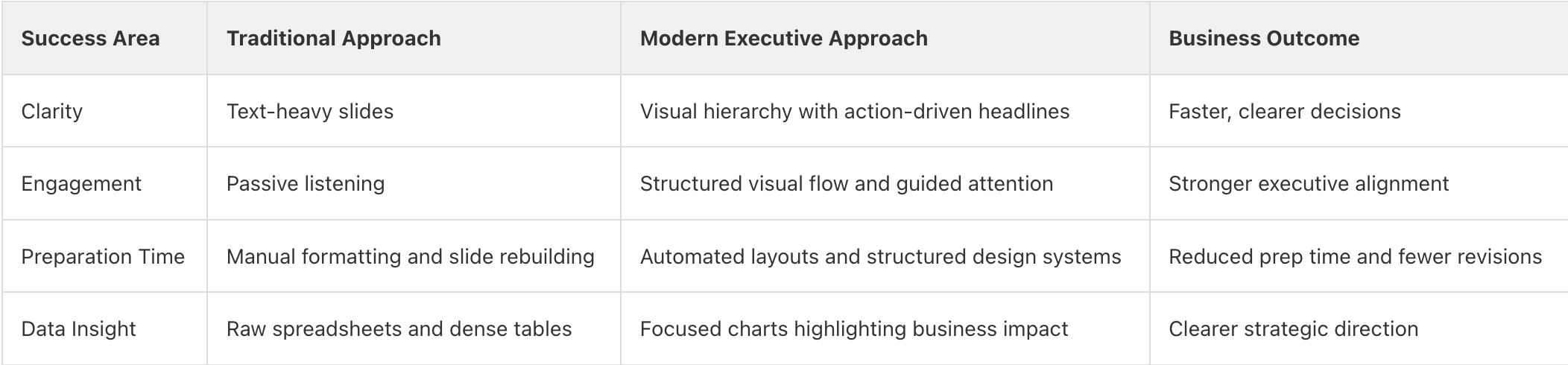
Executive Presentation Planning Checklist
- Identify the single primary decision required from the leadership team before building any slides.
- Draft a Bottom Line Up Front slide that clearly states your recommendation, expected business impact, and urgency.
- Structure each slide around one core insight with an action-oriented headline that communicates the "so what."
- Practice your delivery without looking at the screen to ensure you can maintain eye contact and lead the discussion.
- Rehearse without relying on the screen to ensure you lead the discussion rather than read from the slides.
Post-Arrival Checklist
- Send a concise follow-up within two hours summarizing decisions made, approved actions, and accountable owners.
- Share the final presentation in a secure, centralized location to maintain transparency and leadership alignment.
- Reflect on which slides drove the most discussion or resistance to refine future executive decks.
- Update your executive presentation framework based on leadership feedback and recurring question patterns.
Frequently Asked Questions
Section 1: Executive Clarity and Decision Focus
FAQ 1: What is the number one rule for executive presentations?
The number one rule for executive presentations is to start with your conclusion and the decision you need from leadership. This Bottom Line Up Front approach makes the stakes clear immediately and respects limited executive time, so the room can evaluate your supporting data through the lens of your recommendation. It also prevents a common failure point in leadership meetings, where the audience disengages before the ask appears, and it sets a decisive tone from the first slide.
If you are building with Prezi AI, type a single prompt or attach an existing PowerPoint, PDF, or Word doc directly in the chat. Prezi AI reads your content and generates a fully designed deck — slides, backgrounds, and images — going straight from your input to a finished presentation, no outline step required. Your recommendation lands first, and the evidence is organized around it before you ever touch a slide.
Takeaway: Lead with your recommendation on the first slide so the meeting stays centered on decisions, and the data serves as proof.

FAQ 2: How do you structure leadership presentation slides for impact?
To structure leadership presentation slides for impact, build each slide around one decision-driving takeaway and make that takeaway the most prominent element on the screen. Use a headline that states the conclusion clearly, then support it with one focused proof point such as a key metric, a comparison, or a concise chart. Remove secondary data that does not directly influence the decision so leaders can process the slide in seconds and move the conversation forward.
Prezi AI supports this structure through chat-based refinement. After your deck generates, you keep shaping it through conversation — ask for a layout change, a different data emphasis, or a new slide, and the AI applies it in context. It knows which slide you are looking at, so edits are targeted rather than sweeping. You can also click into any slide to surface three different layout options and choose the one that fits your content best, keeping each frame anchored to a single, clear takeaway.
Takeaway: Design each slide around one clear conclusion and reveal only the proof that strengthens it.
Section 2: Strategy Storytelling and Data Simplicity
FAQ 3: What are some executive level presentation examples for strategy?
Executive level strategy presentations typically center on three things: a clear strategic choice, the market context that justifies it, and the measurable outcome leadership should expect. Strong examples focus on external forces such as market shifts, competitive positioning, customer demand, and financial impact rather than detailed operational steps. They use concise headlines that state the strategic point, supported by one focused visual such as a market trend chart, positioning map, or financial projection. White space and minimal text are intentional, allowing leaders to absorb the insight quickly and discuss implications instead of reading dense slides.
With Prezi AI, you can generate a deck directly from a prompt or an existing file and get a strategy narrative that flows from high-level vision to supporting evidence without crowding the screen. Prezi AI automatically selects the best theme for your content from 16+ designer themes — built on 15+ years of real presentation expertise, not generic templates. Cinematic illustrated overviews generate a custom AI scene as their backdrop, giving your strategy presentation a visual presence that commands the room from the first frame. Paste your website URL and Prezi AI extracts your brand colors, fonts, and logo automatically, so your strategy deck arrives on-brand without any manual setup.
Takeaway: Model your strategy deck around one clear strategic choice per section, supported by focused market insights and clean visuals that drive discussion.
FAQ 4: How can you simplify complex data for a C-suite audience?
To simplify complex data for a C-suite audience, remove anything that does not directly influence a decision and elevate only the insight that matters. Replace descriptive chart titles with action-oriented headlines that state what the data proves, such as "Customer churn decreased 18 percent after pricing change" instead of "Customer churn data." Focus on trends, outliers, and bottom-line impact rather than raw spreadsheets or every available variable. Executives are not looking for full data dumps, they are looking for clear implications tied to revenue, risk, cost, or growth.
Prezi AI supports this directly. It can generate data visualizations from structured input and embed them into slides automatically — so you are not rebuilding charts by hand or worrying about alignment. Custom images generate for every slide based on your content, eliminating the need to hunt for stock photos that match your data story. The result is a slide that shows exactly what changed, why it matters, and what decision follows — without any of the visual noise that buries the point.
Takeaway: Turn charts into action statements and show only the data that directly supports a business decision.
FAQ 5: Why is visual flow better than static bullet points?
Visual flow is more effective than static bullet points because leadership teams process information through relationships and cause-and-effect, not isolated lists. Bullet slides give every line equal visual weight, which often leads to passive listening and fragmented discussion. When you reveal ideas in a deliberate sequence and show how initiatives connect to revenue, risk, or growth, executives can see the logic behind the strategy instead of decoding dense text.
Boring slides often lead to passive listening, while dynamic visuals encourage active participation and stronger retention of key points. Prezi AI generates cinematic illustrated overviews — Mindmap and Journey views with custom AI scenes as their backdrop — that give executives a spatial sense of where the strategy is headed before you zoom into the detail. Background images with parallax motion add depth as you move through the deck, turning a standard board update into a focused, visually persuasive experience that holds the room's attention and makes the logic of your strategy impossible to miss.
Takeaway: Use structured visual flow to show connections between ideas and keep leadership actively engaged in the strategy.
Section 3: Delivery and Outcomes
FAQ 6: How do you handle tough questions from leadership teams?
Handling tough questions from leadership teams requires preparation, transparency, and composure. Treat every challenging question as a signal that the room is engaged and focused on risk, trade-offs, or assumptions. Answer directly, tie your response back to the decision or metric under discussion, and avoid becoming defensive. If you do not have the data at the moment, acknowledge the gap clearly and commit to a specific follow-up timeline. That clarity builds credibility faster than vague responses.
Preparation is what makes this possible. Keep a clean appendix with supporting charts, assumptions, and scenario models so you can go deeper without disrupting your core narrative. In Prezi AI, you can build out backup content in separate frames and navigate to them instantly when a tough question surfaces, then return to the main flow without losing context. AI-generated presenter notes are created for all slides at once, persisted, and editable — so your talking points for every possible follow-up are already drafted before you walk in the room. Version history lets you browse and restore previous states of the deck from the chat sidebar, so no iteration is ever lost.
Takeaway: Prepare a structured appendix and respond with clarity so tough questions strengthen trust instead of derailing your message.
FAQ 7: What executive presentation tips save the most preparation time?
The executive presentation tips that save the most preparation time start with using modern tools that reduce manual formatting and repetitive design work. Instead of rebuilding layouts slide by slide, high-performing leaders rely on structured templates and dynamic layouts that maintain brand consistency without requiring a design degree. When formatting adjusts automatically as you add charts or text, you eliminate hours of alignment fixes and visual clean-up. Reducing the friction of slide creation lets you stay focused on refining your recommendation and preparing for the strategic conversation.
Prezi AI is built around this principle. A prompt goes to a fully designed deck — slides, images, structure, and theme — in under 8 seconds, with images generating in parallel so you are reading finished slides while the rest build in the background. Save your brand once — logo, colors, fonts — and it persists across every session without re-setup. For teams, Your Designer takes this further: a custom AI presentation designer trained on your organization's specific brand, so every rep, marketer, or analyst produces on-brand decks without any design oversight. Most Prezi AI users save hours per presentation. Across a 50-person team, that is full-time work recovered — redirected from slide formatting back to the strategic thinking that actually moves the business.
Takeaway: Use structured templates and automated design support to protect your time and concentrate on strategy, not slide formatting.
FAQ 8: How do you ensure a clear call to action at the end?
A clear call to action ensures the meeting ends with alignment, not ambiguity. State exactly what you need from the leadership team, whether it is budget approval, resource allocation, timeline confirmation, or a strategic shift. Replace general summaries with direct decision language such as "Approve Q3 expansion budget" or "Confirm go-to-market launch date." Vague conclusions often lead to follow-up emails and stalled progress, while precise requests drive momentum.
Use a dedicated final slide that outlines the specific decisions required, the next steps, and the accountable owner for each action. Clearly separating insights from required actions reinforces that the purpose of the presentation is to move the business forward, not simply to share information. After the meeting, Prezi AI's viewer analytics show you who viewed the shared deck, when, and for how long — so you can see which slides drove follow-up and ask the AI to generate a report on your viewing data, identify what landed, and refine before the next leadership touchpoint.
Takeaway: End with a clear decision slide that specifies the action required and who is accountable.






