
Quick Summary / Key Takeaways
- Interactive presentation tools go beyond static slides by guiding attention with movement and structured visual flow, turning passive viewing into active engagement.
- Prezi's dynamic format allows you to connect ideas and present complex topics as clear visual stories that move.
- Encourage participation through structured discussion, Q&A, and adaptable navigation paths that let you respond to audience interest in real time.
- Stronger engagement improves comprehension and recall. In fact, Prezi has been shown to be 25% more effective and 40% more memorable than traditional slide presentations.
- Interactive presentation tools support educators, sales teams, marketers, and trainers who need to create attention-grabbing presentations quickly, confidently, and without design stress.
Introduction
Captivating your audience requires more than well-written slides. Traditional presentations built around static bullet points often limit engagement and make it harder for people to stay focused. When ideas move in a rigid, linear sequence, attention drops and key messages are easily forgotten. To truly hold attention, your presentation needs structure, movement, and intentional visual flow.
Interactive presentations change how information is delivered and experienced. Instead of moving slide by slide, you guide attention across connected ideas, zoom into important details, and adapt your flow based on audience interest. This approach helps audiences see relationships between concepts, process information more deeply, and stay engaged from beginning to end.
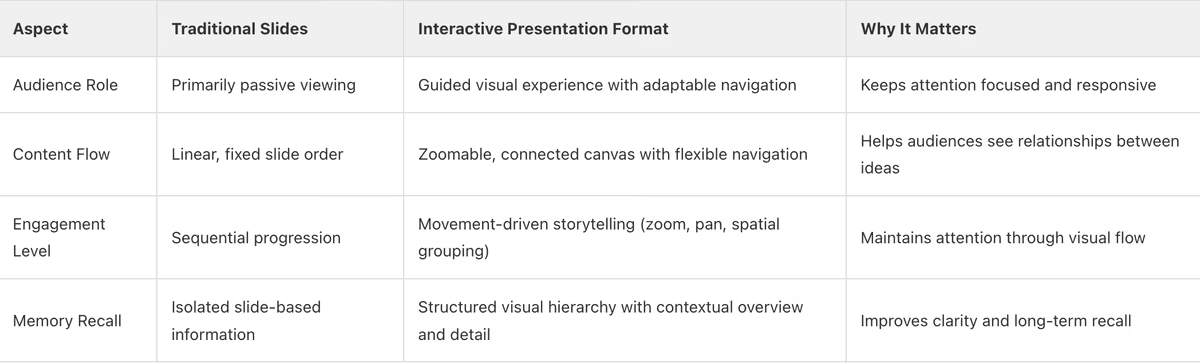
Static Slides vs. Interactive Presentations: What Captures Attention?
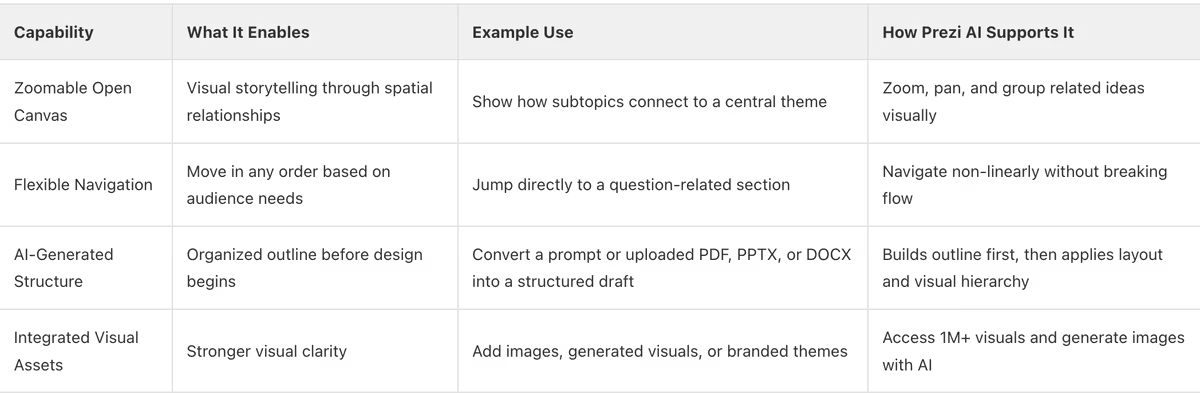
Core Interactive Presentation Capabilities That Drive Engagement
Before Delivering Your Interactive Presentation
- Define your core message and identify specific moments where audience interaction should occur (polls, Q&A, clickable sections, or discussion prompts).
- Structure your content by mapping main themes and related subtopics so you can navigate dynamically based on audience interest.
- Integrate interactive elements such as live polls, audience questions, or decision-based navigation at points that support understanding rather than interrupt flow.
- Practice moving between sections smoothly so the interaction feels intentional and structured, not reactive.
After Delivering Your Interactive Presentation
- Review engagement insights, including poll participation, Q&A volume, and sections that generated the most discussion.
- Evaluate how effectively your navigation supported audience-driven exploration.
- Identify which interactive moments increased clarity or participation and which need refinement.
- Share a follow-up summary that reinforces key points explored during interactive segments.
- Use feedback to adjust structure, interaction timing, and navigation paths for future presentations.
Frequently Asked Questions
Section 1: What Are Interactive Presentation Tools?
FAQ 1: What exactly are interactive presentation tools?
Interactive presentation tools are platforms designed to move beyond static, slide-by-slide delivery. They can include features such as real-time polls, quizzes, live Q&A, and flexible navigation that allow presenters to create more engaging experiences instead of one-way communication. The goal is to keep audiences involved and focused, whether through participation or through structured, dynamic visual flow.
Prezi AI approaches interactivity through visual structure and purposeful movement. When you enter a prompt or upload a PPTX, PDF, or DOCX file, Prezi AI builds your presentation on a zoomable canvas where ideas are visually connected — generating slides, backgrounds, and images concurrently so you're reading finished slides while the rest build in the background. Thanks to recent speed improvements, you can get a fully generated presentation in under 8 seconds. This allows presenters to navigate naturally between topics, zoom into details, and adjust flow in real time.
Takeaway: Interactive presentation tools enhance engagement through participation and dynamic structure. Prezi AI delivers this by organizing content visually and enabling purposeful, flexible navigation that keeps audiences attentive.

FAQ 2: How do interactive tools differ from traditional presentation software?
Interactive tools differ from traditional presentation software in how they structure and display content. Traditional tools present information in a fixed, slide-by-slide sequence, where each slide appears independently and is typically shown in a preset order. This format separates topics across individual slides and limits how presenters can move between sections during delivery.
Interactive tools organize content within a single connected visual space instead of isolated slides. With Prezi, presentations are built on a canvas where main topics and subtopics are arranged spatially. Presenters can zoom into specific sections from an overview and pan across related areas while keeping the overall structure visible. This approach allows flexible navigation and maintains clear visual relationships between ideas throughout the presentation.
Takeaway: Interactive tools differ from traditional slide software by structuring content spatially rather than sequentially.
FAQ 3: What are the main benefits of using interactive presentations?
Interactive presentations offer measurable benefits: stronger audience engagement and clearer understanding of how ideas connect. Unlike static slide sequences, interactive formats organize content within a single visual structure, allowing audiences to see the relationship between main topics and supporting points. This improves focus and makes it easier to follow the logic of the presentation from start to finish.
Prezi's presentation format supports these outcomes. According to Prezi's research, presentations built using its zoomable structure are 25% more effective than traditional slides, and 4 out of 5 professionals say Prezi is more effective at capturing their audience's attention. By keeping the broader context visible while guiding attention to specific sections, the format helps presenters deliver messages that hold attention and improve clarity.
Takeaway: Interactive presentations increase engagement and improve clarity by visually connecting ideas and guiding audience attention within a structured visual space.
FAQ 4: Can interactive presentations be used for any topic or audience?
Yes. Interactive presentations can support a wide range of topics and audiences because the structure adapts to the content being presented. Educational lessons, sales presentations, marketing strategies, training sessions, and business reviews all benefit from a format that visually connects ideas instead of separating them across isolated slides. The key advantage is maintaining context while guiding attention to specific sections, regardless of subject complexity.
Prezi AI supports this versatility by designing presentations that work for both simple explanations and complex narratives. Its zoomable format allows presenters to show the big picture and then focus on detailed sections without losing structure. This makes it suitable for different environments — from classrooms to corporate meetings — while keeping attention anchored and the message clear.
Takeaway: Interactive presentations can be used across topics and audiences because they maintain visual structure and guide attention clearly, regardless of subject matter.
FAQ 5: How does Prezi AI enhance the interactive presentation experience?
Prezi AI enhances the interactive presentation experience by combining AI-driven structure with Prezi's dynamic presentation format. When you provide a prompt or upload a PPTX, PDF, or DOCX file, Prezi AI analyzes your content and builds the full presentation — slides, backgrounds, and imagery — in a single connected flow. Main topics and subtopics are positioned in visual relationship to one another, allowing you to guide attention by zooming into key sections while keeping the broader context visible.
Prezi AI also improves speed and control. Generation happens in parallel — images and slides stream in concurrently — so you're looking at a finished deck in under 8 seconds. You can then refine through natural language chat: ask for content changes, design tweaks, new slides, or a full retheme. The AI is contextually aware of which slide you're viewing, so edits stay precise. You can also paste your website URL to extract your brand colors, fonts, and logo and apply them automatically from the very first prompt. The result is a presentation that moves with purpose, supports real deadlines, and keeps your audience focused through clear visual organization.
Takeaway: Prezi AI enhances interactive presentations by structuring content automatically, designing visual flow intelligently, and using a zoomable canvas to guide audience attention with clarity.
Section 2: Designing Engaging Interactive Presentations
FAQ 6: What elements make a presentation truly interactive?
A presentation becomes truly interactive when its structure allows the audience to see both the overall topic and the supporting details within the same visual space. Instead of separating information into isolated slides, key elements include a clear central overview, visually grouped subtopics, and the ability to move between sections while maintaining context. This structure helps audiences understand how each point fits into the larger narrative rather than processing disconnected screens one at a time.
With Prezi AI, these elements are built through the canvas. Main ideas and subtopics are positioned spatially, allowing presenters to zoom into a specific section and then return to the overview without breaking flow. Prezi AI also generates cinematic illustrated overviews — Mindmap and Journey styles create a custom AI scene as their backdrop, tailored to your presentation's content — adding depth and visual persuasion from the very first frame. This combination of spatial organization and purposeful movement defines what makes a presentation interactive.
Takeaway: A presentation is truly interactive when its structure keeps the big picture visible, connects related topics, and allows guided movement between sections without losing context.
FAQ 7: How can I structure my content for an interactive flow?
Structure your content around one clear central topic, then define distinct subtopics that directly support it. Instead of arranging information in a fixed slide order, organize sections so each subtopic connects back to the main idea. This allows you to move between sections intentionally while keeping the full structure visible. The goal is to maintain context at all times, so audiences understand how each detail fits into the broader message.
With Prezi AI, you can drag slide thumbnails in the timeline to reorder your deck visually — instant and intuitive. You can also click into any slide and choose from three different layout options, or hit "Suggest new" for fresh alternatives. Once placed on Prezi's zoomable canvas, sections are positioned in visual relationship to one another, allowing you to zoom into specific areas and return to the overview without breaking flow. This approach supports flexible navigation while preserving clarity and structure.
Takeaway: Organize your presentation around a central theme with clearly defined subtopics arranged in visual connection to support flexible movement without losing context.
FAQ 8: What are some effective ways to incorporate audience participation?
You can incorporate audience participation by designing your presentation so it adapts in real time based on audience input. With Prezi AI's open, zoomable canvas, you can navigate between topics as needed instead of following a fixed slide order. This allows you to respond directly to questions, explore sections more deeply when interest increases, or shift focus based on audience priorities. Because Prezi presentations move and visually connect ideas, you can zoom into specific data points, pan across related concepts, and return to the big picture without breaking flow.
You can also integrate external participation tools such as live polls or quizzes and then use Prezi AI to visually anchor the results inside your presentation. Highlight key insights, zoom into audience-driven discussion points, and adjust pacing on the spot. Viewer analytics — available when you share a deck — show you who viewed it, when, and how long they stayed on each section, giving you concrete data to refine future sessions. This flexibility keeps attention high and makes the session feel collaborative rather than scripted.
Takeaway: Use Prezi AI's dynamic navigation and visual movement to adapt in real time, respond to audience input, and create interactive presentations that keep attention from start to finish.
FAQ 9: How do I choose the right interactive features for my specific goals?
Choose interactive features by first defining your goal, audience, and desired outcome. With Prezi AI, interaction starts with structure and movement. If your goal is clarity, use Prezi AI to generate a focused deck with a visual flow that guides attention through zooming and spatial connections. If your goal is flexibility, structure your presentation so you can navigate between topics as needed during delivery instead of following a fixed slide order. This allows you to respond to questions, adjust emphasis, and keep discussions aligned with what matters most.
Prezi AI builds layouts, visual hierarchy, and motion automatically based on your prompt or uploaded content — and now supports any language compatible with OpenAI, so global teams can work in their native language from initial concept to final presentation. Choose features that reinforce your message, such as structured sections, clear visual grouping, and purposeful zoom paths. When interaction supports your narrative, you create a presentation that moves with intention and keeps attention from start to finish.
Takeaway: Define your goal first, then use Prezi AI's dynamic structure and guided motion to create interaction that supports your message — not distracts from it.
FAQ 10: What role does visual design play in an interactive presentation?
Visual design plays a critical role in interactive presentations by guiding audience attention and enhancing comprehension. A clean, intuitive structure helps viewers follow your story as ideas zoom and connect across an open, spatial canvas. Strong visual hierarchy reinforces key messages, making complex concepts easier to understand and remember.
Prezi AI now offers 16+ designer themes built with 15+ years of presentation expertise — crafted from real design intelligence, not generic templates. When you prompt or add a file, Prezi AI automatically selects the best theme for your content using semantic understanding. Slides support background images with parallax motion, adding depth and a cinematic feel. You can also save your brand once — logo, colors, fonts — and it persists across sessions, so every presentation goes out on-brand by default. When design and structure work together, interaction feels intentional, clear, and engaging.
Takeaway: Prioritize clear, intuitive visual design to guide audience attention, enhance comprehension, and encourage seamless interaction.
Section 3: Maximizing Impact and Measuring Success
FAQ 11: How can interactive presentations improve audience retention and understanding?
Interactive presentations improve retention and understanding by helping audiences actively process information instead of passively viewing static slides. When ideas are visually connected and presented within a structured flow, audiences can see relationships between concepts. This spatial organization reinforces context, making it easier to understand how details support the bigger picture.
Movement also plays a cognitive role. Zooming between high-level themes and specific points guides attention and reduces cognitive overload. Instead of overwhelming viewers with disconnected slides, a connected visual path strengthens comprehension and memory. Research published by Prezi shows that presentations built with this dynamic format are 25% more effective than traditional slides and 40% more memorable, supporting stronger long-term recall.
Takeaway: Interactive, visually connected presentations improve retention by structuring information clearly and guiding attention with purposeful movement.
FAQ 12: What are the best practices for delivering an interactive presentation?
Best practices for delivering an interactive presentation start with mastering your structure and navigation. If you are using a zoomable format like Prezi's open canvas, practice moving between overview and detail so transitions feel intentional and smooth. Start with a clear agenda, explain how the presentation will flow, and guide your audience through sections with purposeful movement rather than jumping unpredictably.
Be prepared to adapt in real time. Prezi allows you to move in any order, so you can navigate directly to a relevant section when questions arise instead of being locked into a fixed slide sequence. Use Presenter View — with notes, camera (cameo video), and a polished presenter header — to stay on track and maintain strong eye contact. AI-generated presenter notes are available for all slides at once, persisted and editable, so you always have talking points at hand. When structure, navigation, and delivery work together, the presentation feels dynamic while remaining clear and controlled.
Takeaway: Practice structured navigation, use flexible movement intentionally, and deliver with confidence to create an interactive presentation that stays clear, focused, and engaging.
FAQ 13: How can I collect and use feedback from my interactive presentation?
Collect feedback by combining audience input with measurable presentation data. During delivery, encourage questions and navigate directly to relevant sections using Prezi's open, zoomable canvas so you can clarify points in real time. After presenting, use Prezi's viewer analytics to see who viewed your shared deck, when, and how long — including which sections received the most attention. You can even ask the AI to generate a report on your viewing data and make edits directly from the analytics conversation.
You can also share your presentation through easy share links and gather follow-up feedback through external surveys or team discussions. Review engagement data alongside audience responses to identify which sections were most effective and where clarity can improve. This structured approach helps you refine your content, strengthen your message, and improve future interactive presentations with measurable insight.
Takeaway: Use Prezi's viewer analytics and audience feedback together to measure engagement, refine content, and continuously improve your interactive presentations.
FAQ 14: What metrics should I track to measure the success of my interactive presentation?
To measure success, track audience participation levels, time spent on key sections, overall attendance, and post-presentation actions tied to your goal. Participation can include Q&A engagement or discussion involvement, while time-on-section data reveals which parts of your presentation captured the most attention and which may need refinement. Attendance and completion rates also indicate whether your topic and delivery sustained interest.
For business presentations, monitor follow-up actions such as meeting bookings, lead conversions, or next-step commitments. For training or education, review comprehension feedback or post-session evaluations. Prezi's viewer analytics — accessible after sharing your deck — give you a clear, concrete view of how well your interactive presentation performed, and you can use those insights to prompt targeted edits through the AI chat.
Takeaway: Track attention, interaction, and real-world outcomes together to measure whether your interactive presentation truly delivered impact.
FAQ 15: How can interactive tools help me adapt my presentation on the fly?
Interactive tools help you adapt your presentation on the fly by giving you flexible navigation and immediate audience signals so you can adjust in real time. If questions reveal confusion around a key point, you can zoom back to a specific frame, expand on a detail, or move to a related section. If audience interest is high on a particular topic, you can stay there longer and explore supporting frames without breaking flow. This keeps the experience audience-centered instead of locked into a rigid slide order.
Prezi's open, zoomable canvas is built for this kind of flexibility. You can move in any order, revisit sections instantly, and guide attention with purposeful motion instead of flipping through fixed slides. The Stop, Retry, and Resume controls mean that if anything goes wrong mid-session — including connection drops — generation picks up where it left off with no lost work. Combined with viewer analytics, you can refine how you adapt over time and make each presentation more responsive and effective.
Takeaway: Use flexible navigation and real-time audience signals to adjust your content instantly and keep your presentation aligned with audience needs.






