
Presentation Creation
Resources


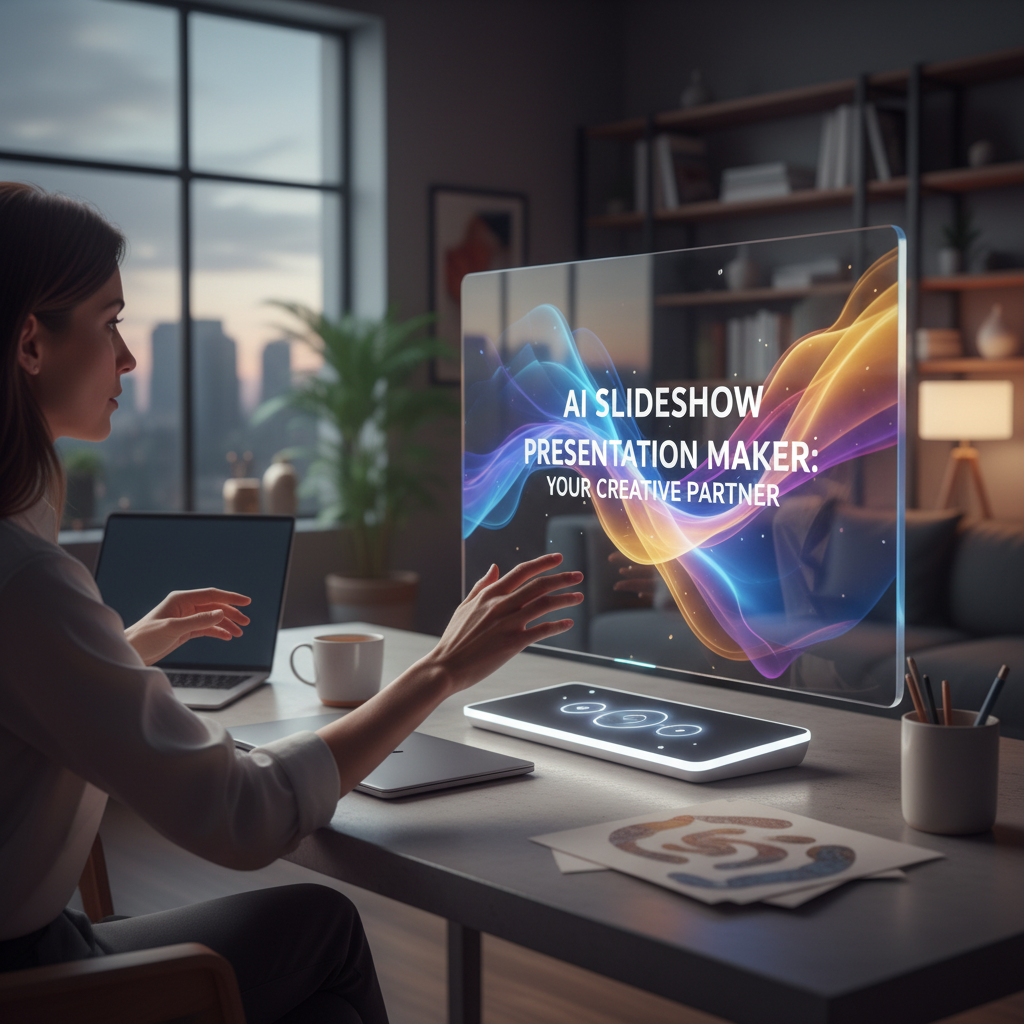
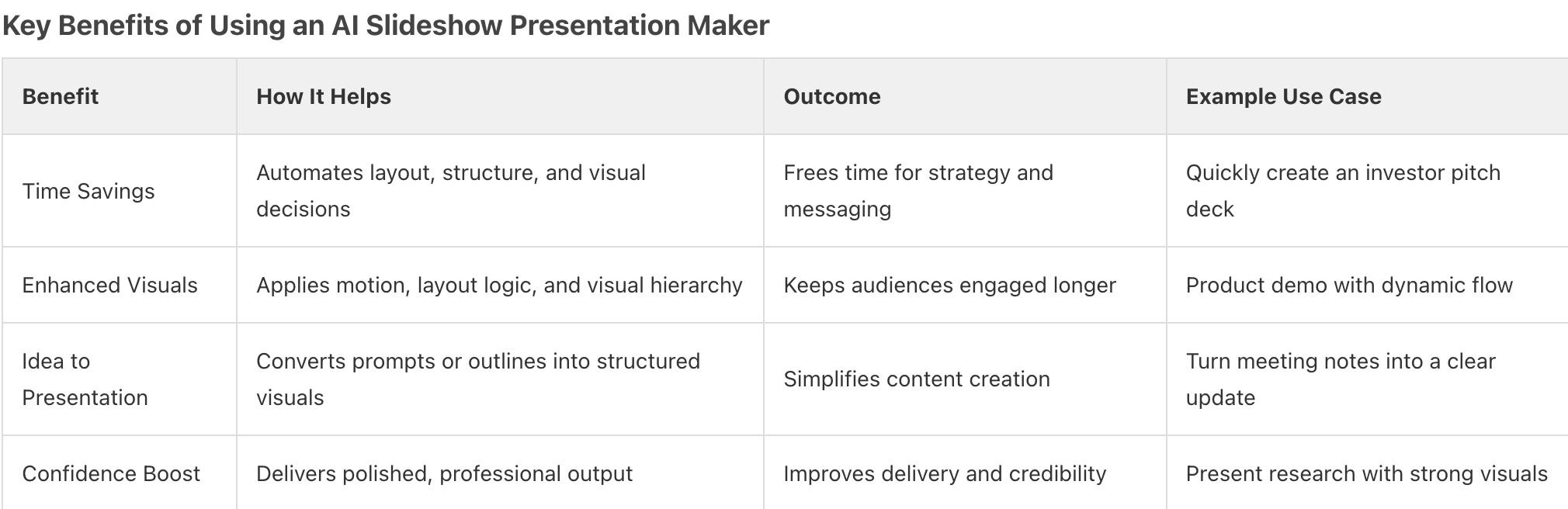
Creating a strong presentation often starts with a great idea, but turning that idea into a polished slideshow can be time-consuming and frustrating. An AI slideshow presentation maker changes that experience by acting as your creative partner, helping you move from a blank screen to a clear, visually engaging presentation faster. Instead of wrestling with formatting and layout decisions, you can focus on shaping your message.
As a creative partner, an AI slideshow presentation maker helps structure your content, apply visual hierarchy, and introduce motion and flow that guide attention naturally. This approach makes it easier to create presentations that feel intentional, cohesive, and visually compelling without requiring advanced design skills.
Whether you’re preparing an investor pitch, sharing a business update, or working on an academic project, an AI slideshow presentation maker helps you communicate with clarity and confidence. If you’re ready to explore this approach,
Prezi AI
offers a way to turn ideas into dynamic presentations that move, connect, and keep audiences focused.

FAQ 1: How does an AI slideshow presentation maker work?
An AI slideshow presentation maker works by turning your idea into a structured, ready-to-present experience in seconds. You enter a prompt, outline, or upload a file such as a .pptx, .docx, or .pdf. The system analyzes your input, identifies key themes, and generates a clear outline before building the visual structure. This ensures your story has logical flow before design even begins.
From there, the AI automatically builds layouts, visuals, and motion to guide attention from one idea to the next. Instead of manually formatting slides, you get a presentation that zooms, connects concepts, and keeps your audience engaged. With tools like Prezi AI, you can edit the outline, refine the tone, adjust visuals, and regenerate sections while staying in full control. The result is a dynamic presentation that moves, feels intentional, and is built fast.
Takeaway: An AI slideshow presentation maker analyzes your input, builds a structured outline, and automatically designs a dynamic presentation so you can create faster and present with confidence.
FAQ 2: What are the main benefits of using an AI presentation tool?
The biggest benefit is faster story development without losing structure.
AI presentation tools help turn pitch inputs such as problem statements, solution details, and traction notes into a clear outline before design starts. This makes it easier to shape a logical investor narrative early, rather than rearranging slides later.
AI also improves how the pitch is delivered. Visual flow and movement help connect ideas across the presentation, making it easier to guide investors through key points and adapt during live discussions. By handling layout and structure in the background, these tools reduce design friction and help founders focus on clarity, confidence, and conversation.
Takeaway: AI presentation tools help founders build investor-ready pitch decks faster by structuring the story clearly and supporting dynamic, focused delivery.
FAQ 3: Who can benefit from using an AI slideshow maker?
AI slideshow makers benefit people who need to communicate ideas clearly and quickly without getting stuck on design. This includes professionals in sales, marketing, training, consulting, and education who regularly present and need to keep audiences engaged, not just informed. When deadlines are tight, AI support helps turn ideas into structured, visually engaging presentations without long revision cycles.
Founders and entrepreneurs also benefit when building pitch decks. AI helps shape a clear narrative and visual flow, making it easier to present complex ideas in a way that feels confident and compelling. For anyone facing time pressure, limited design experience, or disengaged audiences, AI-powered presentation tools reduce friction and help messages land with greater impact.
Takeaway: AI slideshow makers support anyone who needs to create engaging, well-structured presentations quickly, especially when time, design skills, or audience attention are limited.
FAQ 4: How do I start creating a presentation with AI?
Start by entering your core idea directly into Prezi AI or uploading existing materials such as a .pptx, .pdf, or .docx file.
Prezi AI analyzes your input and immediately generates a structured outline, organizing your key points before visual design begins. This helps you move from raw content to a clear, investor-ready narrative in seconds without rebuilding everything from scratch.
From there, refine and customize. Adjust the outline, reshape the flow, update text, select visuals, and apply your branding while Prezi AI automatically builds layouts, motion, and visual hierarchy around your content. Instead of manually reworking slides, you transform your idea into a dynamic presentation that moves and keeps attention.
Takeaway: Start with your idea or upload an existing file in Prezi AI, then refine structure and visuals to quickly create a focused, ready-to-present deck.
FAQ 5: Can I customize the AI-generated slides?
Yes. AI-generated presentations are designed to be a starting point, not a finished product. After the AI creates a structured outline and visual flow, you can edit content, rearrange sections, replace or generate images, and refine how ideas connect across the presentation. This makes it easy to shape the story so it fits your pitch, audience, and goals.
Customization also extends to the overall look and feel. You can choose visual styles, apply branding, and adjust emphasis as you present. The AI supports layout, balance, and movement in the background, while you stay in control of every change. That balance lets you move fast without losing ownership of the final presentation.
Takeaway: AI-generated presentations remain fully customizable, allowing you to refine structure, visuals, and branding while the AI supports flow and layout.
FAQ 6: What kind of content works best for AI presentation makers?
Clear, structured input produces the strongest results. Outlines, key talking points, summaries, or full documents give the AI enough context to organize ideas into a logical flow before design begins. When your content already reflects a clear narrative, it’s easier to build a presentation that stays focused and investor-ready.
Specific details matter just as much. Concrete examples, defined sections, and clear takeaways help the AI support layout, visual flow, and emphasis more effectively. Broad topics can work, but abstract or loosely defined input often leads to weaker structure. The clearer your message going in, the more accurate and impactful the presentation becomes.
Takeaway: Structured input with clear sections and specific details leads to stronger, more accurate AI-generated presentations.
FAQ 7: How does AI help with storytelling in presentations?
AI helps with storytelling by shaping structure and flow before design takes over. It organizes your content into a clear sequence, helping ideas connect logically so your story unfolds naturally. This makes it easier to guide an audience through key moments like the problem, solution, and vision without losing momentum.
Storytelling also improves through visual connection and movement. The AI supports how ideas relate across the presentation, using visual hierarchy and spatial flow to keep attention focused. Instead of presenting disconnected points, your message feels cohesive and intentional, making the story easier to follow and more persuasive.
Takeaway: AI supports storytelling by structuring content clearly and using visual flow to guide audiences through a focused, compelling narrative.
FAQ 8: What are some common pitfalls to avoid when using AI for presentations?
One common pitfall is treating the AI output as final.
AI helps organize structure, layout, and visual flow, but you still need to review content carefully. Always fact-check key points, numbers, and claims to make sure everything is accurate and current, especially for investor-facing presentations where credibility matters.
Another issue is skipping customization. If you don’t refine structure, visuals, and emphasis, the presentation can feel generic or misaligned with your audience. Clear input also makes a difference. Vague or overloaded content weakens storytelling, while focused prompts and clean structure lead to stronger results. Take time to refine flow, pacing, visuals, and accuracy before presenting.
Takeaway: Use AI as a starting point, fact-check all content, customize structure and visuals, and refine flow to deliver a clear, credible presentation.
FAQ 9: Can AI presentation makers create animations and transitions?
AI presentation makers don’t rely on traditional slide animations.
Instead, they create smooth transitions by structuring content visually and guiding the audience through connected sections. Enhanced story blocks organize ideas into clear sequences, making movement between points feel natural and easy to follow rather than abrupt.
Visual consistency also plays a key role in how transitions feel. Unlimited visual content, premium images and backgrounds, and advanced image editing help maintain a cohesive look across sections, so each shift in focus feels intentional. Smart branding keeps colors and styles consistent, while PowerPoint conversion allows existing decks to be restructured into a more fluid, visually connected presentation.
Takeaway: AI presentation makers create effective transitions through structured storytelling and cohesive design rather than traditional slide animations.
FAQ 10: How do AI tools ensure brand consistency?
AI tools ensure brand consistency by applying your visual standards across every part of a presentation.
You can upload logos, define brand colors, and select fonts so each slide follows the same visual rules. This keeps layouts, typography, and imagery aligned, even as content changes or expands, helping your message look polished and intentional from start to finish.
Prezi AI supports this through smart branding features that automatically apply on-brand color palettes and styling as slides are created or updated. This saves time and reduces manual adjustments, especially when multiple people work on the same pitch deck or when you’re moving quickly toward an investor deadline.
Takeaway: AI tools maintain brand consistency by applying your logos, colors, and fonts automatically across every slide.
FAQ 11: What are the limitations of AI slideshow presentation makers?
AI slideshow presentation makers transform prompts or uploaded content into full presentations, but they still rely on human oversight to avoid generic output, factual errors, or missed nuance. While these tools are trained on large presentation datasets and apply proven design principles to structure content and visuals, they may struggle with highly specific investor messaging, subtle emotional tone, or complex strategic context if the input is unclear or incomplete.
AI can accelerate layout, flow, and visual storytelling, but it doesn’t replace judgment or accountability. You still need to fact-check data, refine the narrative, and ensure the presentation aligns with your audience and goals. Used thoughtfully, AI speeds up creation while keeping critical decisions firmly in your control.
Takeaway: AI presentation makers save time and improve structure, but accuracy, nuance, and strategy still require human review.
FAQ 12: How can I integrate my own media (images, videos) into AI presentations?
You integrate your own media by uploading files directly inside the editor and placing them into specific frames of your presentation. Click the upload option to add images or videos from your device, then drag and drop them into a frame, replace existing visuals, or create a new frame to highlight product shots, charts, or short clips. This allows you to control exactly where visuals appear and how they support your key points.
You can also use Prezi AI’s built-in AI image generator to create custom visuals. Simply describe the image you need, generate it, and insert it into your frame with one click. This helps you match visuals precisely to your topic instead of relying only on stock images. After adding media, adjust layout, zoom, and motion settings so each visual enters with purpose and supports the flow of your story.
Takeaway: Upload your own files or generate custom visuals inside Prezi AI, then fine-tune placement and motion to keep your presentation polished, intentional, and engaging.
FAQ 13: How does an AI presentation maker compare to traditional design software?
AI presentation makers focus on speed, clarity, and accessibility by automating layout, structure, and visual flow, making it easier to turn ideas or existing content into investor-ready pitch decks quickly. Instead of starting from a blank canvas, you work from a generated structure that already applies design principles, helping you move faster without needing advanced design skills.
Traditional design software offers deeper manual control and flexibility but requires more time, technical expertise, and iteration to achieve the same level of polish. Tools like Prezi AI sit in between creativity and efficiency, acting as a design partner that handles structure and motion while leaving you in control of messaging, visuals, and refinement. For pitch decks, this balance helps teams focus on storytelling and credibility rather than layout mechanics.
Takeaway: AI presentation makers prioritize speed and structure, while traditional design tools prioritize total control at the cost of time and complexity.
FAQ 14: What's next for AI-powered presentation tools?
AI-powered presentation tools are moving toward smarter personalization, stronger storytelling support, and tighter feedback loops between content and audience engagement.
You can expect improvements in how AI adapts structure, visuals, and motion based on context, goals, and audience type, helping presentations feel more intentional and less generic. Advances in natural language interaction will also make it easier to guide design changes, refine messaging, and iterate faster without breaking creative flow.
Prezi AI reflects this direction by building on years of presentation data and design expertise to improve how ideas turn into dynamic, attention-grabbing stories. As these tools evolve, the focus will remain on helping you create clearer narratives, respond faster to feedback, and deliver presentations that feel more human, not automated.
Takeaway: The future of AI presentations centers on smarter personalization, stronger storytelling, and faster iteration without sacrificing creative control.
Prezi AI
Just enter a few ideas or an outline and we’ll create your presentation for you.