
Presentation Creation
Prezi Picks


AI presentation software is changing how ideas turn into presentations. If you’ve ever struggled to move from a blank slide to something visually compelling, you’re not alone. Having a strong message doesn’t always come with the time or design skills needed to bring it to life. AI presentation tools step in at that moment, helping structure ideas and shape visuals so presentations come together faster and with less friction.
Instead of relying on templates, modern AI presentation software creates custom designs for you and focuses on movement. It helps organize content, guide attention, and connect ideas visually, making presentations easier to follow and more engaging for an audience. The result is a smoother creation process that reduces design stress and keeps the focus where it belongs, on the message you want to deliver.
That’s exactly where
Prezi AI
fits in. It turns ideas or uploaded content into structured, dynamic presentations using motion and visual flow, while keeping creative control in your hands. Whether you’re a student, a business owner, or part of a sales team, it offers a faster way to create presentations that move, connect, and leave a lasting impression.
FAQ 1: What exactly is AI presentation software?
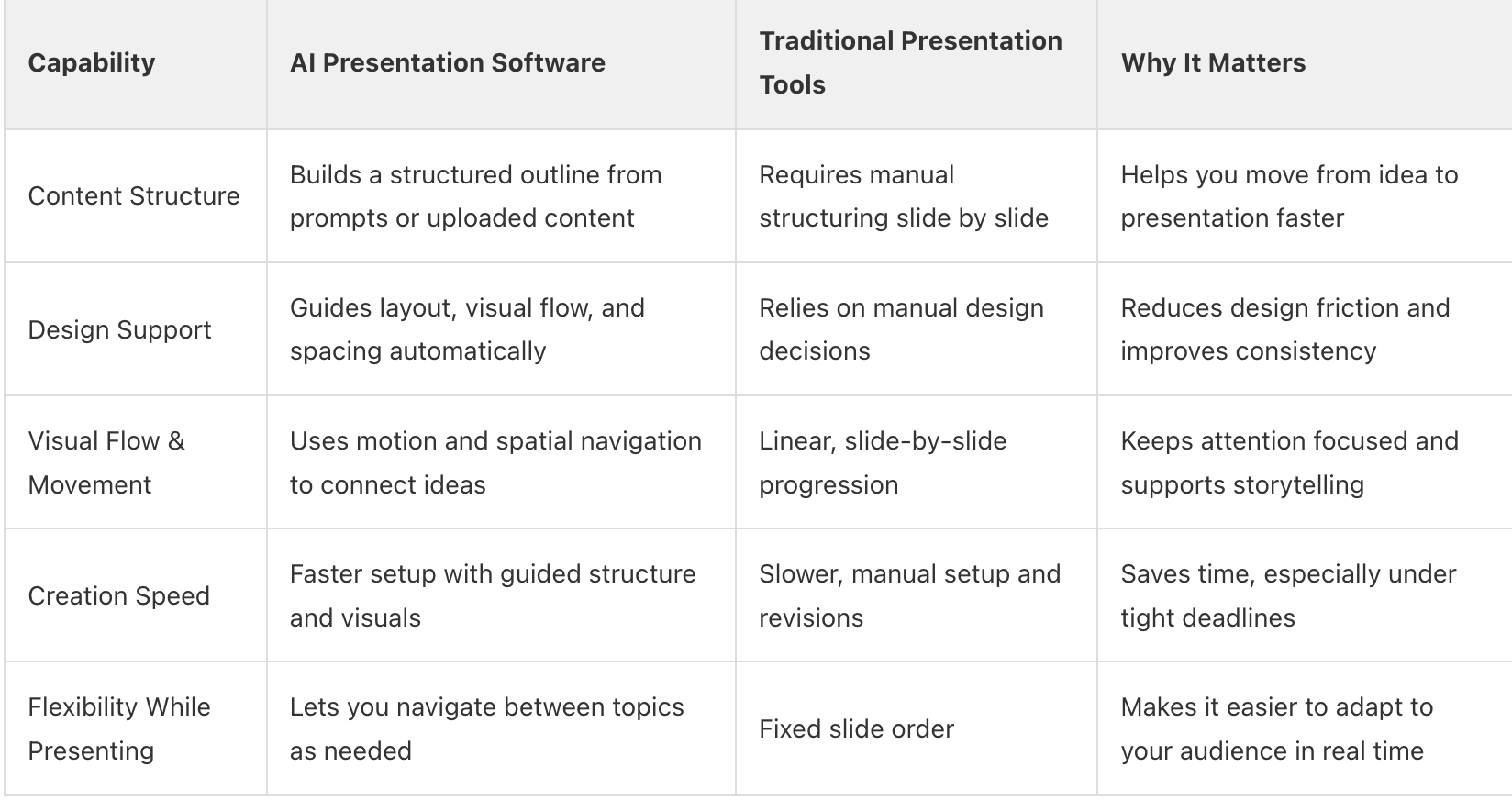
AI presentation software uses artificial intelligence to turn your ideas, text, or uploaded files into a complete presentation by automatically creating an outline, organizing content, and designing the visual structure. It reduces the time spent on layout and formatting by applying proven presentation design principles, so you can move from a concept to a ready to present deck without manually building slides.
With Prezi AI, the AI does more than arrange content on slides. It analyzes your prompt or uploaded content to understand your topic, audience, and goal, then builds a dynamic presentation. Based on that input, it automatically generates a custom layout, suggests design themes, applies cohesive color palettes, and structures visual flow to match your message. You stay in control of every edit, while the AI handles structure, spacing, and motion.
The result is a presentation that’s faster to create, visually engaging, and intentionally designed to guide attention from start to finish, without relying on generic templates.
Takeaway: Use AI to bridge the gap between a raw idea and a professional first draft in minutes.
FAQ 2: How does AI presentation software work?
AI presentation software works by guiding you through a simple, structured creation flow that turns your input into a complete presentation.
You start by entering an idea, pasting content, or uploading files (PDF, PPT, DOC). From there, we instantly generate a custom outline based on what you provide, giving you a clear, organized plan before design even begins. This removes guesswork and helps you focus on shaping your message, not building slides from scratch.
With Prezi AI, the process continues by letting you adjust and refine that outline, then make the presentation your own. You can rearrange sections, choose a visual style, select images, and apply branding with just a few clicks. Our advanced AI model handles layout, visual flow, and movement on an open canvas, helping you create a dynamic presentation quickly while staying fully in control.
Takeaway: AI presentation software turns your ideas into a structured outline, then applies visual design and flow to help you create an engaging presentation faster.
FAQ 3: What are the main benefits of using AI for presentations?
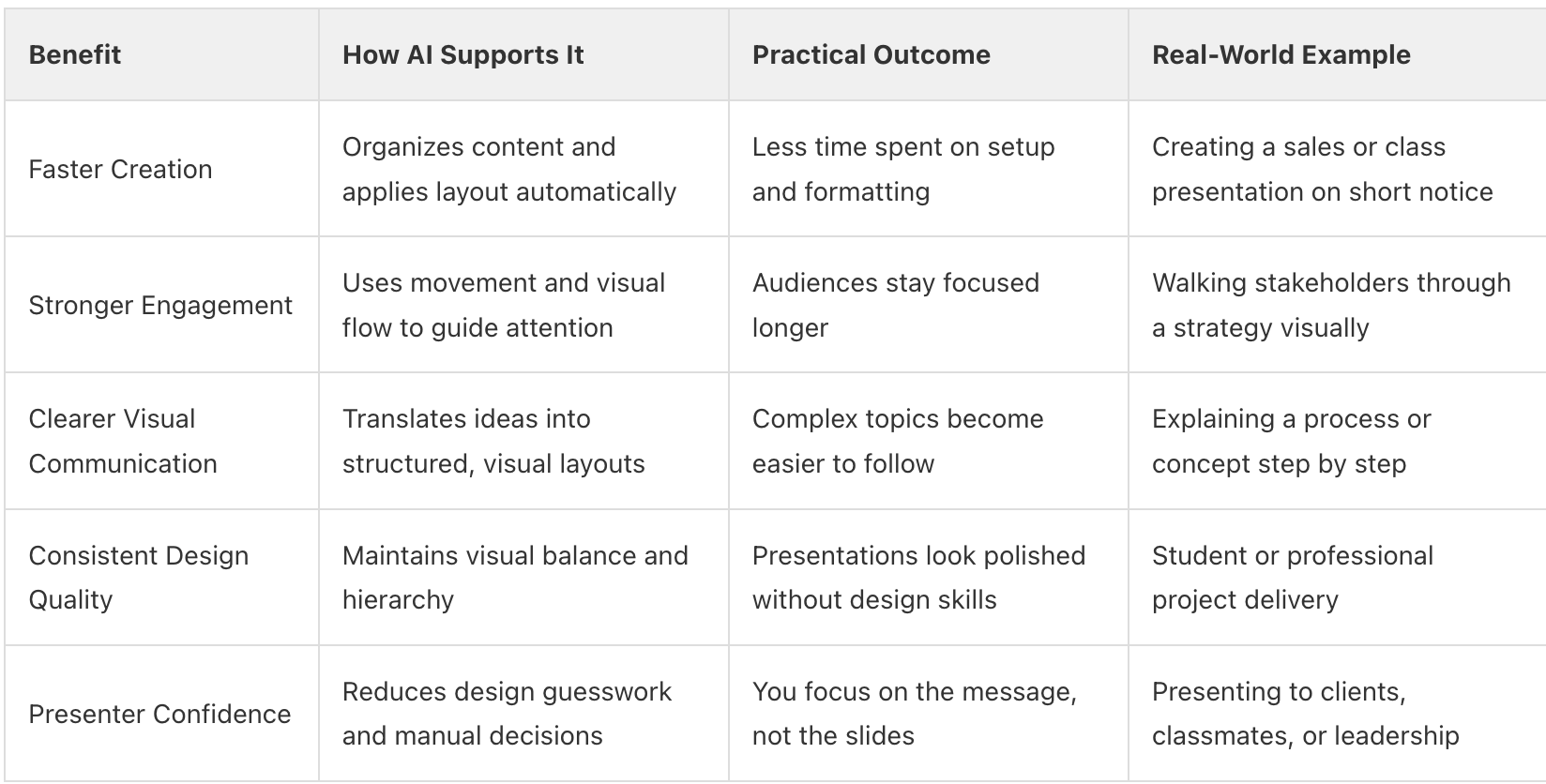
Using AI for presentations helps you save time, improve visual quality, and keep your audience engaged. Instead of spending hours formatting slides, AI organizes your ideas, builds a clear structure, and applies visual design automatically. This makes it easier to move from an idea to a polished presentation while staying focused on your message.
Takeaway: AI helps you create presentations faster, improve design quality, and engage audiences more effectively while keeping you focused on your message.
FAQ 4: Is AI presentation software suitable for beginners?
Absolutely, AI presentation software is highly suitable for beginners because it simplifies complex design tasks. Its intuitive interfaces and automated features guide users through the creation process, requiring minimal technical or design expertise. You can start creating impressive presentations right away, even with no prior experience.
Prezi AI guides you through each step without taking control away. It builds an outline, helps shape visual flow and lets you refine style and structure at your own pace. You get a dynamic, attention-grabbing presentation that looks polished, even if it’s your first time creating one.
Takeaway: Beginners can create confident, professional-looking presentations because AI guides structure and design from start to finish.
FAQ 5: What features should I look for in AI presentation software?
Look for software that helps you move from idea to presentation through a clear, guided workflow.
Strong tools let you enter a prompt, paste content, or upload files, then turn that input into a structured outline before design begins. From there, the software should shape visual flow, handle layout automatically, and support dynamic navigation so ideas connect naturally instead of living on isolated slides.
You should also expect full creative control. The right AI presentation maker lets you rearrange structure, adjust visual style, choose images, and apply branding without friction. Features like guided motion, AI text enhancements, and a large visual library matter because they help you create attention grabbing presentations quickly while keeping your message clear and adaptable. (Which is what Prezi AI offers.)
Takeaway: Choose AI presentation software that creates a structured outline from your content, supports dynamic visual flow, and gives you easy control over design and branding.
FAQ 6: How do I choose between different AI presentation tools?
Compare tools based on their specific AI capabilities, ease of use, available templates, pricing, and integration options.
Then look deeper at how the AI supports real presentation work. The strongest tools turn prompts or uploaded files into a clear outline first, guide visual flow across an open canvas, and help ideas connect through movement rather than locking everything into static slides.
You should also check how much control you keep as you create. A good fit lets you rearrange structure, customize visuals, and apply branding easily. That combination matters if you want presentations that adapt to your message and keep attention, not just slides that look polished.
Takeaway: Choose an AI presentation tool that combines outline based creation, dynamic visual flow, and flexible control so your presentation works the way you present.
FAQ 7: Can AI presentation software integrate with other tools?
Yes. AI presentation software supports integration with the tools you already use to create and manage content.
You can upload existing documents, work with files from cloud storage, and export presentations in common formats. This makes it easier to reuse material, avoid duplicate work, and keep everything in one place as a presentation takes shape. Prezi AI allows you export presentations as a PDF and PowerPoint file.
Integrations also make collaboration smoother. Teams can update content, share access, and refine presentations as ideas evolve, without breaking the creation flow. The goal is a faster, more connected process that fits naturally into everyday work.
Takeaway: Integrations with cloud storage and productivity tools help streamline presentation creation and support easier collaboration.
FAQ 8: What pricing models are common for AI presentation software?
Most AI presentation software uses a tiered subscription model, often combined with a free entry plan.
A basic plan typically allows users to explore core creation tools and limited AI features at no cost. Paid tiers then unlock higher AI usage, more visual assets, export options, and advanced presentation capabilities, with pricing offered monthly or annually.
Pricing usually scales based on how much you create and how you work. For students and individual creators, lower cost plans often include unlimited presentation creation, expanded AI access, premium visuals, and export options. Higher tiers add analytics, advanced imports, training, and collaboration features, while team and department plans focus on shared workspaces, centralized control, and brand consistency. We structure pricing this way so you can choose a plan that fits how often you present and how much flexibility you need.
Takeaway: AI presentation software commonly uses freemium and tiered subscription pricing, with plans that scale from individual creators to teams based on features and usage.
FAQ 9: Are there free AI presentation software options available?
Yes. Some AI presentation tools offer free plans that let you start creating without a paid commitment.
These plans typically include core creation features and limited access to AI powered tools, making it easy to explore how AI supports structure, layout, and visual flow before upgrading.
Free plans usually come with boundaries. You may see limits on AI usage, access to premium visuals, export options, or whether presentations remain public. That setup works well for trying the experience, building confidence, and deciding when you need more flexibility, control, or advanced features as your presentations become more frequent or more polished.
Takeaway: Free AI presentation plans are available and are useful for getting started, with paid tiers unlocking broader AI access and advanced capabilities.
FAQ 10: How do I start creating a presentation with AI?
Start by entering your idea. You can type a prompt, paste written content, or upload files, and the AI instantly builds a custom outline based on what you provide. This gives you an organized plan before design begins, so you’re not guessing how to structure your presentation from the start.
Next, refine and personalize it. You can rearrange sections, adjust the outline, and then shape the look and feel by choosing a style, selecting images, and applying branding. The AI supports layout and visual flow in the background, helping you move quickly from an idea to a finished, attention-grabbing presentation while keeping you in control.
Takeaway: Start by adding your idea, refine the outline, then customize the design to turn it into a complete presentation.
FAQ 11: Can AI help with content creation for presentations?
Yes. AI presentation software helps you shape content from the very beginning. You can start with a prompt, paste text, or upload files, and the AI turns that input into a clear outline with organized sections. This gives you direction early, so you’re not staring at a blank canvas or guessing how to structure your ideas.
As you build, the AI supports refinement. It helps clarify wording, adjust length, and simplify complex points while maintaining a natural flow across the presentation. You stay in control of the message, but the creation process moves faster and feels more focused.
Takeaway: AI supports presentation content by structuring ideas early and helping refine clarity as you create.
FAQ 12: How does AI enhance visual design in presentations?
AI enhances visual design by actively shaping layout, structure, and movement as your presentation is built.
It organizes content on an open canvas, applies visual hierarchy, and guides how viewers move from one idea to the next using zooming and transitions. Instead of manually arranging slides, the AI helps ensure each section connects clearly and keeps attention focused.
You can also control how the presentation looks. The tools let you choose visual styles, apply branding, select or generate images, and adjust design elements as needed. Behind the scenes, the AI manages spacing, balance, and flow so visuals stay consistent and easy to follow, even as content changes.
Takeaway: AI enhances visual design by handling layout, movement, and visual structure while giving you control over style, imagery, and branding.
FAQ 13: What makes AI-generated presentations more engaging?
AI-generated presentations feel more engaging because they guide attention instead of asking viewers to scan static slides.
Visual movement helps ideas unfold in sequence, connecting points through motion and spatial relationships. This creates a clear narrative flow that makes it easier for audiences to follow the message and stay focused.
Engagement also comes from how visuals support meaning. The AI helps structure content visually, suggesting layouts and visual elements that clarify complex ideas rather than overwhelm them. By combining movement, visual hierarchy, and intentional pacing, presentations become easier to understand and more memorable.
Takeaway: AI-generated presentations are more engaging because movement, visual structure, and narrative flow help guide attention and clarify ideas.
FAQ 14: How can I customize AI-generated presentations?
You can customize AI-generated presentations at every stage, starting with structure. After the AI creates a custom outline from your idea or uploaded content, you can rearrange sections, refine the flow, and shape how ideas connect before design begins. This makes it easy to adjust the narrative early instead of fixing slides later.
Customization continues visually. You can choose a style, apply branding, replace or generate images, and refine text directly as you work. The AI supports layout, visual balance, and movement across an open canvas, while you control content, emphasis, and pacing. Every part of the presentation remains editable, so the final result reflects your message, not a preset template.
Takeaway: AI-generated presentations stay fully customizable, letting you adjust structure, visuals, text, and branding while the AI supports layout and visual flow.
Prezi AI
Just enter a few ideas or an outline and we’ll create your presentation for you.