The best AI-powered alternative to Keynote
Create stunning presentations in seconds with Prezi AI, the AI presentation platform proven to capture attention better than Keynote.
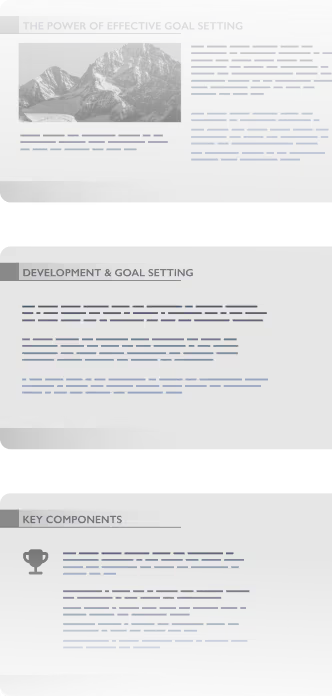


How Prezi beats Keynote
Prezi でより速く、より良いプレゼンテーション
特徴

AI作成


プレゼンテーションに焦点
アニメーション
既存のプレゼンテーションをアップグレード
ライブ適応性
動画プレゼン
利用統計
コラボレーション
Already using Keynote? It’s easy to switch. Prezi AI helps you rebuild presentations in seconds.
Build smarter. Deliver faster.

Custom presentations made quickly
Prezi を始めるのは簡単です。既存のプレゼンテーションをアップロードするか、Prezi AI にアイデアを入力するだけ。わずか数秒で、視覚的に整理され、印象に残るカスタムメイドのプレゼンが完成します。テンプレートや退屈なコンテンツは一切ありません。

Effortless creation
ワンクリックでプレゼンテーションが完成。Prezi AI があなたのプレゼンを理解し、瞬時にデザインします。作成時間を減らし、仕事に集中できる時間を増やしましょう。

Scientifically proven engagement
Prezi’s not just about beautiful slides (we’ve got those, too). We’re about results. In a university-led blind study, Prezi was proven to be 25% more effective and 22% more persuasive than static presentations. That means people will remember what you said, and act on it too.
Collaborate better. Present smarter.

Real-time collaboration
Prezi なら、チームワークが滞ることはありません。チーム全員でライブでプレゼンを作成・編集・レビューできるので、アップデートを待つことも、ファイルの混乱も起きません。

ブランドキット
どのプレゼンテーションでもブランドスタイルを完璧に維持。Prezi のブランドキットでは、色、フォント、ロゴを設定できるので、Prezi AI 作成のプレゼンでも、一貫性のあるプロフェッショナルな作品に仕上がります。

Storytelling in motion
動きのないスライドではオーディエンスの眠気を誘うだけ。Prezi のダイナミックなレイアウトなら、視聴者の注目を引き、次のトピックへもスムーズに進行できます。人々が関心を持ったときに、ピンポイントでその内容にズームし、記憶に残るプレゼンテーションを作成しましょう。

4/5
Prezi のほうが聴衆の注意を引くと言っています

91%が
Prezi が仕事に訳だったと語っています

170M+
高校のプレゼンテーションに Prezi を使用できますか?


Why Keynote users are switching to Prezi
これまで様々なプレゼンテーションツールを使ってきましたが、Preziは群を抜いて優れたツールのです。独自のズーム機能とダイナミックなレイアウトのおかげで、従来のスライドよりも視覚的に魅力的で記憶に残るプレゼンテーションを作成できます。
Prezi AI で何ができるかを副担任に見せたとき、感心していました。単語をいくつか入力するだけで、プレゼン全体がデザインされるのです。その後、もう一度編集したり、追加することができました。このツールで、さらに魅力的な授業を行う予定です!
講演の際には必ずPreziを使っています。Preziなら視覚に訴えるプレゼンが作成できるので、記憶に残りやすくなります。Zoomの画面でも、私の存在を際立たせられます。上手にプレゼンすれば、人々の記憶にメッセージを残すことができます。
Still using Keynote? You’re missing out.
テンプレートや退屈なスライドに時間を浪費するのはもう終わり。Prezi AIが、比類のないスピードとインパクトでプレゼンを作成・デザイン・サポートします。科学的根拠に基づき、何百万人ものユーザーから信頼されています。


よくある質問
Is Prezi AI better than Keynote for presentations?
Absolutely. Prezi AI is built for the modern workplace with full AI-powered presentation creation—from prompt to polished deck in seconds. Keynote's AI features are limited to basic rewriting and image generation, while Prezi gives you complete, custom presentations designed to engage your audience better than traditional slides.
Can I download my Keynotes and import them into Prezi?
Yes! You can easily download your Keynote presentations and upload them to Prezi as a PDF, DOCX, or PPTX file. Prezi AI can transform your work and you’ll get all of the benefits of Prezi without needing to start from scratch.
Can my Windows teammates collaborate on Prezi?
Yes! Unlike Keynote, which creates friction for teams using Windows, Prezi works seamlessly across Mac, Windows, and web. Your entire team can collaborate in real-time, no matter what device they're on.
Do Keynote and Prezi offer free trials?
Yes! You can try all the features of Prezi AI for free, right now. Keynote is free for Apple users, but its limited AI capabilities mean you'll spend far more time manually building presentations than you would with Prezi's AI-powered approach.
Is Prezi harder to learn than Keynote?
Not at all. Thanks to Prezi AI, using Prezi is even easier than Keynote. You can just type your idea or upload a file and get a full presentation ready. No design skills, no new program to learn.